Hello everyone,
I’m currently working on an automation project to provision virtual machines in Proxmox 9 using Terraform (BPG provider) together with cloud-init. The virtual machines are based on Ubuntu 24.04 cloud images.
The provisioning process works perfectly when the VM disk is created on storages such as lvm-local, NFS, or Ceph. However, the issue only appears when the VM disk is created on an LVM storage that is backed by a volume from a Fibre Channel SAN. In this scenario, the VM does not provision correctly.
It is important to mention that the same Terraform script works correctly on that same LVM storage when using Ubuntu 22.04 and even Oracle Linux 9. The problem only occurs with Ubuntu 24.04.
I have exactly the same behavior when using the Telmate provider as well, which makes me believe this is not specific to the BPG provider but something deeper in the interaction between Proxmox, cloud-init, and Ubuntu 24.04 on this particular storage setup.
Following the details of the scenario:
Environment
The VM creation appears to complete, but the VM either:
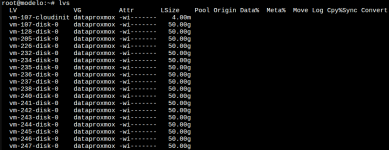
Storage Information
Volume mounted via multipath
Terraform script
main.tf
cloud-config.tf
provider.tf
Terraform plan
Generated VM Proxmox conf file
What I've tried so far:
- Adding explicit cloud-init configuration
- Changing SCSI controller
- Switching to virtio interface
- Switching to ovmf bios and efidisk
- Add explicit boot order
- Using template-based cloning. Preparing the template following the instructions here https://pve.proxmox.com/wiki/Cloud-Init_Support
- Use a cloud-init snippet that is already preloaded on the host in a specific path, to rule out any potential timing issue between the VM creation and the availability of the snippet file.
- Use explicit disks file format
I’ve basically spent over three weeks shuffling and reshuffling every possible configuration in the script, hoping to stumble upon the magic combination… with absolutely no success.
Just today I came across this forum thread, which seems quite closely related to the issue I’m experiencing: https://forum.proxmox.com/threads/template-on-shared-storage.146756/.
Thank you in advance for any help or guidance you can provide, it’s truly appreciated.
I’m currently working on an automation project to provision virtual machines in Proxmox 9 using Terraform (BPG provider) together with cloud-init. The virtual machines are based on Ubuntu 24.04 cloud images.
The provisioning process works perfectly when the VM disk is created on storages such as lvm-local, NFS, or Ceph. However, the issue only appears when the VM disk is created on an LVM storage that is backed by a volume from a Fibre Channel SAN. In this scenario, the VM does not provision correctly.
It is important to mention that the same Terraform script works correctly on that same LVM storage when using Ubuntu 22.04 and even Oracle Linux 9. The problem only occurs with Ubuntu 24.04.
I have exactly the same behavior when using the Telmate provider as well, which makes me believe this is not specific to the BPG provider but something deeper in the interaction between Proxmox, cloud-init, and Ubuntu 24.04 on this particular storage setup.
Following the details of the scenario:
Environment
- Terraform Provider: bpg/proxmox v0.95.0
- Proxmox Version: 9.1.4
- Node: node1
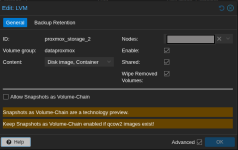
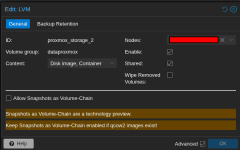
- Storage Type: LVM (mounted storage, appears as proxmox_storage_2)
- Storage unit Dell PowerVault ME4024
The VM creation appears to complete, but the VM either:
- Fails to boot properly
- Doesn't initialize cloud-init correctly
- Has disk-related issues during first boot
Storage Information
Volume mounted via multipath
Bash:
root@node1:~# multipath -ll
dataproxmox (3600c0ff000446df807d9d36801000000) dm-6 DellEMC,ME4
size=4.1T features='0' hwhandler='1 alua' wp=rw
|-+- policy='service-time 0' prio=50 status=active
| `- 15:0:0:0 sdc 8:32 active ready running
`-+- policy='service-time 0' prio=10 status=enabled
  `- 15:0:1:0 sde 8:64 active ready running
Bash:
pvesm status | grep proxmox_storage_2
proxmox_storage_2         lvm     active      4394524672       943722496      3450802176   21.47%
Terraform script
main.tf
YAML:
################################################################################
# Proxmox VM Resource
################################################################################
resource "proxmox_virtual_environment_vm" "ubuntu_vm" {

  depends_on = [
    proxmox_virtual_environment_file.user_data_cloud_config
  ]

  name      = "test-ubuntu"
  node_name = "node1"
  stop_on_destroy = true
  boot_order = ["scsi0"]

  agent {
    enabled = true
  }

  cpu {
    cores = 2
    type  = "host"
  }

  memory {
    dedicated = 2048
  }

  disk {
    datastore_id = "proxmox_storage_2"  # LVM storage - works with 22.04, fails with 24.04
    interface    = "scsi0"
    file_id      = "nfs-isos:iso/ubuntu-24.04.3-server-cloudimg-amd64.img"
    discard      = "on"
    size         = 10
    iothread     = false
    discard      = "ignore"
    ssd          = true
    cache        = "none"
    replicate    = false
    aio          = "native"
  }

  initialization {
    dns {
      servers = ["10.4.62.102", "10.4.4.143"]
    }

    ip_config {
      ipv4 {
        address = "10.4.50.131/24"
        gateway = "10.4.50.254"
      }
    }

    user_data_file_id = proxmox_virtual_environment_file.user_data_cloud_config.id
  }

  network_device {
    bridge = "vmbr70"
  }

  serial_device {
    device = "socket"
  }
}
cloud-config.tf
YAML:
################################################################################
# Cloud-Init Template Rendering
################################################################################
resource "proxmox_virtual_environment_file" "user_data_cloud_config" {
  content_type = "snippets"
  datastore_id = "local"
  node_name    = "node1"

  source_raw {
    data = <<-EOF
    #cloud-config
    package_update: true
    timezone: America/Bogota
    hostname: test_bgp
    manage_etc_hosts: true

    users:
    - name: provision
      gecos: provision
      shell: /bin/bash
      sudo: ALL=(ALL) NOPASSWD:ALL
      lock_passwd: false
      passwd: "$6$MBtHHk1GgCDezmsm$Edz57izEN6N.KK1mWayABGnl1Q4Kfhgw.8HHmHAXsOOZmJNB7lYJ4r8uQpa2F9sKsGtvUA1BiuZEl0jbN1UmL0"

    packages:
    - vim
    - net-tools
    - qemu-guest-agent
    - htop

    runcmd:
    - systemctl enable --now qemu-guest-agent
    - sysctl --system

    final_message: "The system is finally up, after $UPTIME seconds"

    power_state:
      mode: reboot
      message: Restarting server after setup
    EOF

    file_name = "user-data-cloud-config.yaml"
  }
}
provider.tf
YAML:
terraform {
  required_providers {
    proxmox = {
      source  = "bpg/proxmox"
      version = "0.95.0"
    }
  }
}

provider "proxmox" {
  endpoint  = "https://10.4.21.100:8006"
  username  = "root@pam"
  password  = "xxxxx"
  insecure  = true

  ssh {
    agent    = true
    username = "root"

    node {
      name    = "node1"
      address = "10.4.21.100"
    }
  }
}
Terraform plan
Code:
Terraform used the selected providers to generate the following execution plan. Resource actions are indicated with the following symbols:
  + create

Terraform will perform the following actions:

  # proxmox_virtual_environment_file.user_data_cloud_config will be created
  + resource "proxmox_virtual_environment_file" "user_data_cloud_config" {
      + content_type           = "snippets"
      + datastore_id           = "local"
      + file_modification_date = (known after apply)
      + file_name              = (known after apply)
      + file_size              = (known after apply)
      + file_tag               = (known after apply)
      + id                     = (known after apply)
      + node_name              = "optimusprime"
      + overwrite              = true
      + timeout_upload         = 1800

      + source_raw {
          + data      = <<-EOT
                #cloud-config
                package_update: true
                timezone: America/Bogota
                hostname: test-ubuntu
                manage_etc_hosts: true

                users:
                - name: provision
                  gecos: provision
                  shell: /bin/bash
                  sudo: ALL=(ALL) NOPASSWD:ALL
                  lock_passwd: false
                  passwd: "$6$MBtHHk1GgCDezmsm$Edz57izEN6N.KK1mWayABGnl1Q4Kfhgw.8HHmHAXsOOZmJNB7lYJ4r8uQpa2F9sKsGtvUA1BiuZEl0jbN1UmL0"

                packages:
                - vim
                - net-tools
                - qemu-guest-agent
                - htop

                runcmd:
                - systemctl enable --now qemu-guest-agent
                - sysctl --system

                final_message: "The system is finally up, after $UPTIME seconds"

                power_state:
                  mode: reboot
                  message: Restarting server after setup
            EOT
          + file_name = "user-data-cloud-config.yaml"
          + resize    = 0
        }
    }

  # proxmox_virtual_environment_vm.vm will be created
  + resource "proxmox_virtual_environment_vm" "vm" {
      + acpi                                 = true
      + bios                                 = "seabios"
      + boot_order                           = [
          + "scsi0",
        ]
      + delete_unreferenced_disks_on_destroy = true
      + hotplug                              = (known after apply)
      + id                                   = (known after apply)
      + ipv4_addresses                       = (known after apply)
      + ipv6_addresses                       = (known after apply)
      + keyboard_layout                      = "en-us"
      + mac_addresses                        = (known after apply)
      + migrate                              = false
      + name                                 = "test-ubuntu"
      + network_interface_names              = (known after apply)
      + node_name                            = "optimusprime"
      + on_boot                              = true
      + protection                           = false
      + purge_on_destroy                     = true
      + reboot                               = false
      + reboot_after_update                  = true
      + scsi_hardware                        = "virtio-scsi-pci"
      + started                              = true
      + stop_on_destroy                      = true
      + tablet_device                        = true
      + template                             = false
      + timeout_clone                        = 1800
      + timeout_create                       = 1800
      + timeout_migrate                      = 1800
      + timeout_move_disk                    = 1800
      + timeout_reboot                       = 1800
      + timeout_shutdown_vm                  = 1800
      + timeout_start_vm                     = 1800
      + timeout_stop_vm                      = 300
      + vm_id                                = (known after apply)

      + agent {
          + enabled = true
          + timeout = "15m"
          + trim    = false
          + type    = "virtio"
        }

      + cpu {
          + cores      = 2
          + hotplugged = 0
          + limit      = 0
          + numa       = false
          + sockets    = 1
          + type       = "host"
          + units      = (known after apply)
        }

      + disk {
          + aio               = "native"
          + backup            = true
          + cache             = "none"
          + datastore_id      = "proxmox_storage_2"
          + discard           = "ignore"
          + file_format       = (known after apply)
          + file_id           = "nfs-isos:iso/ubuntu-24.04-server-cloudimg-amd64.img"
          + interface         = "scsi0"
          + iothread          = false
          + path_in_datastore = (known after apply)
          + replicate         = false
          + size              = 10
          + ssd               = true
        }

      + initialization {
          + datastore_id         = "local-lvm"
          + file_format          = (known after apply)
          + meta_data_file_id    = (known after apply)
          + network_data_file_id = (known after apply)
          + type                 = (known after apply)
          + user_data_file_id    = (known after apply)
          + vendor_data_file_id  = (known after apply)

          + dns {
              + servers = [
                  + "10.4.62.102", "10.4.4.143"
                ]
            }

          + ip_config {
              + ipv4 {
                  + address = "10.4.50.131/24"
                  + gateway = "10.4.50.254"
                }
            }
        }

      + memory {
          + dedicated      = 4096
          + floating       = 0
          + keep_hugepages = false
          + shared         = 0
        }

      + network_device {
          + bridge      = "vlan70"
          + enabled     = true
          + firewall    = false
          + mac_address = (known after apply)
          + model       = "virtio"
          + mtu         = 0
          + queues      = 0
          + rate_limit  = 0
          + vlan_id     = 0
        }

      + serial_device {
          + device = "socket"
        }

      + vga (known after apply)
    }

Plan: 2 to add, 0 to change, 0 to destroy.
Generated VM Proxmox conf file
Code:
acpi: 1
agent: enabled=1,fstrim_cloned_disks=0,type=virtio
balloon: 0
bios: seabios
boot: order=scsi0
cicustom: user=local:snippets/user-data-cloud-config.yaml
cores: 2
cpu: host
ide2: local-lvm:vm-251-cloudinit,media=cdrom
ipconfig0: gw=10.4.50.254,ip=10.4.50.131/24
keyboard: en-us
memory: 4096
meta: creation-qemu=10.1.2,ctime=1771971201
name: test-ubuntu
nameserver: 10.4.62.102 10.4.4.143
net0: virtio=BC:24:11:AA:9C:A6,bridge=vlan70,firewall=0
numa: 0
onboot: 1
ostype: other
protection: 0
scsi0: proxmox_storage_2:vm-251-disk-0,aio=native,backup=1,cache=none,discard=ignore,iothread=0,replicate=0,size=10G,ssd=1
scsihw: virtio-scsi-pci
serial0: socket
smbios1: uuid=72df512f-13f0-44e6-ae06-b32461cbd225
sockets: 1
tablet: 1
template: 0
vmgenid: 0be59f7d-3a00-4527-ba9d-ee9b30ea509d
What I've tried so far:
- Adding explicit cloud-init configuration
YAML:
initialization {
     datastore_id = "proxmox_storage_2"
     interface    = "scsi1"
     file_format = "raw"
     type   = "nocloud"
     # ... rest of config
   }
- Changing SCSI controller
YAML:
scsi_hardware = "virtio-scsi-single"- Switching to virtio interface
YAML:
disk {
     interface = "virtio0"
     # ...
   }
- Switching to ovmf bios and efidisk
YAML:
machine  = "q35"
   bios  = "ovmf"
   efi_disk {
       datastore_id = "local-lvm"
       type         = "4m"
   }
- Add explicit boot order
YAML:
boot_order = ["scsi0", "scsi1"]- Using template-based cloning. Preparing the template following the instructions here https://pve.proxmox.com/wiki/Cloud-Init_Support
YAML:
clone {
     vm_id = 9000
     full  = true
     node_name = "node1"
   }
- Use a cloud-init snippet that is already preloaded on the host in a specific path, to rule out any potential timing issue between the VM creation and the availability of the snippet file.
YAML:
initialization {
     # ... initial config
     user_data_file_id = "local:snippets/cloud_init_10.4.50.27-Test-DHCP-VM.yml"
     # ... rest of config
}
- Use explicit disks file format
YAML:
file_format = "raw"I’ve basically spent over three weeks shuffling and reshuffling every possible configuration in the script, hoping to stumble upon the magic combination… with absolutely no success.
Just today I came across this forum thread, which seems quite closely related to the issue I’m experiencing: https://forum.proxmox.com/threads/template-on-shared-storage.146756/.
Thank you in advance for any help or guidance you can provide, it’s truly appreciated.
Last edited: