Hi all,
I am running Proxmox Virtual Environment 8.3.3. I am trying to set up a Mount for a Synology NAS NFS Share into an Unprivileged LXC to be used for the App "Immich" which I have deployed using Docker. I have used the Proxmox Helper Scripts for the Docker LXC (https://community-scripts.github.io/ProxmoxVE/scripts?id=docker). I have been successful with Mounting a Synology NFS Share into one of my Unprivileged LXC Containers before but I am not able to get it working with this one Unprivileged LXC on the same Proxmox Host. The step by step guide that I used previously was online somewhere which was set up and I got it working on one of my LXC's but I cannot find it again unfortunately and didn't download it for safe-keeping.
I have tried the below guides but these didn't help and I keep getting the "
- https://github.com/tteck/Proxmox/discussions/2044
- https://forum.proxmox.com/threads/tutorial-mounting-nfs-share-to-an-unprivileged-lxc.138506
- https://www.reddit.com/r/Proxmox/comments/zt11ep/cant_mount_nfs_with_unprivileged_lxc
- https://pve.proxmox.com/wiki/Linux_Container#_bind_mount_points
- https://pve.proxmox.com/wiki/Unprivileged_LXC_containers#Using_local_directory_bind_mount_points
- https://forum.proxmox.com/threads/tutorial-unprivileged-lxcs-mount-cifs-shares.101795
- https://www.closingtags.com/writing-to-bind-mounts-from-unprivileged-lxc-containers
Please can you take a look at the screenshots below to see what I have done / tried and advise on how can I achieve this?
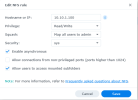
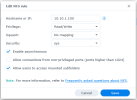
Synology NAS NFS Share:
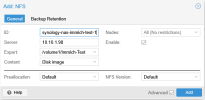
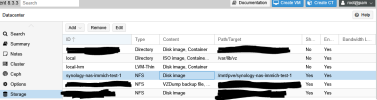
Proxmox Datacenter Storage:
Proxmox Node -
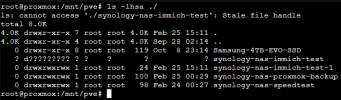
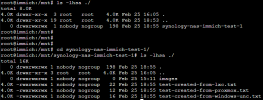
Attempting to access Mounted Storage from Proxmox Node:
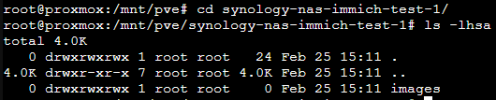
I am able to read / write from the Proxmox Node to the Mounted NFS Share:
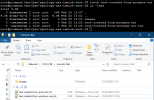
Mounted the NFS Share within the Container via
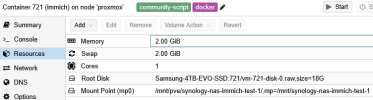
Proxmox LXC Resources showing the newly Mounted NFS Share:
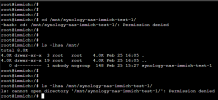
LXC Console (LXC powered on) -
Some guides say to add the below to "
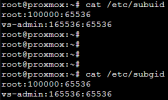
Some guides said to add the below to the LXC Config but this didn't work for my Immich LXC, however, it works for the other LXC Container that I have:
I am not sure what else to try here. Any suggestions please?
Thanks,
Computeristic!
I am running Proxmox Virtual Environment 8.3.3. I am trying to set up a Mount for a Synology NAS NFS Share into an Unprivileged LXC to be used for the App "Immich" which I have deployed using Docker. I have used the Proxmox Helper Scripts for the Docker LXC (https://community-scripts.github.io/ProxmoxVE/scripts?id=docker). I have been successful with Mounting a Synology NFS Share into one of my Unprivileged LXC Containers before but I am not able to get it working with this one Unprivileged LXC on the same Proxmox Host. The step by step guide that I used previously was online somewhere which was set up and I got it working on one of my LXC's but I cannot find it again unfortunately and didn't download it for safe-keeping.
I have tried the below guides but these didn't help and I keep getting the "
Permission Denied" error upon accessing the Mount in the Unprivileged LXC.- https://github.com/tteck/Proxmox/discussions/2044
- https://forum.proxmox.com/threads/tutorial-mounting-nfs-share-to-an-unprivileged-lxc.138506
- https://www.reddit.com/r/Proxmox/comments/zt11ep/cant_mount_nfs_with_unprivileged_lxc
- https://pve.proxmox.com/wiki/Linux_Container#_bind_mount_points
- https://pve.proxmox.com/wiki/Unprivileged_LXC_containers#Using_local_directory_bind_mount_points
- https://forum.proxmox.com/threads/tutorial-unprivileged-lxcs-mount-cifs-shares.101795
- https://www.closingtags.com/writing-to-bind-mounts-from-unprivileged-lxc-containers
Please can you take a look at the screenshots below to see what I have done / tried and advise on how can I achieve this?
Synology NAS NFS Share:
Proxmox Datacenter Storage:
Proxmox Node -
ls -lhsa for Mounted Storage (/mnt/pve):Attempting to access Mounted Storage from Proxmox Node:
I am able to read / write from the Proxmox Node to the Mounted NFS Share:
Mounted the NFS Share within the Container via
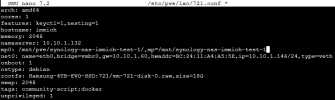
sudo nano /etc/pve/lxc/721.conf with LXC powered off:Proxmox LXC Resources showing the newly Mounted NFS Share:
LXC Console (LXC powered on) -
Permission denied:Some guides say to add the below to "
/etc/subuid" and "/etc/subgid" but this didn't work for my Immich LXC, however, it works for the other LXC Container that I have:Some guides said to add the below to the LXC Config but this didn't work for my Immich LXC, however, it works for the other LXC Container that I have:
Code:
# uid map: from uid 0 map 1005 uids (in the ct) to the range starting 100000 (on the host), so 0..1004 (ct) → 100000..101004 (host)
lxc.idmap = u 0 100000 1005
lxc.idmap = g 0 100000 1005
# we map 1 uid starting from uid 1005 onto 1005, so 1005 → 1005
lxc.idmap = u 1005 1005 1
lxc.idmap = g 1005 1005 1
# we map the rest of 65535 from 1006 upto 101006, so 1006..65535 → 101006..165535
lxc.idmap = u 1006 101006 64530
lxc.idmap = g 1006 101006 64530
I am not sure what else to try here. Any suggestions please?
Thanks,
Computeristic!