High VM-EXIT and Host CPU usage on idle with Windows Server 2025

@_gabriel exactly as @RoCE-geek said.


Hardware: 2x Xeon 6230R and both VMs had this config.

Code:
agent: 1
bios: ovmf
boot: order=scsi0;ide2;ide0;net0
cores: 52
cpu: Cascadelake-Server-v5,flags=+md-clear;+pcid;+spec-ctrl;+pdpe1gb;+hv-tlbflush;+hv-evmcs
efidisk0: linstor_nvme_1:pm-33087c22_114,efitype=4m,ms-cert=2023,pre-enrolled-keys=1,size=3080K
hotplug: 0
ide0: ISO-1:iso/virtio-win-0.1.285.iso,media=cdrom,size=771138K
ide2: ISO-1:iso/Win11_23H2_English_x64.iso,media=cdrom,size=6548134K
machine: pc-q35-10.1
memory: 64000
meta: creation-qemu=10.1.2,ctime=1764535929
name: win11-23h2
net0: virtio=BC:24:11:E4:D1:51,bridge=vmbr0,firewall=1
numa: 1
ostype: win11
scsi0: linstor_nvme_1:pm-a0c6d8aa_114,discard=on,iothread=1,size=159383560K,ssd=1
scsihw: virtio-scsi-single
smbios1: uuid=xxxxxxxxxxxxxxxxxxxxxxxxxxxx
sockets: 2
tpmstate0: linstor_nvme_1:pm-29d19dc3_114,size=4M,version=v2.0
vga: virtio

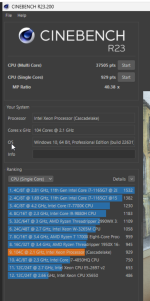
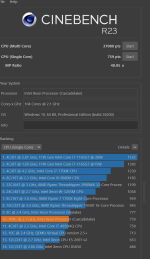
Win23H2 is only marginally faster (margin of error) on all cores but the single core speedup is 18% which kinda reflects the max boost frequency during the single core test run.

Xeon 6230R was able to boost up to 3.75GHz in Win11 23H2 vs 3.1GHz turbo boost on Win11 25H2.
2025-12-01_00-20.png2025-12-01_00-10.png
 
  • Like
Reactions: RoCE-geek
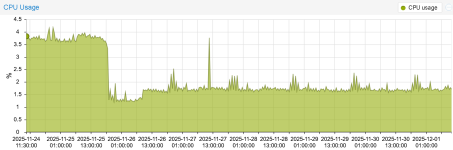
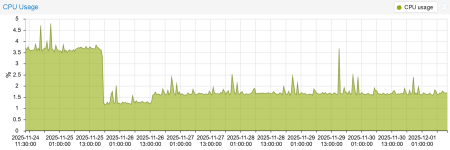
Just for reference, updating PVE to 9.1 / Kernel 6.17 did reduce my CPU usage for VM's, including Windows Server 2025
Node CPU: AMD Epyc 9355P, VM Processor Type: x86-64-v4, virtio-win-0.1.271

Node1 Windows Server 2025 VM CPU usage:
1764583329446.png


Node2 Windows Server 2025 VM CPU usage:
1764583501087.png
 
Just for reference, updating PVE to 9.1 / Kernel 6.17 did reduce my CPU usage for VM's, including Windows Server 2025
Node CPU: AMD Epyc 9355P, VM Processor Type: x86-64-v4, virtio-win-0.1.271

Node1 Windows Server 2025 VM CPU usage:
View attachment 93485


Node2 Windows Server 2025 VM CPU usage:
View attachment 93487
Thanks, will check the impact. What's your VM version? Was the PVE upgrade itself only one change made?
 
Here is a reference to the documentation: https://www.qemu.org/docs/master/system/i386/hyperv.html

The fallback that people noticed to other timers is desired. Yes, Windows 2025/11 instituted more timers because Windows software is broken and may not function well in VM, so this is a kernel change in Windows causing more interrupts. You can play with the above switches to see if you can get better emulation of HyperV but even there is higher CPU usage.

Do qm showcmd, see if hv_frequencies is in there and post the output here. Add hv_frequencies to args if necessary.
 
Here is a reference to the documentation: https://www.qemu.org/docs/master/system/i386/hyperv.html

The fallback that people noticed to other timers is desired. Yes, Windows 2025/11 instituted more timers because Windows software is broken and may not function well in VM, so this is a kernel change in Windows causing more interrupts. You can play with the above switches to see if you can get better emulation of HyperV but even there is higher CPU usage.

Do qm showcmd, see if hv_frequencies is in there and post the output here. Add hv_frequencies to args if necessary.
I've been experimenting with many of these flags - no positive change with hv_frequencies either. There's no (clear) solution via HVE flags.
 
No huge difference for me after updating from kernel 6.16.8 to 6.17.8 (plain Debian) unfortunately. Still the same 2-3x higher idle load and no turbo boost...
 
I'm kind of wondering what people are expecting here after reading some more into the above details - you have 8-16 CPUs, according to the documentation, it is expected that HyperV guests will use less than 1% of CPU per core when 'idle'. So the total host CPU usage should be under 8-16% of 1 CPU at 'idle' (tasks may not get distributed to multiple cores at idle). I get ~5% for a 4-core Windows 11 guest and that seems to scale up as I add more cores. Note that setting the guest type to Linux in Proxmox brings that idle usage to ~15-20%, you have to set the guest type to Windows 11/2025 it drops to ~4-5% and this is on a relatively busy network with AD etc, so lots of things are happening 'constantly' to Windows machines. Look at the logs, you can disable a lot of services to get "more idle", but Windows is quite chatty compared to even 'fat' Linux distros. I get 0.23% on idle containers and ~1% on idle Linux (RHEL, Ubuntu).
 
Last edited:
  • Like
Reactions: Johannes S
I'm kind of wondering what people are expecting here after reading some more into the above details - you have 8-16 CPUs, according to the documentation, it is expected that HyperV guests will use less than 1% of CPU per core when 'idle'. So the total host CPU usage should be under 8-16% of 1 CPU at 'idle' (tasks may not get distributed to multiple cores at idle). I get ~5% for a 4-core Windows 11 guest and that seems to scale up as I add more cores. Note that setting the guest type to Linux in Proxmox brings that idle usage to ~15-20%, you have to set the guest type to Windows 11/2025 it drops to ~4-5% and this is on a relatively busy network with AD etc, so lots of things are happening 'constantly' to Windows machines. Look at the logs, you can disable a lot of services to get "more idle", but Windows is quite chatty compared to even 'fat' Linux distros. I get 0.23% on idle containers and ~1% on idle Linux (RHEL, Ubuntu).
We know quite well what is happening and what has changed in 24H2 core (aka WS2025/Win11-24H2). Just check the recent evidence-based posts if really interested in the root cause. There's a stable WS2022/Win11-23H2 idle baseline, with sudden change in 24H2 core, which is caused by sudden abuse of specific synthetic timers (and/or other substitution VM calls if disabled). This is all we're talking about - and how to mitigate it, otherwise this change will seriously impact any existing dense VM environment. This is not about theorizing Windows vs Linux or about disabling Windows services, etc.
 
@RoCE-geek: I'm not seeing the above as a performance issue on my hardware (rather modern Xeon Gold) in production environments with current Win11-25H2 with mostly default recommended settings.

Even looking at the other posts, I see a 'normal' looking Windows 11/2025 system. I can see where if you set the settings to Linux which disables the Hyper-V emulation, then, the idle jumps to 20%, which would be significant. I can understand AMD virtualization may be worse than Intel. But I'm looking at the documentation from Microsoft where this is discussed and Microsoft says this is 'normal' even on Hyper-V.

But this is VMware cluster for an idle Windows Server host (average it says is ~5%):
exported.png

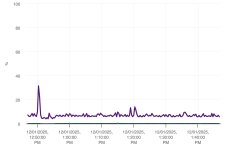
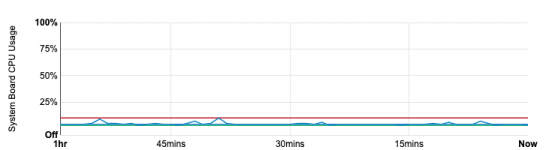
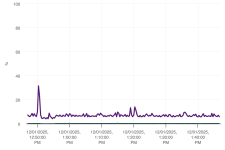
Hyper-V conveniently 'hides' VMs from its host statistics, so without some Prometheus-fu I'm not going to even try to understand, but this is a bare metal Windows (on PowerEdge), "idle" CPU usage bounces to ~10% max according to iDRAC, with an average of, again ~4%.
1764615393867.png

If you're seeing 4-5% CPU usage or a little higher on older models, I think we're chasing ghosts trying to get it to 1-2% we're "used to" in Linux-land because even the bare metal, Windows is just yes, triggering timers, which costs CPU time and has to be patched through. And KVM is not alone in finding out this, various other audio equipment and real-time software and games is "noticing" significant performance issues with interrupts for current iterations of Windows 11, it's not something that "we" could fix without Microsoft.
 

Attachments

  • 1764614907858.png
    1764614907858.png
    68.3 KB · Views: 0
Last edited:
  • Like
Reactions: fba
@RoCE-geek: I'm not seeing the above as a performance issue on my hardware (rather modern Xeon Gold) in production environments with current Win11-25H2 with mostly default recommended settings.

Even looking at the other posts, I see a 'normal' looking Windows 11/2025 system. I can see where if you set the settings to Linux which disables the Hyper-V emulation, then, the idle jumps to 20%, which would be significant. I can understand AMD virtualization may be worse than Intel. But I'm looking at the documentation from Microsoft where this is discussed and Microsoft says this is 'normal' even on Hyper-V.

But this is VMware cluster for an idle Windows Server host (average it says is ~5%):
View attachment 93520

Hyper-V conveniently 'hides' VMs from its host statistics, so without some Prometheus-fu I'm not going to even try to understand, but this is a bare metal Windows (on PowerEdge), "idle" CPU usage bounces to ~10% max according to iDRAC, with an average of, again ~4%.
View attachment 93517

If you're seeing 4-5% CPU usage or a little higher on older models, I think we're chasing ghosts trying to get it to 1-2% we're "used to" in Linux-land because even the bare metal, Windows is just yes, triggering timers, which costs CPU time and has to be patched through. And KVM is not alone in finding out this, various other audio equipment and real-time software and games is "noticing" significant performance issues with interrupts for current iterations of Windows 11, it's not something that "we" could fix without Microsoft.
And here is the root of "misunderstanding". Most of the contributors here are looking for the 24H2 side-effects mitigation, simply because a 3x increase of idle load is hardly acceptable for us, and we do not want to resign ourselves to the fact that this is the "new standard" (if you do, good for you). We've analyzed the root cause and we're definitely not alone - other platforms like FreeBSD/Bhyve seem to be affected in even higher degree.

So why are we so interested? At least for these main reasons: 1) with WS2022 baseline, there is no real/impactful added idle CPU load, 2) other KVM-based system already mitigated this problem (Nutanix here), 3) we're very well aware of the impact of any massive WS2022->WS2025 upgrades in our infrastructure, hence wanna be prepared in advance, and 4) if something technically deactivates TurboBoost, this is definitely bug, not acceptable feature.

That's all - It won't help any of us here to pat each other on the back and say that it's actually okay and that we should just leave it alone.
 
mentioning the big boyz: VmWare ESX 8 is also fine...

can somebody test hyper-v please? windows is not my piece of cake...
 
Last edited:
@RoCE-geek - I definitely understand what you're going after. Can those calls be optimized, perhaps, I'm just trying to understand why you would consider this a KVM/Proxmox problem. Some people mention 18% CPU usage, some people mention 2-3% CPU usage. What is considered an acceptable 'baseline'.

Let's start with: How do you get your bare metal Windows 11/2025 under 5% average usage (the above stats I provided is a relatively clean Windows build)? I've since looked at Grafana for other computers, the lowest bare metal I get is ~3% for a quad-core, a 64C/128T has 8.84% is spent in "privileged" (aka kernel) mode so it does seem to have a relationship with the number of cores/threads. Which makes sense given what you demonstrated, there seems to be a timer attached to each thread and they are continuously firing, I believe that is true regardless of whether it detects being on a VM.

From what I can read these timers are added so it can detect a live migration or CPU frequency change so it can update certain timers/counters in the kernel. Like so many things with modern Windows, this seems more like a 'vibe coded' solution rather than a fix.

@SchorschSK - can you please qualify what is 'fine' - see above for my vSphere environment and just plain "bare metal" idle. Make sure you do not look at stats inside the guest, the guest may report 0% CPU usage, you have to look at the underlying hardware.
 
@RoCE-geek - I definitely understand what you're going after. Can those calls be optimized, perhaps, I'm just trying to understand why you would consider this a KVM/Proxmox problem. Some people mention 18% CPU usage, some people mention 2-3% CPU usage. What is considered an acceptable 'baseline'.

Let's start with: How do you get your bare metal Windows 11/2025 under 5% average usage (the above stats I provided is a relatively clean Windows build)? I've since looked at Grafana for other computers, the lowest bare metal I get is ~3% for a quad-core, a 64C/128T has 8.84% is spent in "privileged" (aka kernel) mode so it does seem to have a relationship with the number of cores/threads. Which makes sense given what you demonstrated, there seems to be a timer attached to each thread and they are continuously firing, I believe that is true regardless of whether it detects being on a VM.

From what I can read these timers are added so it can detect a live migration or CPU frequency change so it can update certain timers/counters in the kernel. Like so many things with modern Windows, this seems more like a 'vibe coded' solution rather than a fix.

@SchorschSK - can you please qualify what is 'fine' - see above for my vSphere environment and just plain "bare metal" idle. Make sure you do not look at stats inside the guest, the guest may report 0% CPU usage, you have to look at the underlying hardware.
I'm afraid that I've already expressed all the key points or relevant ideas I had so far, so I've no need to repeat it. To be clear, I'm not saying that this is a KVM/QEMU/Proxmox problem, I'm just in the gang of those saying "look, something bad happened in 24H2 core, so let's try to mitigate it". We all know well, that if MS crippled something, MS should resolve it. But it's not usually happening. On the other side, in some cases community already expressed much more power (than expected), hence MS was forced to reevaluate something (minor, but helpful). I'm not saying this will happen in this case, but there's always a chance. If a bare metal WS2025 instance is crippled as well, cool, but in VM, it's caused by extensive MSR/HVE STIMER calls (or by its substitution, if disabled). Some platforms already mitigated it, some are probably finding the way at the moment, but in any case, I can hardly imagine that this complex problem will be let untouched, i.e. "silently" accepted. Last but not least, especially the crippled Turbo(Boost) activation on idle OS is simply something what industry will not accept (after the inital WTF phase). But I understand that everyone may have different expectations and goals, and that's okay.
 
Your claim that it has been fixed on other platforms is weird, because I'm not running anything too old, all my stuff is relatively up-to-date including HyperV and bare metal Windows. A vague acknowledgment that 'similar issues' were fixed 'at one point', I agree, this was a problem in 2017, but nothing from 2024/2025.

I can't see anything from Microsoft, VMware, Nutanix, RHEL, Canonical or other providers to even acknowledge this problem, feel free to link if you do.

You are probably the first one to even bring this specific issue up in various forums, but I don't see any acknowledgment, other testers that figured out this was the problem or fixes from upstream KVM. I have an interest in 'fixing' it because I do a lot with low latency audio that stutters and pops because of excessive interrupts even on bare metal, at this point, no vendor has recommended a fix or a patch other than rolling it back to Windows 10 or switching to Linux (feel free to report what you find from this tool: https://www.resplendence.com/latencymon)
 
Last edited: