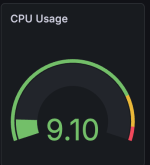
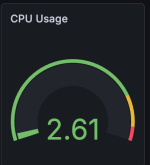
High VM-EXIT and Host CPU usage on idle with Windows Server 2025

I've tried to migrate from 2 Windows Server 2025 Core Hyper-V VMs running on Win10 2019 LTSC IoT and Dell E7470 with i5-6300u (2C/4T), 32 GB of RAM, NVMe SSD. The laptop has cooper radiators on SSD, RAM sticks, PTM 7950 on CPU die and it is lifted few centimeters above desk for better air cooling. When Hyper-V is utilized, the cooler starts spinning only on heavy tasks like Windows Updates installation, restarts. Windows host CPU utilization barely reached 3-5% during idle remote session on Hyper-V host.

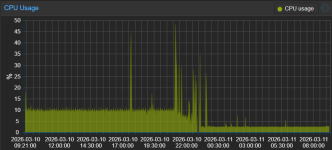
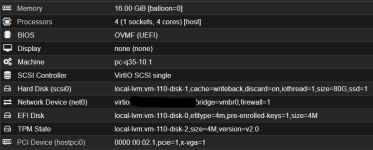
I converted vhdx images to QCOW2 and created Proxmox VMs. The same VMs running on Proxmox VE utilized int total 4-8% of the CPU. Fan was spinning all the time. Windows VirtIO Drivers were installed. I've tried various Proxmox settings but I gave up few hours later and restored Windows 10 from backup.
1765906181025.png

I am afraid we may proceed with Win Sever 2022 instead of 2025 on new infra just for this reason
 
Last edited:
Ok so hyper-v also does not show any degradation and has the same baseline (between 23h2 and 24h2).

As I think we have collectively tried out every parameter, it is likely that the issue will be a core Qemu issue.

We should try out with vanilla Qemu to see if Proxmox might for example have missed a patch or the problem is in upstream Qemu.
 
Any news about this issue? Using X86-64-v2-aes, kvm inside kvm nested virtualization, win11 25h2 - 20% idle cpu usage.
 
I came here today to tag @RoCE-geek. I know they were working on this.

But I also want to say, "There shouldn't be a need to experiment with CPU types". If you have hardware from the past 10-12 years, it should just work with selecting "host" as the CPU type. I have a fairly large homelab cluster of three R640s all with 384 GB of DDR4 and dual Intel Xeon Platinum 8168 CPUs and an older R730xd with dual Intel Xeon E5-2696v4 CPUs.

I recently took one of the R640s out of the cluster and installed Windows Server 2025 on it to act as a Hyper-V host. This is completely a Proxmox issue. The idle CPU issue does not exist there.

And before someone argues semantics like, "It's not actually a Proxmox issue, it's a Linux kernel issue!" or "It's actually a Windows Server 2025 issue!"

All of that may be true. None of it matters.

I cannot recommend Proxmox as a replacement for VMware to my clients if they're going to see incredibly poor performance.
 
Last edited:
I came here today to tag @RoCE-geek. I know they were working on this.

But I also want to say, "There shouldn't be a need to experiment with CPU types". If you have hardware from the past 10-12 years, it should just work with selecting "host" as the CPU type. I have a fairly large homelab cluster of three R640s all with 384 GB of DDR4 and dual Intel Xeon Platinum 8168 CPUs and an older R730xd with dual Intel Xeon E5-2696v4 CPUs.

I recently took one of the R640s out of the cluster and installed Windows Server 2025 on it to act as a Hyper-V host. This is completely a Proxmox issue. The idle CPU issue does not exist there.

And before someone argues semantics like, "It's not actually a Proxmox issue, it's a Linux kernel issue!" or "It's actually a Windows Server 2025 issue!"

All of that may be true. None of it matters.

I cannot recommend Proxmox as a replacement for VMware to my clients if they're going to see incredibly poor performance.
This is also a HyperV issue, but the graphs don’t show it because Windows subsystems don’t capture those calls. Go into the iDRAC of your server and don’t enable the Windows reporting module, you’ll see 10-20% CPU consumption depending on the number of cores you have. You can also go in Prometheus on a Windows 11 guest, physical hardware or HyperV host and see those CPU calls on idle machines.

This is a physical Windows 11 host at idle:
1772725580747.png
This is a physical Windows 10 host (same hardware, build, ...):
1772725956097.png

And this depends on number of cores in my environment. More cores = more idle consumption across the board, we have several clusters of VMware, HyperV and Proxmox and several thousands of physical hosts. We don't collect detailed metrics on everything, but so far I've seen it "everywhere" the best option seems to be to use 4 cores to minimize the idle. Newer CPU seem to help as well, but so far the current generation is only in our laptop/desktop fleets.

If anyone is interesting in more details or research: https://connormcgarr.github.io/secure-calls-and-skbridge/
 
Last edited:
If that is the case, it seems like this could potentially be “ameliorated” on the Windows side by completely disabling this feature:
https://learn.microsoft.com/en-us/w...ualization-based-protection-of-code-integrity

VMs would need IOMMU and secure boot, as well as a modern processor to have the security feature (now enabled by default) with CPU offloading. Still, from the post, it seems a baseline of VMExits (50k/s), or a high idle, is to be expected because of how Windows works and the performance improvements it is talking about are only under load.

I’d have to test with something like AME tool to strip Windows 11 from some of these features.

Also interesting to read how Windows, instead of designing proper user and kernel interface separation, now run most applications almost like a mini-VM instead.
 
Last edited:
I'm having what I believe to be the same problem, though with Windows 11 25H2 and Windows 11 IoT LTSC. VM's idle at constant 4%-6% CPU utilization. The big difference is the 'Software interrupts' process. This can be viewed in Task Manager and sorting by Process name. On Windows 11 23H2 'Software interrupts' is fine and is around 0.1% when idle. On 25H2 'Software interrupts' is constantly 3%-5% while the OS is idle.

Has anyone else noticed 'Software interrupts' using an unusually high amount of CPU time while Windows is idle?
 
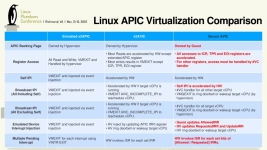
If you're seeing 4-5% CPU usage or a little higher on older models, I think we're chasing ghosts trying to get it to 1-2% we're "used to" in Linux-land because even the bare metal, Windows is just yes, triggering timers, which costs CPU time and has to be patched through. And KVM is not alone in finding out this, various other audio equipment and real-time software and games is "noticing" significant performance issues with interrupts for current iterations of Windows 11, it's not something that "we" could fix without Microsoft.

I'm running a pretty recent processor which is an AMD Ryzen 7840HS (Zen 4). I don't think you're chasing ghosts at all because constant 3%-6% CPU utilization due to 'Software interrupts' is frankly absolute BS. It's pretty obvious the problem was introduced by Microsoft and a modification they made to their OS's. Honestly I'm surprised it hasn't been addressed by now because it causes horrendous stuttering in games.
 
@jeenam I meant trying to fix it in the KVM layer is chasing ghosts. Microsoft has clearly indicated they do not wish to fix it, because to fix it they need to rework the kernel and the Windows security model, which would break a lot more than having your CPU idle slightly higher. We see it because KVM reports it, but as I mentioned before, HyperV and Windows hide most of it.

The NT platform dates from 1994 and like DOS, does not differentiate between kernel and user mode like Unix/Linux does. There is separation to some extent, that improved with Windows XP, but most software still has to run with admin privileges. So to fix the compounding security mess, they added layer and layer of hacks and Intel-specific security models. I don’t see this problem on Windows ARM for example, where even in a VM, idle is 0.5%, except that Windows ARM is absolutely useless as virtually no enterprise software supports it (not even IIS has native ARM, using x86 emulation instead).

I don’t see why people want to run Windows on VM if you’re worried about power consumption at idle. Windows is a hog all around, replace whatever functionality you have with Linux and Wine.
 
Last edited:
@jeenam I meant trying to fix it in the KVM layer is chasing ghosts. Microsoft has clearly indicated they do not wish to fix it, because to fix it they need to rework the kernel and the Windows security model, which would break a lot more than having your CPU idle slightly higher. We see it because KVM reports it, but as I mentioned before, HyperV and Windows hide most of it.

The NT platform dates from 1994 and like DOS, does not differentiate between kernel and user mode like Unix/Linux does. There is separation to some extent, that improved with Windows XP, but most software still has to run with admin privileges. So to fix the compounding security mess, they added layer and layer of hacks and Intel-specific security models. I don’t see this problem on Windows ARM for example, where even in a VM, idle is 0.5%, except that Windows ARM is absolutely useless as virtually no enterprise software supports it (not even IIS has native ARM, using x86 emulation instead).

I don’t see why people want to run Windows on VM if you’re worried about power consumption at idle. Windows is a hog all around, replace whatever functionality you have with Linux and Wine.
They're not worried about power consumption.

They're worried about a very real and serious loss of performance not just from one Windows Server version to another - 2022 to 2025 - but from one feature update to another - 23H2 to 24H2 / 25H2.

And this comment?

I don’t see why people want to run Windows on VM if you’re worried about power consumption at idle. Windows is a hog all around, replace whatever functionality you have with Linux and Wine.
Please be serious. This is a serious forum for serious people. If you think entire trillion dollar industries like biotech and pharma and finance are going to rewrite their products for Linux, you're mistaken.

Linux has been available as both a desktop and a server for 30+ years now.

Wolters Kluwer isn't rewriting CCH ProSystem for Linux.
Thomsen Reuters isn't rewriting AccountingCS for Linux.
Waters, Agilent, Shimadzu, Thermo Fisher - almost all - hell, maybe even all - of their instrument control software is Windows, with hard dependencies on specific Windows version, SQL Server, sometimes even requiring Active Directory (and obviously by extension, a domain controller).

You can't just "swap out to Linux" because you have something called FDA 21 CFR Part 11 compliance, which means validated systems can't be swapped. A lot of these instruments ship with embedded Windows conttrollers that don't ever get updated.

I can go on and on if you want, there's a ton more industries and a ton more vendors where Window is not just king, but Emperor with a capital "E" and Linux isn't even a peasant - it's been banished from the realm.

So that... is why people want to run Windows on VM.

You can hem and haw and say whatever makes you feel good about Linux and Proxmox, more power to you - don't ever stop being an evangalist if you want to be, but I have to live and work in the real world, and in the real world, my clients don't care that whose fault it is - they want a working platform. I'd like to deliver that to them with Proxmox virtualization instead of Windows Server Hyper-V and Azure if I can, but if I can't, I will drop Proxmox like a hot rock and move to something that can.

So it's in everyone's interest to figure out what the cause is and rectify, except perhaps Microsoft's, because if no one figures it out, they know we'll have no choice but to use their products and services.
 
@ChrisBozeman I work with plenty of Windows machines - thousands of them - you know what I’m not worried about - 5% CPU usage at idle. This entire thread is for homelabbers worried about their power bill. If I have a 5% power increase after a Windows upgrade in the datacenter, which it’s not measurably affecting anyway, nobody cares. Even on my nodes with lots of Windows machines, Linux is very effective at scheduling these calls on a few CPUs, I don’t measurably see a difference between Windows 10 and 11, even with dozens of VMs, they idle at about 15% regardless. Windows also does a lot more I/O, so Windows will always be ‘expensive’ and ‘less idle’ if you’re worried about power consumption.

The Proxmox platform works, at much lower cost than any alternative. My point is that it’s not a Proxmox issue, which is just a GUI for KVM/QEMU. All other hypervisor have this ‘problem’ too, as I demonstrated on the raw hardware even when HyperV and Windows (Server) hide the issue in their metrics, you can’t hide from the hardware, because Windows is the one initiating the calls to the CPU. Why - who knows, seems like Windows now uses virtualization calls as a security enhancement and it’s doing this continuously as each program has to go in and out of that enclave, which is expensive on the CPU.

You know what else Windows does - have a shared global timers that every program can adjust, so 1 program can set a timer for 1ms, then another program can set a timer for 1ns and your app will suddenly wake 1000 times until it hits its original time, burning CPU cycles in the process. But you know what says Microsoft, waiting for a timer is not considered CPU usage, good luck troubleshooting. That’s a thing it has been doing for literally decades. Why do we see something causing CPU spikes in a Windows VM - it’s always done that - you just noticed because you’re on a VM and you can inspect it. Also Windows keeps its own interrupt-based time, which when compared to hardware timers can cause time to go back as the underlying CPU is ‘paused’ in a VM when the hypervisor (any hypervisor) to deal with other VMs, the software isn’t designed to work on VMs, many legacy software vendors will say so, this $50k/y piece of Windows data analysis software doesn’t work on a VM - why not - because it’s Windows, doesn’t work on HyperV, doesn’t work on VMware, kind of works on KVM, but suddenly crashes the windowing session (PSRP still works).

I’m not evangelizing, I’m just saying Windows is a crap platform, and if you use it, expect weirdness, like the DOS or VMS machines I’m still supporting, it’s got over 3 decades worth of cruft, adjust your expectations.

Complain to Microsoft, if you can afford the support call and they’ll maybe make an annotation in their documentation.
 
  • Like
Reactions: UdoB
Whatever this bug is, and I say that because I didn't even bother to try and figure out the exact cause when I experienced it (I re-installed and went back to 23H2), it severely affected disk I/O performance. I had installed an app that has a ton of small files (audio plugin software that emulates synthesizers) and it took something like 40 minutes to install. Well lo and behold after switching back and it only took 10 minutes to install the software, only then did I realize how bad this issue is. It is shocking that Microsoft hasn't addressed this problem because the issues it causes are beyond severe.
 
Here is a follow-up on my initial post. I was running out of ideas, so I've decided to let Claude code SSH connect to my production host (because why not?). Figured it might be able to shed some new light on the issue.

Turns out it really did help. I am not back to a Windows 2022 baseline, but I can see a noticeable improvement.

1773235892366.png

Here is a summary of what was done.

Diagnosis

Using perf kvm stat I confirmed ~155K VM exits in 5 seconds. The ioport report revealed the culprit:

IO Port Access Samples Samples%
0x608:PIN 118749 99.92%

Port 0x608 is the ACPI PM Timer — Windows 2025 was polling it ~24,000 times/sec at idle.

What worked

Force Windows off the ACPI PM Timer (elevated cmd in guest):

bcdedit /set useplatformtick yes
bcdedit /set useplatformclock no

This was the single biggest win — IO_INSTRUCTION exits dropped from 120,811 to 90 per 5 seconds.

Disable speculation mitigations in guest (registry import):

Code:
Windows Registry Editor Version 5.00

[HKEY_LOCAL_MACHINE\SYSTEM\CurrentControlSet\Control\Session Manager\Memory Management]
"FeatureSettingsOverride"=dword:00000003
"FeatureSettingsOverrideMask"=dword:00000003

[HKEY_LOCAL_MACHINE\SYSTEM\CurrentControlSet\Control\Session Manager\kernel]
"DisableTsx"=dword:00000001

Results

MetricBeforeAfter
Host CPU (idle VM)10%3%
VM exits (5s)154,73435,145
IO_INSTRUCTION exits (5s) 120,81190

What's NOT fixable (yet)

Package C-states still won't enter any idle state while the VM runs. The Windows 24H2+ kernel distributes timer housekeeping evenly across all vCPUs (~200 wakeups/s each), unlike Win10 which consolidates idle work onto one core. This appears to be a fundamental scheduler change — adding more vCPUs just adds more 200 event/s threads. Likely needs a fix from Microsoft.

Environment:
PVE 9.1.6
Intel Alder Lake (12th gen)
GPU passthrough (Intel iGPU SR-IOV)
VirtIO drivers 0.1.271
mitigations=off on host kernel.

1773236920650.png

Hope this can help.
 
Here is a follow-up on my initial post. I was running out of ideas, so I've decided to let Claude code SSH connect to my production host (because why not?). Figured it might be able to shed some new light on the issue.

Turns out it really did help. I am not back to a Windows 2022 baseline, but I can see a noticeable improvement.

View attachment 96430

Here is a summary of what was done.

Diagnosis

Using perf kvm stat I confirmed ~155K VM exits in 5 seconds. The ioport report revealed the culprit:

IO Port Access Samples Samples%
0x608:PIN 118749 99.92%

Port 0x608 is the ACPI PM Timer — Windows 2025 was polling it ~24,000 times/sec at idle.

What worked

Force Windows off the ACPI PM Timer (elevated cmd in guest):

bcdedit /set useplatformtick yes
bcdedit /set useplatformclock no

This was the single biggest win — IO_INSTRUCTION exits dropped from 120,811 to 90 per 5 seconds.

Disable speculation mitigations in guest (registry import):

Code:
Windows Registry Editor Version 5.00

[HKEY_LOCAL_MACHINE\SYSTEM\CurrentControlSet\Control\Session Manager\Memory Management]
"FeatureSettingsOverride"=dword:00000003
"FeatureSettingsOverrideMask"=dword:00000003

[HKEY_LOCAL_MACHINE\SYSTEM\CurrentControlSet\Control\Session Manager\kernel]
"DisableTsx"=dword:00000001

Results

MetricBeforeAfter
Host CPU (idle VM)10%3%
VM exits (5s)154,73435,145
IO_INSTRUCTION exits (5s)120,81190

What's NOT fixable (yet)

Package C-states still won't enter any idle state while the VM runs. The Windows 24H2+ kernel distributes timer housekeeping evenly across all vCPUs (~200 wakeups/s each), unlike Win10 which consolidates idle work onto one core. This appears to be a fundamental scheduler change — adding more vCPUs just adds more 200 event/s threads. Likely needs a fix from Microsoft.

Environment:
PVE 9.1.6
Intel Alder Lake (12th gen)
GPU passthrough (Intel iGPU SR-IOV)
VirtIO drivers 0.1.271
mitigations=off on host kernel.

View attachment 96431

Hope this can help.

Amazing investigative work. I've been testing both Windows Server 2025 Server Core and Desktop Experience on Proxmox. This reduced average idle CPU down to roughly 1.25% on Server Core to 1.50% per core on Desktop Experience.

Thank you for digging into this so deeply.
 
  • Like
Reactions: SleepyCircuit