I have a server with the following SSD/HDD configuration:
- 1x60 GB SSD as the primary storage medium for the OS.
- 1x2 TB HDD that was my previous backup drive (I am thinking of replacing this one with another SSD for containers / VMs)
- 5 TB HDDs that will become my storage and backup drives.
It's not a fancy server at all. It's just an old/ancient Dell PowerEdge 840 that has been heavily upgraded / maxed out in regards to specifications. It's my home server. Proxox runs fine. I've got a container installed and ready to be configured as an OwnCloud server.
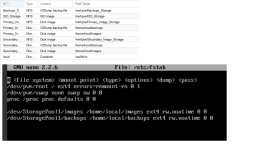
The problem I am having is trying to decide how to manage the two 5 TB HDDs. Should I have those two drives mounted when the server boots via FSTAB or should I give Proxmox control over them using the web based interface (which I was able to accomplish using pvcreate / vgcreate commands referenced in the Storage Model wiki). I am okay with either option. I just don't know which is best and I don't know how I would give the OwnCloud image access to either one. I'm thinking of using one of the 5TB drives as the storage drive and the other as a backup. If I am able to figure out how to give a storage disk to the container, should I give it another storage disk on the backup drive or should I use Proxmox's built-in backup utility?
I know, I know! Super n00b here, but if you have any suggestions (other than to give up) I would be super appreciative! Thanks!
- 1x60 GB SSD as the primary storage medium for the OS.
- 1x2 TB HDD that was my previous backup drive (I am thinking of replacing this one with another SSD for containers / VMs)
- 5 TB HDDs that will become my storage and backup drives.
It's not a fancy server at all. It's just an old/ancient Dell PowerEdge 840 that has been heavily upgraded / maxed out in regards to specifications. It's my home server. Proxox runs fine. I've got a container installed and ready to be configured as an OwnCloud server.
The problem I am having is trying to decide how to manage the two 5 TB HDDs. Should I have those two drives mounted when the server boots via FSTAB or should I give Proxmox control over them using the web based interface (which I was able to accomplish using pvcreate / vgcreate commands referenced in the Storage Model wiki). I am okay with either option. I just don't know which is best and I don't know how I would give the OwnCloud image access to either one. I'm thinking of using one of the 5TB drives as the storage drive and the other as a backup. If I am able to figure out how to give a storage disk to the container, should I give it another storage disk on the backup drive or should I use Proxmox's built-in backup utility?
I know, I know! Super n00b here, but if you have any suggestions (other than to give up) I would be super appreciative! Thanks!