Welcome to GRUB" after GUI update

Smvb64

Member
Dec 9, 2022
9
2
8
Hello all,

Looking for some troubleshooting steps, I performed an update from the Proxmox GUI.
After restarting, I am now stuck on a "Welcome to Grub" Screen and unable to type.

I am running Proxmox 8 (Upgraded from 7 to 8 a few months ago)
Unfortunately, this is all the information I have.

Please let me know if it possible to retrieve logs or if there are any recovery disks I might be able to use in this situation.

UPDATE:
Looking at this thread https://forum.proxmox.com/threads/welcome-to-grub-after-apt-dist-upgrade.162989/
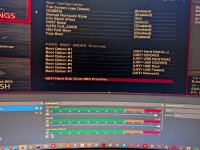
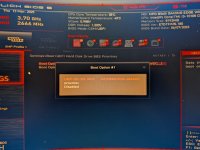
I decided to check my BIOS settings as well and saw this
WhatsApp Image 2025-03-12 at 21.51.50_3a0956f2.jpg


WhatsApp Image 2025-03-12 at 21.51.50_cad119d4.jpg

Just like the thread, I set Proxmox as primary and booted.
Looks like I may have jumped the gun - the thread I linked about is the same issue I am having. Is there any else that needs to be done?

I am getting a new error though

1741830984556.png


Thank you guys
Dan
 

Attachments

  • 1741830966985.png
    1741830966985.png
    8.8 KB · Views: 5
Last edited:
if booting the "proxmox" entry works, please follow the instructions printed during the upgrade to also include the removable bootloader entry in future upgrades. I don't think the other error is related - where exactly do you see it?
 
if booting the "proxmox" entry works, please follow the instructions printed during the upgrade to also include the removable bootloader entry in future upgrades. I don't think the other error is related - where exactly do you see it?
Hello, thank you for your reply.

I followed the instructions and this is what I got:

Code:
Debian GNU/Linux comes with ABSOLUTELY NO WARRANTY, to the extent
permitted by applicable law.
Last login: Wed Mar 12 22:38:00 EDT 2025 on pts/0
root@pve1:~# echo 'grub-efi-amd64 grub2/force_efi_extra_removable boolean true' | debconf-set-selections -v -u
info: Trying to set 'grub2/force_efi_extra_removable' [boolean] to 'true'
info: Loading answer for 'grub2/force_efi_extra_removable'
root@pve1:~# apt install --reinstall grub-efi-amd64
Reading package lists... Done
Building dependency tree... Done
Reading state information... Done
0 upgraded, 0 newly installed, 1 reinstalled, 0 to remove and 0 not upgraded.
Need to get 0 B/45.7 kB of archives.
After this operation, 0 B of additional disk space will be used.
Preconfiguring packages ...
(Reading database ... 71025 files and directories currently installed.)
Preparing to unpack .../grub-efi-amd64_2.06-13+pmx5_amd64.deb ...
Unpacking grub-efi-amd64 (2.06-13+pmx5) over (2.06-13+pmx5) ...
Setting up grub-efi-amd64 (2.06-13+pmx5) ...
Installing for x86_64-efi platform.
File descriptor 3 (pipe:[2496097]) leaked on vgs invocation. Parent PID 408364: grub-install.real
Installation finished. No error reported.
Generating grub configuration file ...
Found linux image: /boot/vmlinuz-6.8.12-8-pve
Found initrd image: /boot/initrd.img-6.8.12-8-pve
Found linux image: /boot/vmlinuz-6.8.12-7-pve
Found initrd image: /boot/initrd.img-6.8.12-7-pve
Found linux image: /boot/vmlinuz-5.15.158-2-pve
Found initrd image: /boot/initrd.img-5.15.158-2-pve
Found linux image: /boot/vmlinuz-5.15.74-1-pve
Found initrd image: /boot/initrd.img-5.15.74-1-pve
Found memtest86+ 64bit EFI image: /boot/memtest86+x64.efi
Adding boot menu entry for UEFI Firmware Settings ...
done
root@pve1:~#

Code:
root@pve1:~# efibootmgr -v
BootCurrent: 0000
Timeout: 0 seconds
BootOrder: 0000,0001,0002,0003,0004
Boot0000* proxmox       HD(2,GPT,32ba3e78-61bb-4a00-b9d0-297a07c371ec,0x800,0x100000)/File(\EFI\proxmox\grubx64.efi)
Boot0001* UEFI OS       HD(2,GPT,32ba3e78-61bb-4a00-b9d0-297a07c371ec,0x800,0x100000)/File(\EFI\BOOT\BOOTX64.EFI)..BO
Boot0002* UEFI:CD/DVD Drive     BBS(129,,0x0)
Boot0003* UEFI:Removable Device BBS(130,,0x0)
Boot0004* UEFI:Network Device   BBS(131,,0x0)
root@pve1:~#

It looks like it worked correctly from what I'm seeing in the other thread

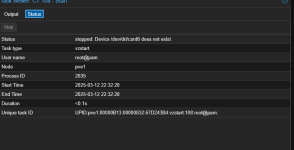
Regarding the other error, that is coming from my Plex installation

1741915981680.png

This is coming from my Plex LXC - It is a different issue but worked before I did the update and rebooted.
I may need to make a separate thread on this one

Best,
Dan
 
yes, that sounds like a different problem!