

Hello everyone.
Within my Proxmox setup i am at a point of questioning the way i have completed.
I would like some guidance on the issues and the steps i have taken and how to move within this state to the "correct" / "desired" stability.
specifically the zfs share between my ct (ubuntu) lxc
since i have seen different configurations on the internet and all different answers and recommendations i would like some guidance on the best practice (proper way) to
mount / map zfs into ct ubuntu for shared data
only visible main issue within my configuration is : IO preassure stall being high on even 1 lxc running like a torrent configuration. High as in %70+
specifically on checking torrent files or moving files via samba even when the only process is this and the only ct running doing this operation.
Like my lxc designated for samba share receiving files while the rest of the proxmox services are offline only one that is online and processing is this job and is this lxc
details
## Hardware
(all i could afford and salvage from old pc for started no zfs have 2 drives )
- Intel(R) Core(TM) i7-6700K CPU @ 4.00GHz
- 32 gb ram
- no gpu
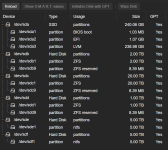
- TOSHIBA ENTERPR 20 TB (zfs created via terminal)
- sandisk ssd 240 gb (main local proxmox running)
- wd red 2tb zfs created
- - use case planned to be designated storage for high load files like jellyfin thumbnails previews etc. planned to be also used for syntchg )
- samsung ssd 1 tb (zfs created via gui)
- - use case planned to be designated storage for higher load files like manga readers
## Setup
- all lxc are mapped via mp in their conf files . same locations
```
mp0: /media-pool/media-imports,mp=/mnt/media,shared=1
mp1: /real-tank/media,mp=/mnt/media-files,shared=1
```
designed to be where all "thumb" and "data" storage is sent to the wd red and all media is stored on the toshiba enterprise

### Start
4 ct lxc ubuntu setup
- for samba share to use on windows pc
- for torrent / jacket / arr setup with dockge and gluten
- for media share and streaming with jellyfin
- for manga
at the moment active working
*Future development: *
- activating the jellyfin and manga setup
- making another ct lxc for syncthing share for family pictures and for management of those with digicam or any other (it can be seperated into 2 or used in same dockge)
### tested
- qbittorrent works with no issue
- router configuration updated and all containers added to the lan list
- jellyfin setup tested within a vm configuration then in ct ( there was a docker internet connection issue in my proxmox thus 2 time test)
- arr setup tested with no issues
- i have moved movies from laptop and desktops via samba to the 20tb toshiba via samba
- i have moved movies from the external hdd (5tb) via proxmox main shell mount and `rsync -av`
Within my Proxmox setup i am at a point of questioning the way i have completed.
I would like some guidance on the issues and the steps i have taken and how to move within this state to the "correct" / "desired" stability.
specifically the zfs share between my ct (ubuntu) lxc
since i have seen different configurations on the internet and all different answers and recommendations i would like some guidance on the best practice (proper way) to
mount / map zfs into ct ubuntu for shared data
only visible main issue within my configuration is : IO preassure stall being high on even 1 lxc running like a torrent configuration. High as in %70+
specifically on checking torrent files or moving files via samba even when the only process is this and the only ct running doing this operation.
Like my lxc designated for samba share receiving files while the rest of the proxmox services are offline only one that is online and processing is this job and is this lxc
details
## Hardware
(all i could afford and salvage from old pc for started no zfs have 2 drives )
- Intel(R) Core(TM) i7-6700K CPU @ 4.00GHz
- 32 gb ram
- no gpu
- TOSHIBA ENTERPR 20 TB (zfs created via terminal)
- sandisk ssd 240 gb (main local proxmox running)
- wd red 2tb zfs created
- - use case planned to be designated storage for high load files like jellyfin thumbnails previews etc. planned to be also used for syntchg )
- samsung ssd 1 tb (zfs created via gui)
- - use case planned to be designated storage for higher load files like manga readers
## Setup
- all lxc are mapped via mp in their conf files . same locations
```
mp0: /media-pool/media-imports,mp=/mnt/media,shared=1
mp1: /real-tank/media,mp=/mnt/media-files,shared=1
```
designed to be where all "thumb" and "data" storage is sent to the wd red and all media is stored on the toshiba enterprise
### Start
4 ct lxc ubuntu setup
- for samba share to use on windows pc
- for torrent / jacket / arr setup with dockge and gluten
- for media share and streaming with jellyfin
- for manga
at the moment active working
| type | number | name | active usecase | mapped 20tb toshiba enterprize | mapped 2tb wd red | |
| ct - lxc | 100 | test | dockge for samba share | yes | yes | |
| ct - lxc | 102 | ct-docker-test | dockge,gluetun,qbittorrent | yes | yes | |
| ct - lxc |
Code:
root@proxmox:~# zpool status -v
  pool: manga
 state: ONLINE
  scan: scrub repaired 0B in 00:00:01 with 0 errors on Sun May 10 00:24:02 2026
config:

        NAME                                STATE     READ WRITE CKSUM
        manga                               ONLINE       0     0     0
          ata-ST1000NM0008-2F2100_ZFA12NVJ  ONLINE       0     0     0

errors: No known data errors

  pool: media-pool
 state: ONLINE
  scan: scrub repaired 0B in 00:33:36 with 0 errors on Sun May 10 00:57:38 2026
config:

        NAME                              STATE     READ WRITE CKSUM
        media-pool                        ONLINE       0     0     0
          ata-WD20EFAX-68FB5N0_95DWXKGAS  ONLINE       0     0     0

errors: No known data errors

  pool: real-tank
 state: ONLINE
  scan: scrub repaired 0B in 1 days 02:39:08 with 0 errors on Mon May 11 03:03:23 2026
config:

        NAME                                    STATE     READ WRITE CKSUM
        real-tank                               ONLINE       0     0     0
          ata-TOSHIBA_MG10ACA20TE_8582A0BSF4MJ  ONLINE       0     0     0

errors: No known data errors
Code:
root@proxmox:~# zpool list
NAME         SIZE  ALLOC   FREE  CKPOINT  EXPANDSZ   FRAG    CAP  DEDUP    HEALTH  ALTROOT
manga        928G  2.07M   928G        -         -     0%     0%  1.00x    ONLINE  -
media-pool  1.81T   260G  1.56T        -         -     0%    13%  1.00x    ONLINE  -
real-tank   18.2T  13.4T  4.81T        -         -    20%    73%  1.00x    ONLINE  -
*Future development: *
- activating the jellyfin and manga setup
- making another ct lxc for syncthing share for family pictures and for management of those with digicam or any other (it can be seperated into 2 or used in same dockge)
### tested
- qbittorrent works with no issue
- router configuration updated and all containers added to the lan list
- jellyfin setup tested within a vm configuration then in ct ( there was a docker internet connection issue in my proxmox thus 2 time test)
- arr setup tested with no issues
- i have moved movies from laptop and desktops via samba to the 20tb toshiba via samba
- i have moved movies from the external hdd (5tb) via proxmox main shell mount and `rsync -av`
Last edited: