[SOLVED] PVE 9 - GRUB stops the machine immediately

hidigoudi

Member
Aug 27, 2023
22
2
8
Hello,

I performed the upgrade from PVE 8.4.9 to 9.0.3 yesterday without any error during the Debian 12 > 13 upgrade by following the documentation.

However, since I rebooted, I'm stuck in the "Welcome grub" step during around 0.5 seconds and then the machine reboots immediately and goes in BIOS setting itself. I can't even reach the list of kernels I can boot from.

I booted using systemrescuecd ISO and chroot inside my system, I find nothing weird or broken, I tried :

Code:
grub-install /dev/sdX
Code:
update-grub
Code:
apt install -f
Code:
dpkg configure -a

All commands work without any error, grub is correctly installed (2.12-9+pmx2 version). I can't figure out what is going on...

I'm on EFI system and the BIOS settings did not change since the upgrade of yesterday (obviously).

PS: My CPU is an Intel Core i5 7400 and my BIOS / MB is American Megatrends version 2.18.1263

Is someone able to help me ?

Thank you.
 
Last edited:
did you mount all the required file systems before chrooting (including the ESP and things like /dev /sys /proc ?)?

could you post the full output of the following commands, running inside the chroot:

Code:
apt update
apt full-upgrade
apt policy
pveversion -v
proxmox-boot-tool status
grub-install --target x86_64-efi --no-floppy --bootloader-id proxmox /dev/sdX
grub-install --target x86_64-efi --no-floppy --bootloader-id proxmox --removable /dev/sdX
efibootmgr -v
update-grub
 
did you mount all the required file systems before chrooting (including the ESP and things like /dev /sys /proc ?)?
Yes, I mounted /, /boot, /boot/efi and also :
Code:
mount --bind /dev /mnt/dev
mount --bind /sys /mnt/sys
mount --bind /proc /mnt/proc
Then :
Code:
chroot /mnt

Then, I had to do this (inside the chroot) :
Code:
mount -t efivarfs efivarfs /sys/firmware/efi/efivars

Unfortunately, I can't send you the output of commands you asked now (I have no access to the server right now).

The only thing I'm sure because I already did it is :
  • apt update -> No error, no package to upgrade
  • apt full-upgrade -> No error, everything is up to date
  • pveversion -v -> 9.0.3
  • grub-install /dev/sdX -> No error + correctly installed
  • efibootmgr -v -> I have several boot "slots", the first one in the order is Debian system (00008)
I will be able to show you more information later.
 
I did these 3 commands :
Code:
proxmox-boot-tool status
grub-install --target x86_64-efi --no-floppy --bootloader-id proxmox /dev/sdX
grub-install --target x86_64-efi --no-floppy --bootloader-id proxmox --removable /dev/sdX

The first one showed :
E: /etc/kernel/proxmox-boot-uuids does not exist.

The 2 last commands for grub-install ran successfully. I rebooted the machine, now I'm able to access to GRUB and list kernels !

However, the initramfs shell appears instead of the system. I tried in addition :
Code:
update-initramfs -u
But same issue.
 
Last edited:
Problem solved : I had to rebuild the initramfs of all kernels :
Code:
update-initramfs -u -k all

I still don’t know what happened during the initial upgrade, as everything appeared to be fine. I have 3 others Proxmox machines in a cluster, I hope it will not be the same behavior.
 
Last edited:
the efibootmgr output would be interesting - I suspect you were booting from the removable boot loader entry and that got out of sync with the rest of the ESP.

could you run "proxmox-boot-tool refresh" and post the output here?
 
  • Like
Reactions: Kingneutron
Code:
root@proxmox:~# proxmox-boot-tool refresh
Running hook script 'proxmox-auto-removal'..
Running hook script 'zz-proxmox-boot'..
Re-executing '/etc/kernel/postinst.d/zz-proxmox-boot' in new private mount namespace..
No /etc/kernel/proxmox-boot-uuids found, skipping ESP sync.
root@proxmox:~#
The efibootmgr -v command output before the correction showed "debian" efi file instead of "proxmox" I got thanks to:
Code:
grub-install --target x86_64-efi --no-floppy --bootloader-id proxmox /dev/sdX

Now, I have :
Code:
root@proxmox:~# efibootmgr -v
BootCurrent: 0000
Timeout: 2 seconds
BootOrder: 0000,0001,0004,0008,000A,0009
Boot0000* proxmox    HD(1,GPT,8a89e9f3-5db5-4036-8a11-2f21995b9f4e,0x800,0x17800)/File(\EFI\PROXMOX\SHIMX64.EFI)
      dp: 04 01 2a 00 01 00 00 00 00 08 00 00 00 00 00 00 00 78 01 00 00 00 00 00 f3 e9 89 8a b5 5d 36 40 8a 11 2f 21 99 5b 9f 4e 02 02 / 04 04 36 00 5c 00 45 00 46 00 49 00 5c 00 50 00 52 00 4f 00 58 00 4d 00 4f 00 58 00 5c 00 53 00 48 00 49 00 4d 00 58 00 36 00 34 00 2e 00 45 00 46 00 49 00 00 00 / 7f ff 04 00
 
great!
 
Hello,

may I hijack the thread?
I also have this issue:
However, since I rebooted, I'm stuck in the "Welcome grub" step during around 0.5 seconds and then the machine reboots immediately and goes in BIOS setting itself. I can't even reach the list of kernels I can boot from.

In BIOS I have a proxmox boot option, but it doesn't seem to work.
I can use the ISO and perform a rescue boot.
Maybe I shouldn't have used the grub options from the maintainer, but I usually keep everything as much as possible at stock level.

Here is the output of some commands:

Bash:
root@pve:~# proxmox-boot-tool status
Re-executing '/usr/sbin/proxmox-boot-tool' in new private mount namespace..
E: /etc/kernel/proxmox-boot-uuids does not exist.

Bash:
root@pve:~# proxmox-boot-tool refresh
Running hook script 'proxmox-auto-removal'..
Running hook script 'zz-proxmox-boot'..
Re-executing '/etc/kernel/postinst.d/zz-proxmox-boot' in new private mount namespace..
No /etc/kernel/proxmox-boot-uuids found, skipping ESP sync.

Bash:
root@pve:~# efibootmgr -v
BootCurrent: 0003
Timeout: 2 seconds
BootOrder: 0002,0000,0001,0003
Boot0000  Windows Boot Manager  VenHw(99e275e7-75a0-4b37-a2e6-c5385e6c00cb)57494e444f5753000100000088000000780000004200430044004f0042004a004500430054003d007b00390064006500610038003600320063002d0035006300640064002d0034006500370030002d0061006300630031002d006600330032006200330034003400640034003700390035007d00000062000100000010000000040000007fff0400
      dp: 01 04 14 00 e7 75 e2 99 a0 75 37 4b a2 e6 c5 38 5e 6c 00 cb / 7f ff 04 00
    data: 57 49 4e 44 4f 57 53 00 01 00 00 00 88 00 00 00 78 00 00 00 42 00 43 00 44 00 4f 00 42 00 4a 00 45 00 43 00 54 00 3d 00 7b 00 39 00 64 00 65 00 61 00 38 00 36 00 32 00 63 00 2d 00 35 00 63 00 64 00 64 00 2d 00 34 00 65 00 37 00 30 00 2d 00 61 00 63 00 63 00 31 00 2d 00 66 00 33 00 32 00 62 00 33 00 34 00 34 00 64 00 34 00 37 00 39 00 35 00 7d 00 00 00 62 00 01 00 00 00 10 00 00 00 04 00 00 00 7f ff 04 00
Boot0001  UEFI: SAMSUNG MZVLB512HBJQ-000L7      HD(2,GPT,f11e1393-0c02-4b7c-ba93-b679748becd8,0x800,0x200000)/File(EFI\boot\bootx64.efi)0000424f
      dp: 04 01 2a 00 02 00 00 00 00 08 00 00 00 00 00 00 00 00 20 00 00 00 00 00 93 13 1e f1 02 0c 7c 4b ba 93 b6 79 74 8b ec d8 02 02 / 04 04 2e 00 45 00 46 00 49 00 5c 00 62 00 6f 00 6f 00 74 00 5c 00 62 00 6f 00 6f 00 74 00 78 00 36 00 34 00 2e 00 65 00 66 00 69 00 00 00 / 7f ff 04 00
    data: 00 00 42 4f
Boot0002* proxmox       HD(2,GPT,f11e1393-0c02-4b7c-ba93-b679748becd8,0x800,0x200000)/File(\EFI\proxmox\shimx64.efi)
      dp: 04 01 2a 00 02 00 00 00 00 08 00 00 00 00 00 00 00 00 20 00 00 00 00 00 93 13 1e f1 02 0c 7c 4b ba 93 b6 79 74 8b ec d8 02 02 / 04 04 36 00 5c 00 45 00 46 00 49 00 5c 00 70 00 72 00 6f 00 78 00 6d 00 6f 00 78 00 5c 00 73 00 68 00 69 00 6d 00 78 00 36 00 34 00 2e 00 65 00 66 00 69 00 00 00 / 7f ff 04 00
Boot0003* UEFI: SanDisk Extreme 0001    PciRoot(0x0)/Pci(0x14,0x0)/USB(16,0)/HD(2,GPT,63fdf814-a086-4c64-aa69-61b539e868c4,0x7730a88,0x10000)0000424f
      dp: 02 01 0c 00 d0 41 03 0a 00 00 00 00 / 01 01 06 00 00 14 / 03 05 06 00 10 00 / 04 01 2a 00 02 00 00 00 88 0a 73 07 00 00 00 00 00 00 01 00 00 00 00 00 14 f8 fd 63 86 a0 64 4c aa 69 61 b5 39 e8 68 c4 02 02 / 7f ff 04 00
    data: 00 00 42 4f
-> I disabled everything except "proxmox" in BIOS. Maybe I need to remove these entries in OS?
 
I consider this a bug. I still don’t know exactly what happened — I was confused because the upgrade from Proxmox 8 to Proxmox 9 completed successfully without any errors. The previous update on Proxmox 8 also worked fine, but then overnight I was no longer able to boot.

Did you try the same recovery steps I used to restore the boot?
 
Did you try the same recovery steps I used to restore the boot?
Nope, not yet.
I didn't dare to install anything as I already have the "proxmox" entry instead of a plain "debian".

And, honestly, I have no idea about bootloaders and it is a PIA to mess around with it.
I couldn't answer questions about what I'm currently using.
How can I look up the current configuration?

I found this but I don't know how to take advantage of this information:

1756597174012.png
 
Last edited:
please post the output of "pve8to9" and "pveversion -v"
 
  • Like
Reactions: Privacy
please post the output of "pve8to9" and "pveversion -v"
Thank you for your assistance. :)

root@pve:~# pve8to9
= CHECKING VERSION INFORMATION FOR PVE PACKAGES =

Checking for package updates..
PASS: all packages up-to-date

Checking proxmox-ve package version..
PASS: already upgraded to Proxmox VE 9

Checking running kernel version..
PASS: running new kernel '6.14.8-2-pve' after upgrade.

= CHECKING CLUSTER HEALTH/SETTINGS =

SKIP: standalone node.

= CHECKING HYPER-CONVERGED CEPH STATUS =

SKIP: no hyper-converged ceph setup detected!

= CHECKING CONFIGURED STORAGES =

PASS: storage 'NAS' enabled and active.
PASS: storage 'local' enabled and active.
PASS: storage 'local-lvm' enabled and active.
PASS: storage 'ssd' enabled and active.
INFO: Checking storage content type configuration..
PASS: no storage content problems found
PASS: no storage re-uses a directory for multiple content types.
INFO: Check for usage of native GlusterFS storage plugin...
PASS: No GlusterFS storage found.
INFO: Checking whether all external RBD storages have the 'keyring' option configured
SKIP: No RBD storage configured.

= VIRTUAL GUEST CHECKS =

SKIP: Skipping check for running guests - already upgraded.
INFO: Checking if LXCFS is running with FUSE3 library, if already upgraded..
PASS: systems seems to be upgraded and LXCFS is running with FUSE 3 library
INFO: Checking for VirtIO devices that would change their MTU...
PASS: All guest config descriptions fit in the new limit of 8 KiB
INFO: Checking container configs for deprecated lxc.cgroup entries
PASS: No legacy 'lxc.cgroup' keys found.
INFO: Checking VM configurations for outdated machine versions
PASS: All VM machine versions are recent enough

= MISCELLANEOUS CHECKS =

INFO: Checking common daemon services..
PASS: systemd unit 'pveproxy.service' is in state 'active'
PASS: systemd unit 'pvedaemon.service' is in state 'active'
PASS: systemd unit 'pvescheduler.service' is in state 'active'
PASS: systemd unit 'pvestatd.service' is in state 'active'
INFO: Checking for supported & active NTP service..
PASS: Detected active time synchronisation unit 'chrony.service'
INFO: Checking if the local node's hostname 'pve' is resolvable..
INFO: Checking if resolved IP is configured on local node..
PASS: Resolved node IP '192.168.2.6' configured and active on single interface.
INFO: Check node certificate's RSA key size
PASS: Certificate 'pve-root-ca.pem' passed Debian Busters (and newer) security level for TLS connections (4096 >= 2048)
PASS: Certificate 'pve-ssl.pem' passed Debian Busters (and newer) security level for TLS connections (2048 >= 2048)
INFO: Checking backup retention settings..
PASS: no backup retention problems found.
INFO: checking CIFS credential location..
PASS: no CIFS credentials at outdated location found.
INFO: Checking permission system changes..
INFO: Checking custom role IDs
PASS: no custom roles defined
INFO: Checking node and guest description/note length..
PASS: All node config descriptions fit in the new limit of 64 KiB
INFO: Checking if the suite for the Debian security repository is correct..
PASS: found no suite mismatch
INFO: Checking for existence of NVIDIA vGPU Manager..
PASS: No NVIDIA vGPU Service found.
INFO: Checking bootloader configuration...
PASS: bootloader packages installed correctly
INFO: Check for dkms modules...
SKIP: could not get dkms status
INFO: Check for legacy 'filter' or 'group' sections in /etc/pve/notifications.cfg...
INFO: Check for legacy 'notification-policy' or 'notification-target' options in /etc/pve/jobs.cfg...
PASS: No legacy 'notification-policy' or 'notification-target' options found!
INFO: Check for LVM autoactivation settings on LVM and LVM-thin storages...
PASS: all guest volumes on storage 'local-lvm' have autoactivation disabled
PASS: No problematic volumes found.
INFO: Checking lvm config for thin_check_options...
PASS: Check for correct thin_check_options passed
INFO: Check post RRD metrics data format migration situation...
PASS: No old RRD metric files found, normally this means all have been migrated.
INFO: Checking for IPAM DB files that have not yet been migrated.
PASS: No legacy IPAM DB found.
PASS: No legacy MAC DB found.
INFO: Checking if the legacy sysctl file '/etc/sysctl.conf' needs to be migrated to new '/etc/sysctl.d/' path.
PASS: Legacy file '/etc/sysctl.conf' is not present.
INFO: Checking if matching CPU microcode package is installed.
PASS: Found matching CPU microcode package 'intel-microcode' installed.
SKIP: NOTE: Expensive checks, like CT cgroupv2 compat, not performed without '--full' parameter

= SUMMARY =

TOTAL: 44
PASSED: 38
SKIPPED: 6
WARNINGS: 0
FAILURES: 0
root@pve:~#

root@pve:~# pveversion -v
proxmox-ve: 9.0.0 (running kernel: 6.14.8-2-pve)
pve-manager: 9.0.6 (running version: 9.0.6/49c767b70aeb6648)
proxmox-kernel-helper: 9.0.4
proxmox-kernel-6.14.11-1-pve-signed: 6.14.11-1
proxmox-kernel-6.14: 6.14.11-1
proxmox-kernel-6.14.8-2-pve-signed: 6.14.8-2
proxmox-kernel-6.8.12-13-pve-signed: 6.8.12-13
proxmox-kernel-6.8: 6.8.12-13
proxmox-kernel-6.8.12-9-pve-signed: 6.8.12-9
ceph-fuse: 19.2.3-pve1
corosync: 3.1.9-pve2
criu: 4.1.1-1
frr-pythontools: 10.3.1-1+pve4
ifupdown2: 3.3.0-1+pmx10
intel-microcode: 3.20250512.1
ksm-control-daemon: 1.5-1
libjs-extjs: 7.0.0-5
libproxmox-acme-perl: 1.7.0
libproxmox-backup-qemu0: 2.0.1
libproxmox-rs-perl: 0.4.1
libpve-access-control: 9.0.3
libpve-apiclient-perl: 3.4.0
libpve-cluster-api-perl: 9.0.6
libpve-cluster-perl: 9.0.6
libpve-common-perl: 9.0.9
libpve-guest-common-perl: 6.0.2
libpve-http-server-perl: 6.0.4
libpve-network-perl: 1.1.6
libpve-rs-perl: 0.10.10
libpve-storage-perl: 9.0.13
libspice-server1: 0.15.2-1+b1
lvm2: 2.03.31-2+pmx1
lxc-pve: 6.0.4-2
lxcfs: 6.0.4-pve1
novnc-pve: 1.6.0-3
proxmox-backup-client: 4.0.14-1
proxmox-backup-file-restore: 4.0.14-1
proxmox-backup-restore-image: 1.0.0
proxmox-firewall: 1.1.2
proxmox-kernel-helper: 9.0.4
proxmox-mail-forward: 1.0.2
proxmox-mini-journalreader: 1.6
proxmox-offline-mirror-helper: 0.7.1
proxmox-widget-toolkit: 5.0.5
pve-cluster: 9.0.6
pve-container: 6.0.9
pve-docs: 9.0.8
pve-edk2-firmware: 4.2025.02-4
pve-esxi-import-tools: 1.0.1
pve-firewall: 6.0.3
pve-firmware: 3.16-4
pve-ha-manager: 5.0.4
pve-i18n: 3.5.2
pve-qemu-kvm: 10.0.2-4
pve-xtermjs: 5.5.0-2
qemu-server: 9.0.19
smartmontools: 7.4-pve1
spiceterm: 3.4.0
swtpm: 0.8.0+pve2
vncterm: 1.9.0
zfsutils-linux: 2.3.4-pve1
root@pve:~#
 
okay. could you please also do "find /boot/efi" and post the result here in code tags or as attachment?
 
  • Like
Reactions: Privacy
Bash:
root@pve:~# find /boot/efi
/boot/efi

The directory is empty.

that is very unexpected. please ensure your ESP is mounted there, if you are not using proxmox-boot-tool (as per your posted output higher up in this thread).
 
  • Like
Reactions: Privacy
that is very unexpected. please ensure your ESP is mounted there, if you are not using proxmox-boot-tool (as per your posted output higher up in this thread).
What does ESP mean?
I never ever changed anything. I installed version 8 and now upgraded to version 9.
Of course I used the rescue option and booted from USB to be able to access pve at all.

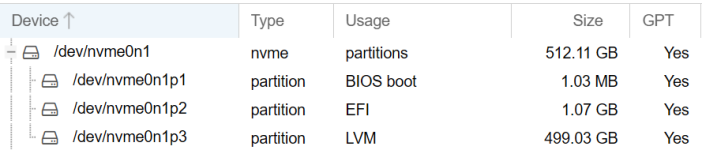
According to my screenshot /dev/nvme0n1p2 is an EFI partition.

When I mount this to /mnt/test I see that it contains an directory named "EFI".
This is the content:

Bash:
root@pve:~# ls -l /mnt/test/EFI/
total 8
drwxr-xr-x 2 root root 4096 Apr 10 12:37 BOOT
drwxr-xr-x 2 root root 4096 Apr 10 12:37 proxmox
root@pve:~# ls -l /mnt/test/EFI/BOOT/
total 5964
-rwxr-xr-x 1 root root  952384 Apr 10 12:37 BOOTx64.efi
-rwxr-xr-x 1 root root   88568 Apr 10 12:37 fbx64.efi
-rwxr-xr-x 1 root root 4209256 Apr 10 12:37 grubx64.efi
-rwxr-xr-x 1 root root  851368 Apr 10 12:37 mmx64.efi
root@pve:~# ls -l /mnt/test/EFI/proxmox/
total 5972
-rwxr-xr-x 1 root root     112 Apr 10 12:37 BOOTX64.CSV
-rwxr-xr-x 1 root root   88568 Apr 10 12:37 fbx64.efi
-rwxr-xr-x 1 root root     201 Apr 10 12:37 grub.cfg
-rwxr-xr-x 1 root root 4209256 Apr 10 12:37 grubx64.efi
-rwxr-xr-x 1 root root  851368 Apr 10 12:37 mmx64.efi
-rwxr-xr-x 1 root root  952384 Apr 10 12:37 shimx64.efi

Is this what we are looking for?
 
please post the contents of /etc/fstab ..
 
  • Like
Reactions: Privacy
Bash:
root@pve:~# cat /etc/fstab
# <file system> <mount point> <type> <options> <dump> <pass>
/dev/pve/root / ext4 errors=remount-ro 0 1
/dev/pve/swap none swap sw 0 0
proc /proc proc defaults 0 0
root@pve:~#