[TUTORIAL] NVIDIA drivers instalation Proxmox and CT

bialykostek

New Member
Oct 24, 2024
5
4
3
Hi! I post step by step tutorial how to install NVIDIA drivers on Promox server. I hope it will be usefull for someone:

1. Blacklist nouveau:
vi /etc/modprobe.d/blacklist-nouveau.conf

2. Paste, save and quit:
blacklist nouveau
options nouveau modeset=0

3. Update initramfs:
update-initramfs -u

4. Check if nouveau is enabled:
lsmod | grep nouveau

5. Disable nouveau and verify:
rmmod nouveau
lsmod | grep nouveau

6. Ensure GPU is visible:
lspci | grep NVIDIA

7. Download driver (check for most recent version compatible with nvidia-utils-xxx-server):
wget https://us.download.nvidia.com/XFree86/Linux-x86_64/550.90.07/NVIDIA-Linux-x86_64-550.90.07.run
chmod +x NVIDIA-Linux-x86_64-550.90.07.run

8.Install build packages:
apt install build-essential pve-headers-$(uname -r)

9. Run instalation:
./NVIDIA-Linux-x86_64-550.90.07.run

10. Check if instalation was successfull:
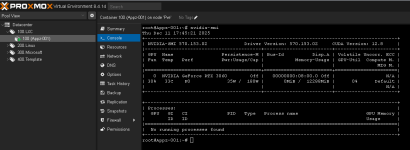
nvidia-smi

11. [optional] Turn on persistane mode if necessary (lowers IDLE power consumption):
https://docs.nvidia.com/deploy/driver-persistence/index.html
nvidia-smi --persistence-mode=1 #only for current session
nvidia-persistenced

12. After creating CT shut it down and edit lxc configuration file (location might be diffrent):
vi /etc/pve/nodes/pve/lxc/10001.conf

13. Paste, save and quit. If you have more than one GPU, change /dev/nvidia0 /dev/nvidia0 to /dev/nvidia<GPU ID> /dev/nvidia<GPU ID>:
lxc.cgroup2.devices.allow: c 195:* rwm
lxc.cgroup2.devices.allow: c 243:* rwm
lxc.mount.entry: /dev/dri/renderD128 dev/dri/renderD128 none bind,optional,create=file
lxc.mount.entry: /dev/nvidia0 dev/nvidia0 none bind,optional,create=file
lxc.mount.entry: /dev/nvidiactl dev/nvidiactl none bind,optional,create=file
lxc.mount.entry: /dev/nvidia-uvm dev/nvidia-uvm none bind,optional,create=file
lxc.mount.entry: /dev/nvidia-uvm-tools dev/nvidia-uvm-tools none bind,optional,create=file

14. Start your CT and install (on the CT):
apt install nvidia-utils-550-server

15. Verify installation (on the CT)
nvidia-smi
 
Thanks for the contribution. I've been trying to install the NVIDIA GPU in Proxmox for a while now, but without success. I'm stuck on step 9, which isn't working. I'm probably doing something wrong, but I'm stuck.
 
As mentioned in previous comment, due to lack of compability for all devices, currently I'm using 550.127.05 everywhere. It is tricky because there was a problem with libnvidia-compute dependancy, so I'm just using local files instead. I have gathered all necessary files here:

https://drive.google.com/drive/folders/1GaiN_2FC1HJCYGAdqiE3CeX5Vu41Qofi?usp=drive_link

To update instructions, in step 7 you don't need to download file, just use the one from the drive. Then instead of step 14 run:
Code:
dpkg -i libnvidia-compute-550-server_550.127.05-0ubuntu0.22.04.1_amd64.deb
dpkg -i nvidia-utils-550-server_550.127.05-0ubuntu0.22.04.1_amd64.deb

Everything should work just fine
 
Thanks for the contribution. I've been trying to install the NVIDIA GPU in Proxmox for a while now, but without success. I'm stuck on step 9, which isn't working. I'm probably doing something wrong, but I'm stuck.
Please tell me you GPU model and what error occurs, I'll try to help. You may also try drivers from my previous reply.
 
Step 1: Edit GRUB Execute: nano /etc/default/grub Change this line from GRUB_CMDLINE_LINUX_DEFAULT="quiet" to GRUB_CMDLINE_LINUX_DEFAULT="quiet intel_iommu=on iommu=pt pcie_acs_override=downstream,multifunction nofb nomodeset video=vesafb:off,efifb:off" Save file and exit the text editor
Step 2: Update GRUB Execute the command: update-grub
Step 3: Edit the module files Execute: nano /etc/modules Add these lines: vfio vfio_iommu_type1 vfio_pci vfio_virqfd Save file and exit the text editor
Step 4: IOMMU remapping a) Execute: nano /etc/modprobe.d/iommu_unsafe_interrupts.conf Add this line: options vfio_iommu_type1 allow_unsafe_interrupts=1 Save file and exit the text editor b) Execute: nano /etc/modprobe.d/kvm.conf Add this line: options kvm ignore_msrs=1 Save file and exit the text editor
Step 5: Blacklist the GPU drivers Execute: nano /etc/modprobe.d/blacklist.conf Add these lines: blacklist radeon blacklist nouveau blacklist nvidia blacklist nvidiafb Save file and exit the text editor
Step 6: Adding GPU to VFIO a) Execute: lspci -v Look for your GPU and take note of the first set of numbers b) Execute: lspci -n -s (PCI card address) This command gives you the GPU vendors number. c) Execute: nano /etc/modprobe.d/vfio.conf Add this line with your GPU number and Audio number: options vfio-pci ids=(GPU number,Audio number) disable_vga=1 Save file and exit the text editor
Step 7: Command to update everything and Restart a) Execute: update-initramfs -u b) Then restart the your Proxmox Node
 
Last edited:
i am also struggeling, I have a 5060TI, the driver installs (580.76.05 latest) but nvidia-smi shows no devices found..
 
i am also struggeling, I have a 5060TI, the driver installs (580.76.05 latest) but nvidia-smi shows no devices found..

I've got the same problem, but with a RTX 2000 Ada Generation.

Google suggests to use apt install nvidia-driver instead, but apt doesn't have a repository where it could pull nvidia-driver from.

Edit: My quess is that the nvidia-driver package hasn't been ported for trixie yet. (I'm running PVE 9.0.5 with an Enterprise subscription)
 
Last edited:
Ive got it working for containers. I want to use he card in multiple containers.


apt update && apt upgrade -y && apt install pve-headers-$(uname -r) build-essential software-properties-common make nvtop htop -y

wget https://in.download.nvidia.com/XFree86/Linux-x86_64/580.76.05/NVIDIA-Linux-x86_64-580.76.05.run

chmod +x NVIDIA-Linux-x86_64-580.76.05.run

./NVIDIA-Linux-x86_64-580.76.05.run --dkms

(run the opensource and not the nvidia proprietary)

nvidia-smi
check

Then in the container


wget https://in.download.nvidia.com/XFree86/Linux-x86_64/580.76.05/NVIDIA-Linux-x86_64-580.76.05.run

chmod +x NVIDIA-Linux-x86_64-580.76.05.run

./NVIDIA-Linux-x86_64-580.76.05.run --no-kernel-module

I sometimes have to reboot the lxc to load the drivers correctly ... i think that has to do with the sequence.... but working on that..
 
Last edited:
When I try to install the driver I get this error message - ERROR: Unable to load the kernel module 'nvidia.ko'.
This happens most frequently when this kernel module was built against the wrong or improperly configured kernel sources, with a version of gcc that differs from the one used to build the target kernel, or if another driver, such as nouveau, is present and prevents the NVIDIA kernel module from obtaining ownership of the NVIDIA device(s), or no NVIDIA device installed in this system is supported by this NVIDIA Linux graphics driver release.
The driver NVIDIA-Linux-x86_64-580.105.08.run is for a MSI Armor 2X GeForce GTX 970 4GB OC DirectX 12 VR Ready (GTX 970 4GD5T OC) graphics card.
I'm running kernel 6.8.12-17-pve on Proxmox 8.4.14 and nouveau is blacklisted. Any help would be appreciated.
 
Hello,

@jwelvaert: Can you test this method.


Proxmox

# Blacklist Driver:
clear;
cat > /etc/modprobe.d/blacklist-nouveau.conf << EOF
blacklist nouveau
options nouveau modeset=0
EOF
update-initramfs -u;

# Unload Driver
modprobe -r nouveau;
lsmod | grep nouveau;

# Dependencies for Nvidia
apt install -y build-essential;
apt install -y pciutils;
apt install -y pve-headers;

# Download Drivers
VERSION="570.153.02"
URL="https://fr.download.nvidia.com/XFree86/Linux-x86_64/$VERSION/NVIDIA-Linux-x86_64-$VERSION.run"
wget --quiet $URL -O /tmp/NVIDIA-Linux-x86_64.run;

# Clean Driver
bash /tmp/NVIDIA-Linux-x86_64.run --uninstall --silent;
apt purge -y *nvidia*;
apt autoremove -y;

# Install Driver nvidia
bash /tmp/NVIDIA-Linux-x86_64.run --no-x-check --dkms;
cat /var/log/nvidia-installer.log;

# Modules (Optional ?)
if ! grep nvidia /etc/modules 1>/dev/null; then
echo "nvidia-drm
nvidia-uvm" >> /etc/modules;
fi
update-initramfs -u;

# Check Work
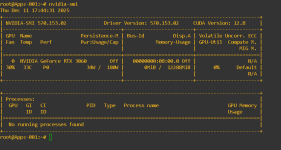
/usr/bin/nvidia-smi;

Host Information:
Group : 195, 234, 237
# Command: ls -al /dev/nvidia*
crw-rw-rw- 1 root root 195, 0 11 déc. 16:31 /dev/nvidia0
crw-rw-rw- 1 root root 195, 255 11 déc. 16:31 /dev/nvidiactl
crw-rw-rw- 1 root root 234, 0 11 déc. 16:32 /dev/nvidia-uvm
crw-rw-rw- 1 root root 234, 1 11 déc. 16:32 /dev/nvidia-uvm-tools

/dev/nvidia-caps:
cr-------- 1 root root 237, 1 11 déc. 16:32 nvidia-cap1
cr--r--r-- 1 root root 237, 2 11 déc. 16:32 nvidia-cap2

/etc/pve/lxc/100.conf
...
lxc.cgroup2.devices.allow: c 195:* rwm
lxc.cgroup2.devices.allow: c 234:* rwm
lxc.cgroup2.devices.allow: c 237:* rwm

lxc.mount.entry: /dev/nvidia0 dev/nvidia0 none bind,optional,create=file
lxc.mount.entry: /dev/nvidiactl dev/nvidiactl none bind,optional,create=file
lxc.mount.entry: /dev/nvidia-uvm dev/nvidia-uvm none bind,optional,create=file
lxc.mount.entry: /dev/nvidia-uvm-tools dev/nvidia-uvm-tools none bind,optional,create=file
lxc.mount.entry: /dev/nvidia-caps dev/nvidia-caps none bind,optional,create=dir
...

LXC: (Debian 12 / Kernel 6.8.12-17-pve)
# Repository
cat > /etc/apt/sources.list << EOF
deb http://deb.debian.org/debian bookworm main non-free non-free-firmware contrib
deb http://deb.debian.org/debian bookworm-updates main non-free non-free-firmware contrib
deb http://security.debian.org bookworm-security main non-free non-free-firmware contrib
EOF

# Dependencies (Error not problem)
apt install -y build-essential;
apt install -y pciutils;
apt install -y pve-headers;
apt install -y linux-headers-$(uname -r);

# Download Nvidia
VERSION="570.153.02"
URL="https://fr.download.nvidia.com/XFree86/Linux-x86_64/$VERSION/NVIDIA-Linux-x86_64-$VERSION.run"
wget --quiet $URL -O /tmp/NVIDIA-Linux-x86_64.run;

# Clean old Drivers:
bash /tmp/NVIDIA-Linux-x86_64.run --uninstall --silent;
apt purge -y *nvidia*;
apt autoremove -y;

# Install Driver Nvidia without Module Kernel (Important !!!!!)
bash /tmp/NVIDIA-Linux-x86_64.run --no-kernel-module;
cat /var/log/nvidia-installer.log;

# Check Drivers:
/usr/bin/nvidia-smi

1765475141482.png
 

Attachments

  • 1765475095646.png
    1765475095646.png
    14.7 KB · Views: 1
Last edited:
I followed your steps and when it tries to install the driver I get the same error. Here is the end of the log it tells me to look at:

-> Kernel module load error: No such device
-> Kernel messages:
NVRM: again.
[ 375.963450] NVRM: No NVIDIA devices probed.
[ 375.964161] nvidia-nvlink: Unregistered Nvlink Core, major device number 234
[ 1408.302130] nvidia-nvlink: Nvlink Core is being initialized, major device number 234
[ 1408.302137] NVRM: GPU 0000:01:00.0 is already bound to vfio-pci.
[ 1408.307454] NVRM: The NVIDIA probe routine was not called for 1 device(s).
[ 1408.307455] NVRM: This can occur when another driver was loaded and
NVRM: obtained ownership of the NVIDIA device(s).
[ 1408.307470] NVRM: Try unloading the conflicting kernel module (and/or
NVRM: reconfigure your kernel without the conflicting
NVRM: driver(s)), then try loading the NVIDIA kernel module
NVRM: again.
[ 1408.307471] NVRM: No NVIDIA devices probed.
[ 1408.308151] nvidia-nvlink: Unregistered Nvlink Core, major device number 234
[14675.186207] nvidia-nvlink: Nvlink Core is being initialized, major device number 234
[14675.186214] NVRM: GPU 0000:01:00.0 is already bound to vfio-pci.
[14675.187348] NVRM: The NVIDIA probe routine was not called for 1 device(s).
[14675.187350] NVRM: This can occur when another driver was loaded and
NVRM: obtained ownership of the NVIDIA device(s).
[14675.187350] NVRM: Try unloading the conflicting kernel module (and/or
NVRM: reconfigure your kernel without the conflicting
NVRM: driver(s)), then try loading the NVIDIA kernel module

I have this card available to my VM's so maybe it can't be used for VM's and containers at the same time?