

Hello!
I have a non-proxmox based server inthere it's running simple lxc, and container running on LVM logical partition. I can create this container type a simple following command:
lxc-create -n HOSTNAME -t ubuntu -B lvm --lvname HOSTNAME --vgname main --fstype ext4 --fssize SIZE
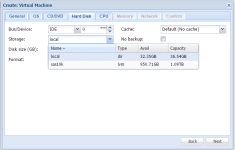
But, when I searched this function in proxmox, I wasn't found any solution (with KVM technology support it).
Anyone has any idea ?
Thank you!

I have a non-proxmox based server inthere it's running simple lxc, and container running on LVM logical partition. I can create this container type a simple following command:
lxc-create -n HOSTNAME -t ubuntu -B lvm --lvname HOSTNAME --vgname main --fstype ext4 --fssize SIZE
But, when I searched this function in proxmox, I wasn't found any solution (with KVM technology support it).
Anyone has any idea ?
Thank you!

