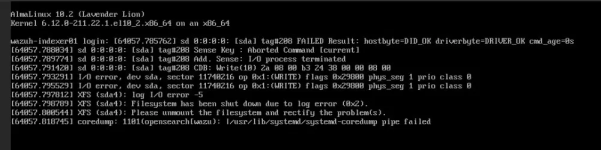
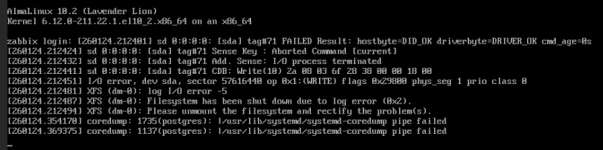
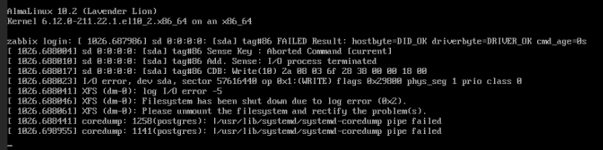
io_uring on kernel 7.0.6-2-pve (PVE 9.2.3): guest disk I/O errors (EIO) + filesystem XFS shutdown

hidigoudi

Member
Aug 27, 2023
37
2
13
After moving to the Linux 7.0 kernel (7.0.6-2-pve) that became the new default with PVE 9.2.x, I encounter I/O failures on some VMs on the host and it starts throwing hard I/O errors (EIO) on its virtual disk, which makes the guest filesystem abort and shut down. The host itself reports no disk, mdadm, dm-crypt/LUKS or LVM errors — SMART is clean and the underlying storage is healthy. The exact same VMs, on the exact same storage, run flawlessly on the previous kernel 6.17.13-2-pve.

Setting aio=threads on the affected disks does not solved the issue while staying on 7.0.6-2-pve. Toggling only the aio backend (io_uring ↔ threads), changing nothing else.

The same failure the same guest-side signature has since appeared on a second, completely unrelated host: different hardware, different storage backend, different guest workload, same PVE 9.2.3 / 7.0.6-2-pve. The only common denominator is the software stack (PVE 9.2.3 / kernel 7.0.6-2-pve, with the default io_uring backend).

This is a functional data-availability bug (guests lose their disks under normal load).

Here are screenshots of failed console of affected VMs :
1781680677501.png1781680696706.png

Does anyone can help me ?

Thank you.
 
Last edited:
could you post the full "pveversion -v", the VM config and the host and guest journals covering the period up to and including the I/O error?
 
Bash:
root@lab-hq1-pve01:~# cat /etc/pve/qemu-server/105.conf
acpi: 1
agent: enabled=1,fstrim_cloned_disks=0,type=virtio
balloon: 0
bios: seabios
boot: order=scsi0;net0
cicustom: user=local:snippets/wazuh-indexer01-ci-user.yml
cores: 4
cpu: x86-64-v3
ide2: local:105/vm-105-cloudinit.qcow2,media=cdrom
ipconfig0: gw=172.19.128.129,ip=172.19.128.135/26
keyboard: en-us
memory: 8192
meta: creation-qemu=11.0.0,ctime=1781256516
name: wazuh-indexer01
nameserver: 10.26.16.191 10.26.17.18
net0: virtio=BC:24:11:39:17:65,bridge=vmbr1,firewall=0,tag=200
numa: 0
onboot: 0
ostype: other
parent: OK
protection: 0
scsi0: encrypted_vmdisks:vm-105-disk-0,aio=threads,cache=none,iothread=1,size=100G
scsihw: virtio-scsi-single
smbios1: uuid=a88ea03a-d5d0-42a8-b138-9972c6f12ff0
sockets: 1
tablet: 1
tags: POC;SIEM
template: 0
vmgenid: df4b2d68-e6b3-43b5-ade6-4c6fed3fe507

[OK]
acpi: 1
agent: enabled=1,fstrim_cloned_disks=0,type=virtio
balloon: 0
bios: seabios
boot: order=scsi0;net0
cicustom: user=local:snippets/wazuh-indexer01-ci-user.yml
cores: 4
cpu: x86-64-v3
ide2: local:105/vm-105-cloudinit.qcow2,media=cdrom
ipconfig0: gw=172.19.128.129,ip=172.19.128.135/26
keyboard: en-us
memory: 8092
meta: creation-qemu=11.0.0,ctime=1781256516
name: wazuh-indexer01
nameserver: 10.26.16.191 10.26.17.18
net0: virtio=BC:24:11:39:17:65,bridge=vmbr1,firewall=0,tag=200
numa: 0
onboot: 0
ostype: other
protection: 0
running-nets-host-mtu: net0=1500
runningcpu: qemu64,+abm,+aes,+avx,+avx2,+bmi1,+bmi2,enforce,+f16c,+fma,+kvm_pv_eoi,+kvm_pv_unhalt,+movbe,+pni,+popcnt,+sse4.1,+sse4.2,+ssse3,+xsave
runningmachine: pc-i440fx-11.0+pve0
scsi0: encrypted_vmdisks:vm-105-disk-0,aio=io_uring,backup=1,cache=none,discard=ignore,iothread=1,replicate=1,size=100G,ssd=0
scsihw: virtio-scsi-single
smbios1: uuid=a88ea03a-d5d0-42a8-b138-9972c6f12ff0
snaptime: 1781256885
sockets: 1
tablet: 1
tags: POC;SIEM
template: 0
vmgenid: df4b2d68-e6b3-43b5-ade6-4c6fed3fe507
vmstate: encrypted_vmdisks:vm-105-state-OK
root@lab-hq1-pve01:~# pveversion -v
proxmox-ve: 9.2.0 (running kernel: 7.0.6-2-pve)
pve-manager: 9.2.3 (running version: 9.2.3/d0fde103346cf89a)
proxmox-kernel-helper: 9.2.0
proxmox-kernel-7.0: 7.0.6-2
proxmox-kernel-7.0.6-2-pve-signed: 7.0.6-2
proxmox-kernel-7.0.0-3-pve-signed: 7.0.0-3
proxmox-kernel-6.17: 6.17.13-13
proxmox-kernel-6.17.13-13-pve-signed: 6.17.13-13
ceph-fuse: 19.2.3-pve1
corosync: 3.1.10-pve2
criu: 4.1.1-1
frr-pythontools: 10.6.1-1+pve2
ifupdown: residual config
ifupdown2: 3.3.0-1+pmx12
intel-microcode: 3.20251111.1~deb13u1
libjs-extjs: 7.0.0-5
libproxmox-acme-perl: 1.7.1
libproxmox-backup-qemu0: 2.0.2
libproxmox-rs-perl: 0.4.1
libpve-access-control: 9.1.1
libpve-apiclient-perl: 3.4.2
libpve-cluster-api-perl: 9.1.6
libpve-cluster-perl: 9.1.6
libpve-common-perl: 9.1.13
libpve-guest-common-perl: 6.0.3
libpve-http-server-perl: 6.0.5
libpve-network-perl: 1.6.6
libpve-notify-perl: 9.1.6
libpve-rs-perl: 0.15.3
libpve-storage-perl: 9.1.5
libspice-server1: 0.15.2-1+b1
lvm2: 2.03.31-2+pmx1
lxc-pve: 7.0.0-2
lxcfs: 7.0.0-pve1
novnc-pve: 1.7.0-1
proxmox-backup-client: 4.2.1-1
proxmox-backup-file-restore: 4.2.1-1
proxmox-backup-restore-image: 1.0.0
proxmox-firewall: 1.2.3
proxmox-kernel-helper: 9.2.0
proxmox-mail-forward: 1.0.3
proxmox-mini-journalreader: 1.6
proxmox-offline-mirror-helper: 0.7.4
proxmox-widget-toolkit: 5.2.3
pve-cluster: 9.1.6
pve-container: 6.1.10
pve-docs: 9.2.2
pve-edk2-firmware: not correctly installed
pve-esxi-import-tools: 1.0.1
pve-firewall: 6.0.4
pve-firmware: 3.18-4
pve-ha-manager: 5.2.4
pve-i18n: 3.7.5
pve-qemu-kvm: 11.0.0-4
pve-xtermjs: 6.0.0-1
qemu-server: 9.1.16
smartmontools: 7.5-pve2
spiceterm: 3.4.2
swtpm: 0.8.0+pve3
vncterm: 1.9.2
zfsutils-linux: 2.4.2-pve1
root@lab-hq1-pve01:~#

On the guest, I don't have any logs as the disk was not available :

Bash:
Jun 17 08:28:50 wazuh-indexer01 systemd[1]: Started serial-getty@ttyS0.service - Serial Getty on ttyS0.
Jun 17 08:29:00 wazuh-indexer01 systemd[1]: serial-getty@ttyS0.service: Deactivated successfully.
Jun 17 08:29:00 wazuh-indexer01 systemd[1]: serial-getty@ttyS0.service: Scheduled restart job, restart counter is at 6244.
Jun 17 08:29:00 wazuh-indexer01 systemd[1]: Started serial-getty@ttyS0.service - Serial Getty on ttyS0.
Jun 17 08:34:17 wazuh-indexer01 kernel: Command line: BOOT_IMAGE=(hd0,gpt3)/vmlinuz-6.12.0-211.22.1.el10_2.x86_64 root=UUID=1f5fce98-2902-4ac3-b784-b4f10857f44e ro console=tty0 console=ttyS0,115200n8 no_timer_check biosdevname=0 net.ifnames=0
Jun 17 08:34:17 wazuh-indexer01 kernel: x86/CPU: Model not found in latest microcode list
Jun 17 08:34:17 wazuh-indexer01 kernel: BIOS-provided physical RAM map:
Jun 17 08:34:17 wazuh-indexer01 kernel: BIOS-e820: [mem 0x0000000000000000-0x000000000009fbff] usable
Jun 17 08:34:17 wazuh-indexer01 kernel: BIOS-e820: [mem 0x000000000009fc00-0x000000000009ffff] reserved
Jun 17 08:34:17 wazuh-indexer01 kernel: BIOS-e820: [mem 0x00000000000f0000-0x00000000000fffff] reserved
Jun 17 08:34:17 wazuh-indexer01 kernel: BIOS-e820: [mem 0x0000000000100000-0x00000000bffd9fff] usable

The only logs I have are in the 2 screenshots I provided in my first post.
 
Last edited:
Bash:
Jun 17 08:26:21 lab-hq1-pve01 pvedaemon[1526509]: <root@pam> successful auth for user 'prometheus@pve'
Jun 17 08:26:47 lab-hq1-pve01 pmxcfs[3003]: [status] notice: received log
Jun 17 08:27:21 lab-hq1-pve01 pvedaemon[1526509]: <root@pam> successful auth for user 'prometheus@pve'
Jun 17 08:27:47 lab-hq1-pve01 pmxcfs[3003]: [status] notice: received log
Jun 17 08:28:21 lab-hq1-pve01 pvedaemon[1526509]: <root@pam> successful auth for user 'prometheus@pve'
Jun 17 08:28:47 lab-hq1-pve01 pmxcfs[3003]: [status] notice: received log
Jun 17 08:29:21 lab-hq1-pve01 pvedaemon[1526509]: <root@pam> successful auth for user 'prometheus@pve'
Jun 17 08:29:30 lab-hq1-pve01 pveproxy[1550078]: Clearing outdated entries from certificate cache
Jun 17 08:29:47 lab-hq1-pve01 pmxcfs[3003]: [status] notice: received log
Jun 17 08:30:21 lab-hq1-pve01 pvedaemon[1523674]: <root@pam> successful auth for user 'prometheus@pve'
Jun 17 08:30:47 lab-hq1-pve01 pmxcfs[3003]: [status] notice: received log
Jun 17 08:31:21 lab-hq1-pve01 pvedaemon[1526509]: <root@pam> successful auth for user 'prometheus@pve'
Jun 17 08:31:31 lab-hq1-pve01 pvedaemon[1554489]: starting vnc proxy UPID:lab-hq1-pve01:0017B839:07B087EB:6A323F43:vncproxy:105:root@pam:
Jun 17 08:31:31 lab-hq1-pve01 pvedaemon[1534167]: <root@pam> starting task UPID:lab-hq1-pve01:0017B839:07B087EB:6A323F43:vncproxy:105:root@pam:
Jun 17 08:31:47 lab-hq1-pve01 pmxcfs[3003]: [status] notice: received log
Jun 17 08:32:21 lab-hq1-pve01 pvedaemon[1526509]: <root@pam> successful auth for user 'prometheus@pve'
Jun 17 08:32:36 lab-hq1-pve01 pvedaemon[1534167]: <root@pam> end task UPID:lab-hq1-pve01:0017B839:07B087EB:6A323F43:vncproxy:105:root@pam: OK
Jun 17 08:32:39 lab-hq1-pve01 pvedaemon[1523674]: <root@pam> successful auth for user 'root@pam'
Jun 17 08:32:45 lab-hq1-pve01 pvedaemon[1555069]: stop VM 105: UPID:lab-hq1-pve01:0017BA7D:07B0A501:6A323F8D:qmstop:105:root@pam:
Jun 17 08:32:45 lab-hq1-pve01 pvedaemon[1523674]: <root@pam> starting task UPID:lab-hq1-pve01:0017BA7D:07B0A501:6A323F8D:qmstop:105:root@pam:
Jun 17 08:32:45 lab-hq1-pve01 kernel: tap105i0: left allmulticast mode
Jun 17 08:32:45 lab-hq1-pve01 kernel: vmbr1: port 6(tap105i0) entered disabled state
Jun 17 08:32:45 lab-hq1-pve01 qmeventd[2695]: read: Connection reset by peer
Jun 17 08:32:45 lab-hq1-pve01 systemd[1]: 105.scope: Deactivated successfully.
Jun 17 08:32:45 lab-hq1-pve01 systemd[1]: 105.scope: Consumed 1h 24min 33.480s CPU time, 6.8G memory peak.
Jun 17 08:32:46 lab-hq1-pve01 pvedaemon[1523674]: <root@pam> end task UPID:lab-hq1-pve01:0017BA7D:07B0A501:6A323F8D:qmstop:105:root@pam: OK
Jun 17 08:32:46 lab-hq1-pve01 qmeventd[1555083]: Starting cleanup for 105
Jun 17 08:32:46 lab-hq1-pve01 qmeventd[1555083]: Finished cleanup for 105
Jun 17 08:32:47 lab-hq1-pve01 pmxcfs[3003]: [status] notice: received log
Jun 17 08:32:47 lab-hq1-pve01 pvedaemon[1523674]: <root@pam> starting task UPID:lab-hq1-pve01:0017BA8E:07B0A5EA:6A323F8F:qmshutdown:106:root@pam:
Jun 17 08:32:47 lab-hq1-pve01 pvedaemon[1555086]: shutdown VM 106: UPID:lab-hq1-pve01:0017BA8E:07B0A5EA:6A323F8F:qmshutdown:106:root@pam:
Jun 17 08:32:49 lab-hq1-pve01 kernel: tap106i0: left allmulticast mode
Jun 17 08:32:49 lab-hq1-pve01 kernel: vmbr1: port 7(tap106i0) entered disabled state
Jun 17 08:32:49 lab-hq1-pve01 qmeventd[2695]: read: Connection reset by peer
Jun 17 08:32:49 lab-hq1-pve01 pvedaemon[1523674]: <root@pam> end task UPID:lab-hq1-pve01:0017BA8E:07B0A5EA:6A323F8F:qmshutdown:106:root@pam: OK
Jun 17 08:32:49 lab-hq1-pve01 systemd[1]: 106.scope: Deactivated successfully.
Jun 17 08:32:49 lab-hq1-pve01 systemd[1]: 106.scope: Consumed 47min 32.719s CPU time, 1.2G memory peak.
Jun 17 08:32:50 lab-hq1-pve01 qmeventd[1555154]: Starting cleanup for 106
Jun 17 08:32:50 lab-hq1-pve01 qmeventd[1555154]: Finished cleanup for 106
Jun 17 08:32:50 lab-hq1-pve01 pvedaemon[1555211]: shutdown VM 109: UPID:lab-hq1-pve01:0017BB0B:07B0A6E9:6A323F92:qmshutdown:109:root@pam:
Jun 17 08:32:50 lab-hq1-pve01 pvedaemon[1534167]: <root@pam> starting task UPID:lab-hq1-pve01:0017BB0B:07B0A6E9:6A323F92:qmshutdown:109:root@pam:
Jun 17 08:32:52 lab-hq1-pve01 kernel: tap109i0: left allmulticast mode
Jun 17 08:32:52 lab-hq1-pve01 kernel: vmbr1: port 8(tap109i0) entered disabled state
Jun 17 08:32:52 lab-hq1-pve01 qmeventd[2695]: read: Connection reset by peer
Jun 17 08:32:52 lab-hq1-pve01 pvedaemon[1534167]: <root@pam> end task UPID:lab-hq1-pve01:0017BB0B:07B0A6E9:6A323F92:qmshutdown:109:root@pam: OK
Jun 17 08:32:52 lab-hq1-pve01 systemd[1]: 109.scope: Deactivated successfully.
Jun 17 08:32:52 lab-hq1-pve01 systemd[1]: 109.scope: Consumed 9h 30min 55.995s CPU time, 4.1G memory peak.
Jun 17 08:32:53 lab-hq1-pve01 qmeventd[1555280]: Starting cleanup for 109
Jun 17 08:32:53 lab-hq1-pve01 qmeventd[1555280]: Finished cleanup for 109
Jun 17 08:33:21 lab-hq1-pve01 pvedaemon[1523674]: <root@pam> successful auth for user 'prometheus@pve'
Jun 17 08:33:47 lab-hq1-pve01 pmxcfs[3003]: [status] notice: received log
Jun 17 08:34:01 lab-hq1-pve01 pvedaemon[1555800]: start VM 109: UPID:lab-hq1-pve01:0017BD58:07B0C2DC:6A323FD9:qmstart:109:root@pam:
Jun 17 08:34:01 lab-hq1-pve01 pvedaemon[1523674]: <root@pam> starting task UPID:lab-hq1-pve01:0017BD58:07B0C2DC:6A323FD9:qmstart:109:root@pam:
Jun 17 08:34:02 lab-hq1-pve01 systemd[1]: Started 109.scope.
Jun 17 08:34:03 lab-hq1-pve01 kernel: tap109i0: entered promiscuous mode
Jun 17 08:34:03 lab-hq1-pve01 kernel: vmbr1: port 6(tap109i0) entered blocking state
Jun 17 08:34:03 lab-hq1-pve01 kernel: vmbr1: port 6(tap109i0) entered disabled state
Jun 17 08:34:03 lab-hq1-pve01 kernel: tap109i0: entered allmulticast mode
Jun 17 08:34:03 lab-hq1-pve01 kernel: vmbr1: port 6(tap109i0) entered blocking state
Jun 17 08:34:03 lab-hq1-pve01 kernel: vmbr1: port 6(tap109i0) entered forwarding state
Jun 17 08:34:03 lab-hq1-pve01 pvedaemon[1555800]: VM 109 started with PID 1555823.
Jun 17 08:34:03 lab-hq1-pve01 pvedaemon[1523674]: <root@pam> end task UPID:lab-hq1-pve01:0017BD58:07B0C2DC:6A323FD9:qmstart:109:root@pam: OK
Jun 17 08:34:03 lab-hq1-pve01 pvedaemon[1523674]: <root@pam> starting task UPID:lab-hq1-pve01:0017BDA9:07B0C391:6A323FDB:qmstart:106:root@pam:
Jun 17 08:34:03 lab-hq1-pve01 pvedaemon[1555881]: start VM 106: UPID:lab-hq1-pve01:0017BDA9:07B0C391:6A323FDB:qmstart:106:root@pam:
Jun 17 08:34:04 lab-hq1-pve01 systemd[1]: Started 106.scope.
Jun 17 08:34:05 lab-hq1-pve01 kernel: tap106i0: entered promiscuous mode
Jun 17 08:34:05 lab-hq1-pve01 kernel: vmbr1: port 7(tap106i0) entered blocking state
Jun 17 08:34:05 lab-hq1-pve01 kernel: vmbr1: port 7(tap106i0) entered disabled state
Jun 17 08:34:05 lab-hq1-pve01 kernel: tap106i0: entered allmulticast mode
Jun 17 08:34:05 lab-hq1-pve01 kernel: vmbr1: port 7(tap106i0) entered blocking state
Jun 17 08:34:05 lab-hq1-pve01 kernel: vmbr1: port 7(tap106i0) entered forwarding state
Jun 17 08:34:05 lab-hq1-pve01 pvedaemon[1555881]: VM 106 started with PID 1555904.
Jun 17 08:34:05 lab-hq1-pve01 pvedaemon[1523674]: <root@pam> end task UPID:lab-hq1-pve01:0017BDA9:07B0C391:6A323FDB:qmstart:106:root@pam: OK
Jun 17 08:34:05 lab-hq1-pve01 pvedaemon[1523674]: <root@pam> starting task UPID:lab-hq1-pve01:0017BDE3:07B0C45A:6A323FDD:qmstart:105:root@pam:
Jun 17 08:34:05 lab-hq1-pve01 pvedaemon[1555939]: start VM 105: UPID:lab-hq1-pve01:0017BDE3:07B0C45A:6A323FDD:qmstart:105:root@pam:
Jun 17 08:34:06 lab-hq1-pve01 systemd[1]: Started 105.scope.
Jun 17 08:34:07 lab-hq1-pve01 kernel: tap105i0: entered promiscuous mode
Jun 17 08:34:07 lab-hq1-pve01 kernel: vmbr1: port 8(tap105i0) entered blocking state
Jun 17 08:34:07 lab-hq1-pve01 kernel: vmbr1: port 8(tap105i0) entered disabled state
Jun 17 08:34:07 lab-hq1-pve01 kernel: tap105i0: entered allmulticast mode
Jun 17 08:34:07 lab-hq1-pve01 kernel: vmbr1: port 8(tap105i0) entered blocking state
Jun 17 08:34:07 lab-hq1-pve01 kernel: vmbr1: port 8(tap105i0) entered forwarding state
Jun 17 08:34:07 lab-hq1-pve01 pvedaemon[1555939]: VM 105 started with PID 1555964.
Jun 17 08:34:07 lab-hq1-pve01 pvedaemon[1523674]: <root@pam> end task UPID:lab-hq1-pve01:0017BDE3:07B0C45A:6A323FDD:qmstart:105:root@pam: OK
Jun 17 08:34:21 lab-hq1-pve01 pvedaemon[1523674]: <root@pam> successful auth for user 'prometheus@pve'
Jun 17 08:34:47 lab-hq1-pve01 pmxcfs[3003]: [status] notice: received log
Jun 17 08:35:21 lab-hq1-pve01 pvedaemon[1534167]: <root@pam> successful auth for user 'prometheus@pve'
Jun 17 08:35:47 lab-hq1-pve01 pmxcfs[3003]: [status] notice: received log
Jun 17 08:36:19 lab-hq1-pve01 pveproxy[1520324]: worker exit
Jun 17 08:36:19 lab-hq1-pve01 pveproxy[3223]: worker 1520324 finished
Jun 17 08:36:19 lab-hq1-pve01 pveproxy[3223]: starting 1 worker(s)
Jun 17 08:36:19 lab-hq1-pve01 pveproxy[3223]: worker 1557158 started

Nothing specific
 
Last edited:
I would like to add that this happens randomly and rarely; not all VMs are impacted on the same node with the same storage. So it is maybe related to a I/O pressure.
 
Here is the storage architecture :
Bash:
root@lab-hq1-pve01:~# lsblk
NAME                                  MAJ:MIN RM   SIZE RO TYPE  MOUNTPOINTS
sda                                     8:0    0  29.5T  0 disk
└─sdb_crypt                           252:3    0  29.5T  0 crypt
  ├─VG_VMDISKS-LV_DISKS_tmeta         252:4    0   120M  0 lvm
  │ └─VG_VMDISKS-LV_DISKS-tpool       252:6    0  29.5T  0 lvm
  │   ├─VG_VMDISKS-LV_DISKS           252:7    0  29.5T  1 lvm
  │   ├─VG_VMDISKS-vm--100--disk--0   252:8    0    30G  0 lvm
  │   ├─VG_VMDISKS-vm--101--disk--0   252:9    0    30G  0 lvm
  │   ├─VG_VMDISKS-vm--102--disk--0   252:10   0    30G  0 lvm
  │   ├─VG_VMDISKS-vm--110--cloudinit 252:11   0     4M  0 lvm
  │   ├─VG_VMDISKS-vm--110--disk--0   252:12   0    32G  0 lvm
  │   ├─VG_VMDISKS-vm--110--disk--1   252:13   0   4.9T  0 lvm
  │   ├─VG_VMDISKS-vm--105--disk--0   252:14   0   100G  0 lvm
  │   ├─VG_VMDISKS-vm--106--disk--0   252:15   0    50G  0 lvm
  │   ├─VG_VMDISKS-vm--109--disk--0   252:16   0   100G  0 lvm
  │   └─VG_VMDISKS-vm--105--state--OK 252:17   0  16.3G  0 lvm
  └─VG_VMDISKS-LV_DISKS_tdata         252:5    0  29.5T  0 lvm
    └─VG_VMDISKS-LV_DISKS-tpool       252:6    0  29.5T  0 lvm
      ├─VG_VMDISKS-LV_DISKS           252:7    0  29.5T  1 lvm
      ├─VG_VMDISKS-vm--100--disk--0   252:8    0    30G  0 lvm
      ├─VG_VMDISKS-vm--101--disk--0   252:9    0    30G  0 lvm
      ├─VG_VMDISKS-vm--102--disk--0   252:10   0    30G  0 lvm
      ├─VG_VMDISKS-vm--110--cloudinit 252:11   0     4M  0 lvm
      ├─VG_VMDISKS-vm--110--disk--0   252:12   0    32G  0 lvm
      ├─VG_VMDISKS-vm--110--disk--1   252:13   0   4.9T  0 lvm
      ├─VG_VMDISKS-vm--105--disk--0   252:14   0   100G  0 lvm
      ├─VG_VMDISKS-vm--106--disk--0   252:15   0    50G  0 lvm
      ├─VG_VMDISKS-vm--109--disk--0   252:16   0   100G  0 lvm
      └─VG_VMDISKS-vm--105--state--OK 252:17   0  16.3G  0 lvm
sdb                                     8:16   0 557.8G  0 disk
├─sdb1                                  8:17   0   476M  0 part  /boot/efi
├─sdb2                                  8:18   0   2.8G  0 part  /boot
└─sdb3                                  8:19   0 554.5G  0 part
  └─sda3_crypt                        252:0    0 554.5G  0 crypt
    ├─VG_SYSTEM-LV_SWAP               252:1    0  14.9G  0 lvm   [SWAP]
    └─VG_SYSTEM-LV_ROOT               252:2    0 539.6G  0 lvm   /
sdc                                     8:32   0   7.4G  0 disk
root@lab-hq1-pve01:~#
 
It just happens few seconds ago on my second physical server :
Bash:
Jun 17 11:08:12 vd-hel1-dc5-pve01 dhclient[6293]: DHCPREQUEST for 192.168.100.13 on eth0 to 192.168.100.2 port 67
Jun 17 11:08:12 vd-hel1-dc5-pve01 dhclient[6293]: DHCPACK of 192.168.100.13 from 192.168.100.2
Jun 17 11:08:12 vd-hel1-dc5-pve01 dhclient[6293]: bound to 192.168.100.13 -- renewal in 3137 seconds.
Jun 17 11:17:01 vd-hel1-dc5-pve01 CRON[532465]: pam_unix(cron:session): session opened for user root(uid=0) by root(uid=0)
Jun 17 11:17:01 vd-hel1-dc5-pve01 CRON[532467]: (root) CMD (cd / && run-parts --report /etc/cron.hourly)
Jun 17 11:17:01 vd-hel1-dc5-pve01 CRON[532465]: pam_unix(cron:session): session closed for user root
Jun 17 11:39:47 vd-hel1-dc5-pve01 pmxcfs[2529]: [dcdb] notice: data verification successful
Jun 17 11:42:57 vd-hel1-dc5-pve01 kernel: pcieport 0000:00:01.3: AER: Correctable error message received from 0000:02:00.0
Jun 17 11:42:57 vd-hel1-dc5-pve01 kernel: nvme 0000:02:00.0: PCIe Bus Error: severity=Correctable, type=Physical Layer, (Receiver ID)
Jun 17 11:42:57 vd-hel1-dc5-pve01 kernel: nvme 0000:02:00.0:   device [144d:a80a] error status/mask=00000001/0000e000
Jun 17 11:42:57 vd-hel1-dc5-pve01 kernel: nvme 0000:02:00.0:    [ 0] RxErr                  (First)
Jun 17 11:58:12 vd-hel1-dc5-pve01 kernel: pcieport 0000:00:01.3: AER: Correctable error message received from 0000:02:00.0
Jun 17 11:58:12 vd-hel1-dc5-pve01 kernel: nvme 0000:02:00.0: PCIe Bus Error: severity=Correctable, type=Physical Layer, (Receiver ID)
Jun 17 11:58:12 vd-hel1-dc5-pve01 kernel: nvme 0000:02:00.0:   device [144d:a80a] error status/mask=00000001/0000e000
Jun 17 11:58:12 vd-hel1-dc5-pve01 kernel: nvme 0000:02:00.0:    [ 0] RxErr                  (First)
Jun 17 12:00:29 vd-hel1-dc5-pve01 dhclient[6293]: DHCPREQUEST for 192.168.100.13 on eth0 to 192.168.100.2 port 67
Jun 17 12:00:29 vd-hel1-dc5-pve01 dhclient[6293]: DHCPACK of 192.168.100.13 from 192.168.100.2
Jun 17 12:00:29 vd-hel1-dc5-pve01 dhclient[6293]: bound to 192.168.100.13 -- renewal in 3289 seconds.
Jun 17 12:02:35 vd-hel1-dc5-pve01 pvedaemon[3046968]: <root@pam> successful auth for user 'root@pam'
Jun 17 12:02:37 vd-hel1-dc5-pve01 pvedaemon[3044024]: <root@pam> successful auth for user 'root@pam'
Jun 17 12:02:47 vd-hel1-dc5-pve01 pvedaemon[556039]: starting vnc proxy UPID:vd-hel1-dc5-pve01:00087C07:063B251B:6A3270C7:vncproxy:102:root@pam:
Jun 17 12:02:47 vd-hel1-dc5-pve01 pvedaemon[3054669]: <root@pam> starting task UPID:vd-hel1-dc5-pve01:00087C07:063B251B:6A3270C7:vncproxy:102:root@pam:
Jun 17 12:02:47 vd-hel1-dc5-pve01 pvedaemon[3054669]: <root@pam> end task UPID:vd-hel1-dc5-pve01:00087C07:063B251B:6A3270C7:vncproxy:102:root@pam: OK
Jun 17 12:03:19 vd-hel1-dc5-pve01 pvedaemon[556333]: starting vnc proxy UPID:vd-hel1-dc5-pve01:00087D2D:063B31DD:6A3270E7:vncproxy:102:root@pam:
Jun 17 12:03:19 vd-hel1-dc5-pve01 pvedaemon[3054669]: <root@pam> starting task UPID:vd-hel1-dc5-pve01:00087D2D:063B31DD:6A3270E7:vncproxy:102:root@pam:
Jun 17 12:03:20 vd-hel1-dc5-pve01 pvedaemon[3054669]: <root@pam> end task UPID:vd-hel1-dc5-pve01:00087D2D:063B31DD:6A3270E7:vncproxy:102:root@pam: OK
Jun 17 12:03:24 vd-hel1-dc5-pve01 pvedaemon[556339]: starting vnc proxy UPID:vd-hel1-dc5-pve01:00087D33:063B33AF:6A3270EC:vncproxy:102:root@pam:
Jun 17 12:03:24 vd-hel1-dc5-pve01 pvedaemon[3046968]: <root@pam> starting task UPID:vd-hel1-dc5-pve01:00087D33:063B33AF:6A3270EC:vncproxy:102:root@pam:
Jun 17 12:03:25 vd-hel1-dc5-pve01 pvedaemon[3046968]: <root@pam> end task UPID:vd-hel1-dc5-pve01:00087D33:063B33AF:6A3270EC:vncproxy:102:root@pam: OK
Jun 17 12:04:15 vd-hel1-dc5-pve01 pvedaemon[556840]: stop VM 102: UPID:vd-hel1-dc5-pve01:00087F28:063B4781:6A32711F:qmstop:102:root@pam:
Jun 17 12:04:15 vd-hel1-dc5-pve01 pvedaemon[3044024]: <root@pam> starting task UPID:vd-hel1-dc5-pve01:00087F28:063B4781:6A32711F:qmstop:102:root@pam:
Jun 17 12:04:15 vd-hel1-dc5-pve01 kernel: tap102i0: left allmulticast mode
Jun 17 12:04:15 vd-hel1-dc5-pve01 kernel: vmbr0: port 3(tap102i0) entered disabled state
Jun 17 12:04:15 vd-hel1-dc5-pve01 qmeventd[2311]: read: Connection reset by peer
Jun 17 12:04:15 vd-hel1-dc5-pve01 systemd[1]: 102.scope: Deactivated successfully.
Jun 17 12:04:15 vd-hel1-dc5-pve01 systemd[1]: 102.scope: Consumed 11min 57.173s CPU time, 8G memory peak.
Jun 17 12:04:15 vd-hel1-dc5-pve01 qmeventd[556861]: Starting cleanup for 102
Jun 17 12:04:15 vd-hel1-dc5-pve01 qmeventd[556861]: trying to acquire lock...
Jun 17 12:04:16 vd-hel1-dc5-pve01 qmeventd[556861]:  OK
Jun 17 12:04:16 vd-hel1-dc5-pve01 qmeventd[556861]: Finished cleanup for 102
Jun 17 12:04:16 vd-hel1-dc5-pve01 pvedaemon[3044024]: <root@pam> end task UPID:vd-hel1-dc5-pve01:00087F28:063B4781:6A32711F:qmstop:102:root@pam: OK
Jun 17 12:04:30 vd-hel1-dc5-pve01 pvedaemon[556945]: start VM 102: UPID:vd-hel1-dc5-pve01:00087F91:063B4D6C:6A32712E:qmstart:102:root@pam:
Jun 17 12:04:30 vd-hel1-dc5-pve01 pvedaemon[3046968]: <root@pam> starting task UPID:vd-hel1-dc5-pve01:00087F91:063B4D6C:6A32712E:qmstart:102:root@pam:
Jun 17 12:04:30 vd-hel1-dc5-pve01 systemd[1]: Started 102.scope.
Jun 17 12:04:30 vd-hel1-dc5-pve01 kernel: tap102i0: entered promiscuous mode
Jun 17 12:04:30 vd-hel1-dc5-pve01 kernel: vmbr0: port 3(tap102i0) entered blocking state
Jun 17 12:04:30 vd-hel1-dc5-pve01 kernel: vmbr0: port 3(tap102i0) entered disabled state
Jun 17 12:04:30 vd-hel1-dc5-pve01 kernel: tap102i0: entered allmulticast mode
Jun 17 12:04:30 vd-hel1-dc5-pve01 kernel: vmbr0: port 3(tap102i0) entered blocking state
Jun 17 12:04:30 vd-hel1-dc5-pve01 kernel: vmbr0: port 3(tap102i0) entered forwarding state
Jun 17 12:04:30 vd-hel1-dc5-pve01 pvedaemon[556945]: VM 102 started with PID 556958.
Jun 17 12:04:30 vd-hel1-dc5-pve01 pvedaemon[3046968]: <root@pam> end task UPID:vd-hel1-dc5-pve01:00087F91:063B4D6C:6A32712E:qmstart:102:root@pam: OK
Jun 17 12:04:39 vd-hel1-dc5-pve01 kernel: kvm: kvm [556958]: vcpu0, guest rIP: 0xffffffff8ae75145 Unhandled WRMSR(0xc0010007) = 0xffff
Jun 17 12:04:57 vd-hel1-dc5-pve01 sshd-session[557272]: Accepted publickey for root from 192.168.100.11 port 51076 ssh2: ED25519 SHA256:nn6tlXFTZNn9GuNkNkHfAgPURL9BkdNumVlVco5cdF0
Jun 17 12:04:57 vd-hel1-dc5-pve01 sshd-session[557272]: pam_unix(sshd:session): session opened for user root(uid=0) by root(uid=0)
Jun 17 12:04:57 vd-hel1-dc5-pve01 systemd[1]: Created slice user-0.slice - User Slice of UID 0.
Jun 17 12:04:57 vd-hel1-dc5-pve01 systemd[1]: Starting user-runtime-dir@0.service - User Runtime Directory /run/user/0...
 
This is the impacted guest logs when it happens :
Bash:
Jun 17 11:33:12 montblanc systemd[1]: dnf-makecache.service: Deactivated successfully.
Jun 17 11:33:12 montblanc systemd[1]: Finished dnf-makecache.service - dnf makecache.
Jun 17 11:33:12 montblanc systemd[1]: dnf-makecache.service: Consumed 334ms CPU time, 131.1M memory peak.
Jun 17 11:45:59 montblanc NetworkManager[837]: <info>  [1781685959.8041] dhcp4 (ens18): state changed new lease, address=192.168.110.152
Jun 17 11:45:59 montblanc systemd[1]: Starting NetworkManager-dispatcher.service - Network Manager Script Dispatcher Service...
Jun 17 11:45:59 montblanc systemd[1]: Started NetworkManager-dispatcher.service - Network Manager Script Dispatcher Service.
Jun 17 11:46:09 montblanc systemd[1]: NetworkManager-dispatcher.service: Deactivated successfully.
Jun 17 12:13:30 montblanc kernel: sd 1:0:0:1: [sdb] tag#213 FAILED Result: hostbyte=DID_OK driverbyte=DRIVER_OK cmd_age=0s
Jun 17 12:13:30 montblanc kernel: sd 1:0:0:1: [sdb] tag#213 Sense Key : Aborted Command [current]
Jun 17 12:13:30 montblanc kernel: sd 1:0:0:1: [sdb] tag#213 Add. Sense: I/O process terminated
Jun 17 12:13:30 montblanc kernel: sd 1:0:0:1: [sdb] tag#213 CDB: Write(10) 2a 08 03 20 00 38 00 00 10 00
Jun 17 12:13:30 montblanc kernel: I/O error, dev sdb, sector 52428856 op 0x1:(WRITE) flags 0x29800 phys_seg 1 prio class 0
Jun 17 12:13:30 montblanc kernel: XFS (sdb): log I/O error -5
Jun 17 12:13:30 montblanc kernel: XFS (sdb): Filesystem has been shut down due to log error (0x2).
Jun 17 12:13:30 montblanc kernel: XFS (sdb): Please unmount the filesystem and rectify the problem(s).
Jun 17 12:45:59 montblanc NetworkManager[837]: <info>  [1781689559.8042] dhcp4 (ens18): state changed new lease, address=192.168.110.152
Jun 17 12:45:59 montblanc systemd[1]: Starting NetworkManager-dispatcher.service - Network Manager Script Dispatcher Service...
Jun 17 12:45:59 montblanc systemd[1]: Started NetworkManager-dispatcher.service - Network Manager Script Dispatcher Service.
Jun 17 12:46:09 montblanc systemd[1]: NetworkManager-dispatcher.service: Deactivated successfully.
Jun 17 13:02:44 montblanc qemu-ga[842]: info: guest-ping called
Jun 17 13:02:52 montblanc qemu-ga[842]: info: guest-ping called
Jun 17 13:03:03 montblanc qemu-ga[842]: info: guest-ping called
Jun 17 13:03:14 montblanc qemu-ga[842]: info: guest-ping called
Jun 17 13:03:21 montblanc qemu-ga[842]: info: guest-ping called
Jun 17 13:03:48 montblanc qemu-ga[842]: info: guest-ping called
Jun 17 13:03:59 montblanc qemu-ga[842]: info: guest-ping called
Jun 17 13:03:03 montblanc qemu-ga[842]: info: guest-ping called
Jun 17 13:03:14 montblanc qemu-ga[842]: info: guest-ping called
Jun 17 13:03:21 montblanc qemu-ga[842]: info: guest-ping called
Jun 17 13:03:48 montblanc qemu-ga[842]: info: guest-ping called
Jun 17 13:03:59 montblanc qemu-ga[842]: info: guest-ping called
 
the timestamps there don't line up, can you please post logs that match the same events, otherwise it is impossible to analyze them..


are all the affected hosts using LVM on top of LUKS?
 
are all the affected hosts using LVM on top of LUKS? Yes both of them

the timestamps there don't line up, can you please post logs that match the same events, otherwise it is impossible to analyze them..

I know, I noticed when I search in logs, I can't explain why there is a delta between host and guest but this is the same period of time. I also found this on one of both physical server :
Bash:
Jun 17 11:42:57 vd-hel1-dc5-pve01 kernel: pcieport 0000:00:01.3: AER: Correctable error message received from 0000:02:00.0
Jun 17 11:42:57 vd-hel1-dc5-pve01 kernel: nvme 0000:02:00.0: PCIe Bus Error: severity=Correctable, type=Physical Layer, (Receiver ID)
Jun 17 11:42:57 vd-hel1-dc5-pve01 kernel: nvme 0000:02:00.0:   device [144d:a80a] error status/mask=00000001/0000e000
Jun 17 11:42:57 vd-hel1-dc5-pve01 kernel: nvme 0000:02:00.0:    [ 0] RxErr                  (First)
Jun 17 11:58:12 vd-hel1-dc5-pve01 kernel: pcieport 0000:00:01.3: AER: Correctable error message received from 0000:02:00.0
Jun 17 11:58:12 vd-hel1-dc5-pve01 kernel: nvme 0000:02:00.0: PCIe Bus Error: severity=Correctable, type=Physical Layer, (Receiver ID)
Jun 17 11:58:12 vd-hel1-dc5-pve01 kernel: nvme 0000:02:00.0:   device [144d:a80a] error status/mask=00000001/0000e000
Jun 17 11:58:12 vd-hel1-dc5-pve01 kernel: nvme 0000:02:00.0:    [ 0] RxErr                  (First)

But it can't really explain the issue as the other affected host does not have those errors.
 
Last edited:
one more question - are all the VMs using the same distro inside? if so, could you give an exact version for that (in particular the guest kernel version would be interesting)?
 
one more question - are all the VMs using the same distro inside? if so, could you give an exact version for that (in particular the guest kernel version would be interesting)?

All the VM are using the same distro yes, it's Alma Linux 10.X. However, the affected VM are more up to date :
  • Kernel 6.12.0-211.22.1.el10_2.x86_64
  • AlmaLinux AlmaLinux 10.2 (Lavender Lion)
One VM that is not affected (since the proxmox upgrade) :
  • Kernel 6.12.0-124.52.1.el10_1.x86_64
  • AlmaLinux AlmaLinux 10.1 (Heliotrope Lion)

All the VM are using XFS as filesystem also (default with AlmaLinux).
 
Last edited:
can you try booting the 6.12.0-124.52.1.el10_1.x86_64 kernel in the affected VMs?
 
I just find a way to reproduce the issue on the guest :
Bash:
 root@zabbix :~$ fio --name=stress-write --ioengine=libaio --iodepth=64 --rw=randwrite \
    --bs=4k --direct=1 --size=20G --numjobs=8 --runtime=600 \
    --time_based --ramp_time=30 --group_reporting \
    --filename=/tmp/fio-test --output-format=normal,json \
    --output=fio-result.json
Jobs: 8 (f=0): [/(8)][-.-%][eta 10m:15s]
Jobs: 8 (f=0): [/(8)][-.-%][eta 10m:14s]
fio: io_u error on file /tmp/fio-test: Input/output error: write offset=20592291840, buflen=4096
fio: io_u error on file /tmp/fio-test: Input/output error: write offset=9765498880, buflen=4096
fio: io_u error on file /tmp/fio-test: Input/output error: write offset=11389923328, buflen=4096
fio: io_u error on file /tmp/fio-test: Input/output error: write offset=10865082368, buflen=4096
fio: io_u error on file /tmp/fio-test: Input/output error: write offset=4592693248, buflen=4096
fio: io_u error on file /tmp/fio-test: Input/output error: write offset=17240551424, buflen=4096
fio: io_u error on file /tmp/fio-test: Input/output error: write offset=10608463872, buflen=4096
fio: io_u error on file /tmp/fio-test: Input/output error: write offset=18193764352, buflen=4096
fio: io_u error on file /tmp/fio-test: Input/output error: write offset=10405310464, buflen=4096
fio: io_u error on file /tmp/fio-test: Input/output error: write offset=18420568064, buflen=4096
fio: io_u error on file /tmp/fio-test: Input/output error: write offset=20068622336, buflen=4096
fio: io_u error on file /tmp/fio-test: Input/output error: write offset=14732562432, buflen=4096
fio: io_u error on file /tmp/fio-test: Input/output error: write offset=19714949120, buflen=4096
fio: io_u error on file /tmp/fio-test: Input/output error: write offset=11894398976, buflen=4096
fio: io_u error on file /tmp/fio-test: Input/output error: write offset=13342396416, buflen=4096
fio: io_u error on file /tmp/fio-test: Input/output error: write offset=18269777920, buflen=4096
fio: io_u error on file /tmp/fio-test: Input/output error: write offset=21153767424, buflen=4096
fio: io_u error on file /tmp/fio-test: Input/output error: write offset=8210624512, buflen=4096
fio: io_u error on file /tmp/fio-test: Input/output error: write offset=5009162240, buflen=4096

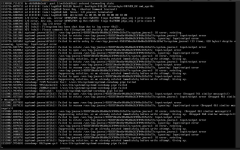
I got immediately :
1781719896528.png
Then I need to hard-stop the guest from the Proxmox web UI (stop + start) before I can reconnect again.
 
Last edited: