How can I make Proxmox allocate the full configured VM memory at startup, similar to VMware?

McShadow

New Member
Sep 24, 2025
16
2
3
Hi,

I am trying to understand how memory allocation works in Proxmox VE compared to VMware.

My environment contains both Linux and Windows VMs. For all VMs, the following memory options are enabled:
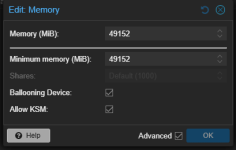
  • Ballooning Device
  • Allow KSM

1784193582649.png

For each VM, Memory and Minimum Memory are configured with the same value. Therefore, there should be no dynamic ballooning range.

Based on this configuration, I would expect each VM to use or reserve a constant amount of host memory while it is running. Is this assumption correct?
1784193593619.png

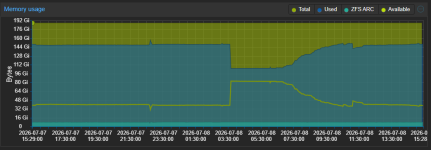
However, I observe different behavior after rebooting the VMs:
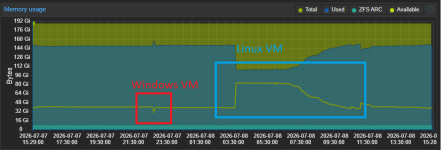
  • After rebooting the Windows VMs, the amount of free host memory decreases by ~10GB (happened once a week until now).
  • Immediately after rebooting the Linux VM, the amount of free host memory increases by ~the amount of configured RAM.
  • The Linux VM then gradually consumes more host memory again as applications inside the guest require additional RAM.

This looks as though Proxmox/QEMU allocates host memory on demand when guest memory pages are actually touched (in Linux environments), rather than immediately allocating the VM’s complete configured memory.

With VMware, I am used to seeing the configured VM memory appear as allocated on the host as soon as the VM is started.

My main questions are:
  • Is this expected behavior in Proxmox VE when Memory and Minimum Memory are identical?
  • Is there a supported way to make Proxmox/QEMU allocate or preallocate the VM’s complete configured RAM when the VM starts, similar to the behavior I am used to from VMware?

Thanks and best wishes,
McShadow
 
This is the first time I heard something like this. Usually VMs consume as much memory as you configure on the host. . Even KSM (which saves some memory by deduplicating identical contents from different vms (e.g. due to the same os) can save some RAM it shouldn't have such a big impact. In fact most of the time people come here, because they complain that the VMs internal monitoring shows less memory usage than the host since on the host the vm memory is reserved completly while inside the vm parts are not used. I even wrote a piece ( https://forum.proxmox.com/threads/f...ram-usage-of-the-vms-in-the-dashboard.165943/ ) to have a reference if said question is asked one more time ;)
And the enabled Baloon is necessary to "look" inside the VM and the memory usage from it's perspective but normally VMs are launched with the normal memory, balooning starts only if the host memory usage reaches 80% and the minimum memory is less than the default. Even then it usually takes some time and has some caveats (since memory gets swapped from the vm applications might crash with outofmemory errors). But in your case I don't see any reason for this since the values are identical.

So I wonder how the behaviour you monitored can be explained. The temporary changes during reboot wouldn't bother me to much though because basically the vm is stopped and started again so I would expect that this will reflect in RAM usage. What I don't get is the difference between Linux and Windows but this might be explained by possible differences (just a guess on my part, I didn't read the source code) between the Baloon drivers in Linux and Windows.

Did you already try to disable both options independently and together from each other and if yes, did you see any difference? As said I don't think that they have something to do with it but that's more a guess, now knowing.
 
  • Like
Reactions: uzumo
yes, this is normal - for Linux VMs, the memory is only allocated on the host when the guest demands it (though without KSM and active ballooning, it is not freed again afterwards if no longer used). Windows will map all the memory during boot, which causes it to be allocated on the host side.
 
  • Like
Reactions: Johannes S
This is the first time I heard something like this. Usually VMs consume as much memory as you configure on the host. . Even KSM (which saves some memory by deduplicating identical contents from different vms (e.g. due to the same os) can save some RAM it shouldn't have such a big impact. In fact most of the time people come here, because they complain that the VMs internal monitoring shows less memory usage than the host since on the host the vm memory is reserved completly while inside the vm parts are not used. I even wrote a piece ( https://forum.proxmox.com/threads/f...ram-usage-of-the-vms-in-the-dashboard.165943/ ) to have a reference if said question is asked one more time ;)
And the enabled Baloon is necessary to "look" inside the VM and the memory usage from it's perspective but normally VMs are launched with the normal memory, balooning starts only if the host memory usage reaches 80% and the minimum memory is less than the default. Even then it usually takes some time and has some caveats (since memory gets swapped from the vm applications might crash with outofmemory errors). But in your case I don't see any reason for this since the values are identical.

So I wonder how the behaviour you monitored can be explained. The temporary changes during reboot wouldn't bother me to much though because basically the vm is stopped and started again so I would expect that this will reflect in RAM usage. What I don't get is the difference between Linux and Windows but this might be explained by possible differences (just a guess on my part, I didn't read the source code) between the Baloon drivers in Linux and Windows.

Did you already try to disable both options independently and together from each other and if yes, did you see any difference? As said I don't think that they have something to do with it but that's more a guess, now knowing.
The strange part is that we have three clusters, but only one of them shows this behavior for Windows guest reboots.

The two clusters that do not show it use AMD CPUs, while the affected cluster uses Intel CPU. At the moment, this is the most obvious hardware difference between them (well the nodes of the affected cluster also have only 1/4 RAM in total, compared with other cluster nodes). However, I am not sure whether the CPU vendor is actually relevant.

All thre clusters host a similar mix of Windows and Linux VMs, and the VMs follow comparable reboot schedules.
I have not tested disabling the Ballooning Device and KSM separately. Since Memory and Minimum Memory are configured with identical values, I originally expected the memory behavior to remain effectively static.

Currently the VMs are productive, so it's hard to test the different scenarios. But I will try to tomorrow.

yes, this is normal - for Linux VMs, the memory is only allocated on the host when the guest demands it (though without KSM and active ballooning, it is not freed again afterwards if no longer used). Windows will map all the memory during boot, which causes it to be allocated on the host side.
The VM is only rebooted from inside the guest, so the QEMU process itself remains running.
I understand that the complete guest memory address space can remain assigned to the VM while only the pages actually touched by the guest are resident in host RAM.

However, I still don't understand why Linux and Windows VMs behave completly different, or how I can achieve VMware-like behavior where the full configured memory appears to be allocated on the host from VM startup.
 
However, I still don't understand why Linux and Windows VMs behave completly different, or how I can achieve VMware-like behavior where the full configured memory appears to be allocated on the host from VM startup.
because the guest OS behaves differently. windows actively touches *all* memory (to zero it), which causes it to be allocated on the host.