[SOLVED] Drive/RAID Configuration for Proxmox - Advice/Guidance

First: I would encourage you to read the documentation and watch some videos.......


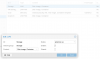
Now you have to activate your storage "VM-Storage" and "Storage (for your backups, ISO images, etc...)"

Mine looks like this:

1569674512784.png

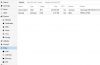
Select the disk you want: "VM-Storage" and click the initialize Disk with GPT

Once your disk is initialized you can create the file system you want: LVM, LVM Thin, ZFS (if applicable), mount it as a directory....
1569674619082.png

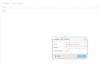
For VM Storage I use the LVM-Thin: Click on it and go to create disk

Select the disk and name the pool
1569674718812.png

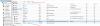
Once you create the different type storage's, you can go to "datacenter"; "storage" and edit some properties if available (which type of files are stored on that storage type" ..... not all types of storage support everything: Iso images, backups, VM images, etc....
1569674954783.png
 
  • Like
Reactions: Y0nderBoi
I did read documentation and watch a number of videos. Most of which did not cover the concept of RAID and RAID configuration all that well. I read the wiki and thought that all I would need to do was create new directories for each RAID since directories seemed the most versatile form of storage.

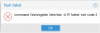
With all that being said. I was able to successfully intiialize and create a thin-LVM for the VM-Storage RAID. However when I try to initialize the second RAID I get this error:

command '/sbin/sgdisk /dev/sdc -U R' failed: exit code 2

1569678510920.png

Any ideas as to what I should try?
 
Hardware raid is configured outside the operating system and presents the raid volume as a single disk to the operating system. Your system sees it as just a single hard drive.

Now are you getting this error when you initialize the disk with GPT or during another step ?

Or are you trying to mount this volume as a directory ?
 
Hardware raid is configured outside the operating system and presents the raid volume as a single disk to the operating system. Your system sees it as just a single hard drive.

Now are you getting this error when you initialize the disk with GPT or during another step ?

Or are you trying to mount this volume as a directory ?
I get this error when trying to initialize the drive.
 
Coul you try on shell

mkfs.ext4 /dev/sdc
wipefs -a /dev/sdc

That seems like Read Only raid pool...
Tried this and got the following outputs:
root@proxmox-ve:~# mkfs.ext4 /dev/sdc
mke2fs 1.44.5 (15-Dec-2018)
Creating filesystem with 117040640 4k blocks and 29261824 inodes
Filesystem UUID: bb405991-4aea-4fe7-b265-cc644ea5e770
Superblock backups stored on blocks:
32768, 98304, 163840, 229376, 294912, 819200, 884736, 1605632, 2654208,
4096000, 7962624, 11239424, 20480000, 23887872, 71663616, 78675968,
102400000

Allocating group tables: done
Writing inode tables: done
Creating journal (262144 blocks): done
Writing superblocks and filesystem accounting information: done

Then tried this and got the following output:
root@proxmox-ve:~# wipefs -a /dev/sdc
/dev/sdc: 2 bytes were erased at offset 0x00000438 (ext4): 53 ef


After all of that I was able to intialize the disk. So was the first command to make it an .ext4 format and the second command was to wipe it?
 
And now even after initializing and creating I am unable to upload anything to the drives.
1569699762522.png

I am assuming that since I made the LVM I need to partition them in order to upload anything to it.
 
Did you go to "datacenter"; "storage" and select what types of information are allowed on "Storage (promox-ve) ?

If it will not let you select anything, than you may want to just mount the disk as a standard directory

I use external storage through CIFS or NFS for backups and ISO images, so I am not very familiar how to setup a local store for those items.

You should be able to create containers and vm's and use the "VM.Storage.Thin" as your VM disk storage location
 
Did you go to "datacenter"; "storage" and select what types of information are allowed on "Storage (promox-ve) ?

If it will not let you select anything, than you may want to just mount the disk as a standard directory

I use external storage through CIFS or NFS for backups and ISO images, so I am not very familiar how to setup a local store for those items.

You should be able to create containers and vm's and use the "VM.Storage.Thin" as your VM disk storage location
I checked. Default seems fine, as it only allows for Disk Images and Containers.
1569701637825.png

Then to mount it, would I just select the "Storage" drive, hit "Remove" and then re-add it as a directory?
 
It looks like you have to mount the disk as a directory, which will allow you to select other storage types and enable the "upload" option.

You can try within "datacenter; Storage" to delete the LVM

Than see under "disks; directory" it will let you add the LVM and format it as ext4 or xfs


If that does not work, just wipe the LVM off the disk and than try adding it as directory again
 
Removed it from the "datacenter; Storage". Checked under the "disks; directory" I still see it as a VG.

I was able to remove the Volume Group, but when I go to add it as a directory it says "No disk unused".
 
Last edited:
Tried this and got the following outputs:
root@proxmox-ve:~# mkfs.ext4 /dev/sdc
mke2fs 1.44.5 (15-Dec-2018)
Creating filesystem with 117040640 4k blocks and 29261824 inodes
Filesystem UUID: bb405991-4aea-4fe7-b265-cc644ea5e770
Superblock backups stored on blocks:
32768, 98304, 163840, 229376, 294912, 819200, 884736, 1605632, 2654208,
4096000, 7962624, 11239424, 20480000, 23887872, 71663616, 78675968,
102400000

Allocating group tables: done
Writing inode tables: done
Creating journal (262144 blocks): done
Writing superblocks and filesystem accounting information: done

Then tried this and got the following output:
root@proxmox-ve:~# wipefs -a /dev/sdc
/dev/sdc: 2 bytes were erased at offset 0x00000438 (ext4): 53 ef


After all of that I was able to intialize the disk. So was the first command to make it an .ext4 format and the second command was to wipe it?


wipefs remove all disk format signature and gpt partition table from disk.. if that device was have another disk signature maybe cause of that proxmox can not be add that...
 
Update:
So after much trial and error and googling. I simply removed the old LVM Group, then ran "sgdisk -Z /dev/sdc" on the drive. From there I was able to reinitialize the drive and add it is a directory where I can now upload files too it.

Thanks you @vshaulsk you have been a huge help.
 
I was having the same issue with this. Thank you for providing the command "sgdisk -Z /dev/sdc" as this resolved the same issue I was having.
 
Update:
So after much trial and error and googling. I simply removed the old LVM Group, then ran "sgdisk -Z /dev/sdc" on the drive. From there I was able to reinitialize the drive and add it is a directory where I can now upload files too it.

Thanks you @vshaulsk you have been a huge help.
I had same issue, thank you for your help, that command saved me
 
Important Info reading this post. First if you want to use the ZFS it is recommended to expose the disks as single units, meaning do not configure your disks on the raid controller. This means do not configure the disks in a hardware raid as it is written that this will probably fail in time and lead to data-loss !. So with ZFS make sure to clear your hardware raid and add the disks you have into the controller config as "single-non-raid disks when using ZFS. Getting deeper I also noticed this has a huge advantage in that the way ZFS works as a software raid, in that there is no extra disk needed for parity... So for example in a common hardware raid when you calculate space (for example 4 disks at 4TB pro disk egals 16 TB total, but then due to parity (Raid 5 for example) you have to subtract one disk´s space in a hardware raid5 which leaves you only 12TB... Well with ZFS it has integrated this parity so that you will have the whole 16 TB of space to use. That is amazing. Now if you want to still use the hardware raid then make sure you are using the EXT 3/ 4 formating and not ZFS !!! Last Note: Also remember to "burn in your system" and do some simple benchmarking.. As you all know stripping does deliver more throughput, but if you have ever encountered a HD Crash you already know that to lose a VM-HD and your data you really need to consider the raid to begin with... With Raid 5 you can lose a disk (one) and still be able to recover onto an new disk by rebuilding the raid... But consider that other raid levels will allow you to recover more that one disk, so be careful to choose the right Raid level based on your requirements, but moreso dont forget to use the integrated backup function of proxmox... Per Backup you can calculate around 30% required space for each VM... This tells us that we may need a huge backup drive. I can only summarize that if you decided to invest in a home lab / office etc., do it right the first time by not putting limitations on your storage and backup drives, configure the raid properly using the advantages of the formatting (hardware Raid vs. Software Raid (formatting). It all has to "jive" and opposing popular beliefs, better to have a stable system as opposed to having the fastest system. As far as VM-Systems are concerned, have enough resources ( Ram /HD / CPUs ) alloted per VM to today´s standard... That is to say, if you are installing a windows server then 4 GB Ram (min) 8 GB Ram recommended .. 200 GB HD, and at least4 CPUs... You´ll find that everything is fast enough but moreso stabile enough. I am an ITler for over 50 years so this should tell you that I know where it counts. I myself run a dell server with 16 SSDs between 512 GB to 4TB drives... 20 CPUs and 40 threads.. So if you calculate beased on my recommendations that will give me 10 VMs im my home lab. I also have over 200 GB Ram, so I pretty much maxed the server out. In addition I have replaced all the fans in the server to BE Quiet! fans which means I can keep the server in my office and you practically dont hear it. 16 Bays for SSDs ...I dont use mechnical drives at all, so you can imagine that its all pretty fast. The last point Im missing is to upgrade my home network to fiber-optic, with multiple network cards or multiple ports and VLANS, as a real bottle neck is when I do anything data related between servers over the network... Im pretty much down to around 90 MB /sec limitations on a Gbit Network... There is always room for improvement but as said my advice is do the hardware picking right the first time as to avoid creating a bottomless pit in investment, meaning constantly upgrading old hardware for newer, more powerful and larger components... ie Ram, CPU threads, HD and maybe even Graphic cards / add-on cards. In any case basically I hope this helps you all with an overall concept of Virtualization and the dos and donts... Remember that many things you can learn "learn by doing" but still you need to augment with reading the docs, to compare any segment of knowledge so that you can decide your systems and your next steps... If you had you would already know some very important suff, making this discussion obsolete ...Raid config being one point in the whole "soup" of things. In addition remember to consult the docs and the recommendations of Proxmox´s DEV if you are not sure ! I turned from VMware ESXi to Proxmox due to advantages in Proxmox, where I have hit (several years agi) limitations in VMware. Also the fact that the new owner of VMware (Broadcom) has decided to stop community editions and start charging for use in home labs, bringing a pricetag per year. As a community we often find better approaches, and have fed VMware for decades to make their products what they are today. So it is refreshing to see Proxmox not taking that same path. Im all in !!! Feel free to answer my posts and I will try to help where I can .... I wish you all success ;)