CPU Type Benchmark comparison - 'host' performance noticeably worse

McShadow

New Member
Sep 24, 2025
9
2
3
Hi all,

I recently ran a series of CPU and memory benchmark comparisons in PVE and came across some unexpected results, specifically with the host CPU type performing worse than anticipated.

Environment
  • AMD EPYC 9375F (32-Core)
  • 384 GB RAM
  • Storage:
    • Micron NVMe
    • Kioxia NVMe
  • Proxmox VE 9.1 (fresh install on bare metal Supermicro server)

Setup / background
  • Uninstalled VMware tools from Windows Server 2019 VM
  • Migrated this VM from VMware to Proxmox
  • Initially kept the original VM configuration and started the VM
  • Installed qemu tools and virtio driver, rebooted and changed to VirtIO network model
    • Doing this a new Ethernet adapter has been installed and I lost my static settings
  • As expected, performance improved significantly due to better hardware
  • Used AIDA64 for benchmarking


Tested CPU types
  • x86-64-v2-AES
  • x86-64-v4-AES
  • host
  • EPYC
  • EPYC-Genoa
  • EPYC-v4


Tests
I performed multiple benchmark runs per CPU type and compared
  • Memory throughput (read,write,copy)
  • Cache performance (L1/L2/L3)
  • Latency
Additionally tested:
  • NUMA: enabled vs disabled
  • C-States: enabled vs disabled

Benchmark results
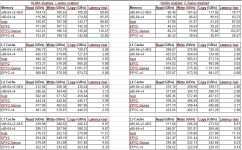
1774539653239.png


Observations
  • host CPU type consistently performed worse than expected, especially in:
    • Memory latency
    • Some throughputs
  • x86-64-v4 and EPYC-based types often showed more stable or better results
  • NUMA enabled:
    • No major impact (except for less throughput as expected)
    • Slight improvement in latency
  • NUMA enabled and C-States disabled:
    • Noticeable improvement in latency (up to 10%)
    • No significant change in throughputs

Questions
I'm aware that there are several threads about the host CPU type performing worse than expected. However, I still wonder why host is acting like that. Does anyone have deeper insight into why this happens?

What would you recommend as the preferred CPU type for EPYC-based Proxmox clusters in practice?


Thanks in advance.
McShadow
 
Last edited:
It depends on the guest os. If you use host without disabling nested virtualization in the cpu flags it triggerns Windows to enable several mitigations for CPU security Bugs. For other Systems than Windows host should be fine.
 
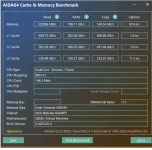
I've changed to host again and disabled nested-virt. The results are almost the same, just slightly better in Memory.

1774600166801.png

Is there some other flags I need to disable/enable to achieve better performance using host?
 
see this
I had no time to investigate further, but its relatet to VBS/HVCI in the client
VBS/HVCI might be triggered by disabling nested-virt - thats why many ppl claim that disabling nested-virt helps. but thats not the full story.
 
Last edited:
your reply is not useful at all .

You can also use a cpu type better fitted for your cpu. You following tool to determine this CPU type:
https://github.com/credativ/ProxCLMC

that tool is to determine the fitting cpu typ across a cluster - obviously the OP´s intent was to get the best setting on ONE host (otherwise he would not try to use host cpu)

You also need to setup the virtio drivers and guest Tools correctly:

https://pve.proxmox.com/wiki/Windows_11_guest_best_practices

the OP´s post was about CPU/Cache performance - virtio drivers are (mostly) a different layer (drivers for NIC, storage etc.) - though You are partly right here because it also has ballooning and other memory related drivers there. But not for CPU.

I guess thats just unrelated KI-slop ?


Johannes, how does that feel ? Not good right ? I would really like You to turn down Your replies to or three notches to a less hostile level.
 
Last edited:
Johannes, how does that feel ? Not good right ? I would really like You to turn down Your replies to or three notches to a less hostile level.
I don't understand this paragraph. I can't see any hostility in Johannes' messages in this thread.
Moreover, I don't remember any hostile posts from Johannes.
My established impression about @Johannes S ' messages is that these are useful, helpful and kind.
 
  • Like
Reactions: UdoB and leesteken
You could try "Epyc-Turin" for your Zen5 based Epyc Processor, that should unlock some newer CPU extensions (AVX2 ...) inside your VM.

Not sure if Windows Server 2019 can even use those newer CPU extensions or if you are better off hiding them by using something older and generic like "x86-64-v4".

Use virtio-win-0.1.271 for now, newer versions seem to have performance and stability issues.

Disable C-States / power saving in your server bios, on HPE this would be "Virtualization - Max Performance" setting.

I personally use "x86-64-v4" for Windows VM's - that works for me but is not the best setting if you want to squeeze out the last bit of performance you can get.

@SteveITS those timers are only an issue on Windows Server 2025? Don't think that affects Windows Server 2019.
 
  • Like
Reactions: Johannes S
Moreover, I don't remember any hostile posts from Johannes.
I gave bitranox some flak due to his propagation of AI so I can see where he comes from. That banter between us has nothing to do with this thread though and I would prefer we both stop that bickering and return back to actual topic while agreeing to disagree.
Regarding ProxCLMC: It's mainly intended for clusters but also works for single-nodes so I assumed it might be of use for the OPs problem to testing possible solutions for his problem. Since the debate now shifted to other potential root causes it's kind of obsolete now and my suggestion was propably more a red herring.
 
Last edited:
Thanks everyone for your replies. I'll try to address all of them.


see this
I had no time to investigate further, but its relatet to VBS/HVCI in the client
VBS/HVCI might be triggered by disabling nested-virt - thats why many ppl claim that disabling nested-virt helps. but thats not the full story.
I already tried disabling nested-virt. Performance was only slightly better in memory.


You can also use a cpu type better fitted for your cpu. You following tool to determine this CPU type:
https://github.com/credativ/ProxCLMC

You also need to setup the virtio drivers and guest Tools correctly:

https://pve.proxmox.com/wiki/Windows_11_guest_best_practices

@Falk R. provides a custom iso to make it easier: https://forum.proxmox.com/threads/a-small-game-changer-for-windows-migration-to-proxmox.181582/
VirtIO drivers and guest tools are already installed. I'll take a closer look at @Falk R.'s script for migrating and ProxCLMC.


that tool is to determine the fitting cpu typ across a cluster - obviously the OP´s intent was to get the best setting on ONE host (otherwise he would not try to use host cpu)


the OP´s post was about CPU/Cache performance - virtio drivers are (mostly) a different layer (drivers for NIC, storage etc.) - though You are partly right here because it also has ballooning and other memory related drivers there. But not for CPU.
I'm actually running a cluster with two nodes. Both have the same hardware. However, I'm still at a very early stage of migrating from VMware to Proxmox. 100+ VMs to come (mix of Windows Server 2019-2022, different Debian and Ubuntu versions, etc.). ProxCLMC might be worth checking out.
Right now, we are evaluating which CPU type might be the best to fit. Once we've made a decision, we'll use it across all VMs in the cluster.


You could try "Epyc-Turin" for your Zen5 based Epyc Processor, that should unlock some newer CPU extensions (AVX2 ...) inside your VM.

Not sure if Windows Server 2019 can even use those newer CPU extensions or if you are better off hiding them by using something older and generic like "x86-64-v4".

Use virtio-win-0.1.271 for now, newer versions seem to have performance and stability issues.

Disable C-States / power saving in your server bios, on HPE this would be "Virtualization - Max Performance" setting.

I personally use "x86-64-v4" for Windows VM's - that works for me but is not the best setting if you want to squeeze out the last bit of performance you can get.
I don't have 'EPYC-Turin' available as a CPU type.
x86-64-v4 also shows very good performance, but latency is significantly lower compared to some EPYC CPU types.
VirtIO driver .285 is installed, but according to the known issues this shouldn't matter since the VM is running Windows Server 2019.
I'll keep .271 in mind for 2025, which might be relevant soon.


Oh sorry I missed that OP mentioned 2019.
2025 is only a matter of time.
 
Last edited:
  • Like
Reactions: Johannes S
Are you on PVE 8.x? I'm on 9.1 and i got "Epyc-Turin"

*edit*
For newer cpu's it would be beneficial to use the newest PVE release due to newer kernel and qemu versions
 
Last edited:
  • Like
Reactions: Johannes S
Are you on PVE 8.x? I'm on 9.1 and i got "Epyc-Turin"

*edit*
For newer cpu's it would be beneficial to use the newest PVE release due to newer kernel and qemu versions
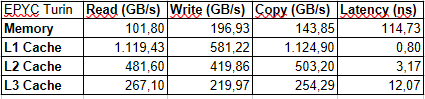
Yep, you are absolutely right. Some updates were missing. Seems like it came in some minor after 9.1... After updating, I am able to select EPYC Turin.

Results:
1774697512478.png
These are pretty similar to EPYC-Genoa.
 
  • Like
Reactions: Johannes S