Add multiple disks to single node proxmox

powersupport

Well-Known Member
Jan 18, 2020
343
12
58
31
Hi,

Is it possible to add multiple disks to a single node Proxmox? if so, could you please share with us the possibilities here?

Thank you
 
Hi,

what exactly do you mean? Adding several disks to the physical nodes? Yes of course that is supported. There are several approaches you could take depending on your use-case/needs. Here are three options:
  1. Add them to zfs pools that also support different RAID levels or create a RAID array via btrfs during the installation process.
  2. Add disks later on and configure them through the GUI with a file system of your choice.
  3. Or add them to existing zfs pools.
Really there are many many possibilities depending on your exact use case and setup.
 
Hi,

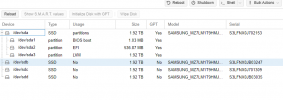
The current setup is, it is a physical server with local lvm storage, the Proxmox is already installed and it is in production
In this scenario what is the best-recommended way to add an additional disk to the local storage?


Thank you
 

Attachments

  • disk-px.png
    disk-px.png
    5.4 KB · Views: 52
  • storage-px.png
    storage-px.png
    34.8 KB · Views: 55
Ok so since you have three separate disks that you want to add, its likely easier and more resilient to create a new zfs-based pool. You could for example add them to a RAIDZ array which would provide you with redundancy allowing for at least one drive failure as well as increased read write performance. This comes at the loss of some usable space, you'll likely only have about 3,5TB available.

To do so you can go to the node > Disks > ZFS > Create ZFS. From there give the new pool a name, select the disks you want to add and the RAID level. Depending on what exactly you need/want you could go with Single DIsk (adding each disk as a different ZFS pool, maximizing available storage space), Mirror (this will give you maximum redundancy by storing everything on all three disks, so you will not see a performance increase and the available space will be the size of the smallest disk in the pool (1.94TB)) or RAIDZ (see above).
 
If you go the ZFS route, you could also consider reinstalling the node directly with a ZFS raid10 (for example) over all four of your disks.
 
  • Like
Reactions: sterzy
Hi,

what exactly do you mean? Adding several disks to the physical nodes? Yes of course that is supported. There are several approaches you could take depending on your use-case/needs. Here are three options:
  1. Add them to zfs pools that also support different RAID levels or create a RAID array via btrfs during the installation process.
  2. Add disks later on and configure them through the GUI with a file system of your choice.
  3. Or add them to existing zfs pools.
Really there are many many possibilities depending on your exact use case and setup.
Apologies for reviving an old thread, but could you elaborate on the second half of #1? If you setup a btrfs RAID array during install (we'll say RAID 10 for this example), are you then stuck with both your proxmox install and your VM's/etc on the same physical disks if you want them on btfs?

Zfs is amazing, but I worry about write amplification and not being able to configure my pool well for my highly variable use case. I would like to use a filesystem with bitrot protection, so I'm thinking btfs.