

Why does proxmox have 2 ip address?
- Thread starter Bala
- Start date
-
- Tags
- ip address mac address router
You are using an out of date browser. It may not display this or other websites correctly.
You should upgrade or use an alternative browser.
You should upgrade or use an alternative browser.
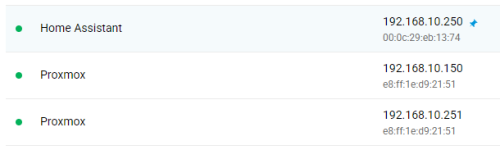
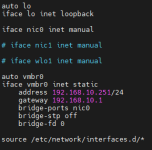
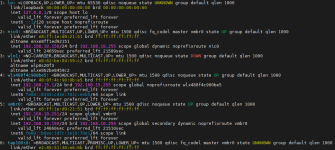
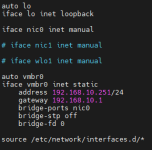

Can you explain in more detail where this directory is located?Morning, you get what you Setup. please see your data under your network Setup source directory.
This happens if you initially allowed the host to come up in DHCP mode, then reconfigured the network but have not rebooted the host yet. Not saying that is this particular issue, but I have ran into it before.

This folder is emptyAs shown in the screenshot look into the files in /etc/network/interfaces.d/
Yes, that seems to be exactly what happened. I selected DHCP during installation, but later I assigned an address to the vmbr0 interface via the config. How can I fix this now?This happens if you initially allowed the host to come up in DHCP mode, then reconfigured the network but have not rebooted the host yet. Not saying that is this particular issue, but I have ran into it before.
Not possible as PVE installer wait for static ip validated or entered.I selected DHCP during installation
Just rebootHow can I fix this now?
Unfortunately, this situation has been going on for a long time, reboots don't help.Not possible as PVE installer wait for static ip validated or entered.
Just reboot
if Proxmox VE ISO used, you've enabled the DHCP client manually somehow, you need to figure out where.
I had used crontab @reboot myself.
I had used crontab @reboot myself.
Did you add proxmox to this host or did you deploy with proxmox iso?
if Proxmox VE ISO used, you've enabled the DHCP client manually somehow, you need to figure out where.
I had used crontab @reboot myself.
Yes, I used an ISO image for installation. Could you please tell me where to find it?
Things to try:
rgrep "d9:21:51" /etc/*
rgrep "d92151" /etc/*
rgrep "192.168.10.150" /etc/*
See if these find any instances of the MAC or IP in /etc.
You might also run those against /var as well (or separate into a few subdirs under var like lib, run, cache).
Post what you find here.
rgrep "d9:21:51" /etc/*
rgrep "d92151" /etc/*
rgrep "192.168.10.150" /etc/*
See if these find any instances of the MAC or IP in /etc.
You might also run those against /var as well (or separate into a few subdirs under var like lib, run, cache).
Post what you find here.
nothing found in /etc or /var foldersThings to try:
rgrep "d9:21:51" /etc/*
rgrep "d92151" /etc/*
rgrep "192.168.10.150" /etc/*
See if these find any instances of the MAC or IP in /etc.
You might also run those against /var as well (or separate into a few subdirs under var like lib, run, cache).
Post what you find here.
These commands were executed without errors, but the second address remained accessibleAnother idea:
dhclient -r nic0
ip addr flush dev nic0
ifup nic0
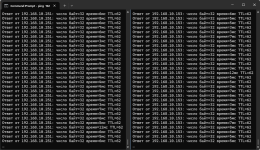
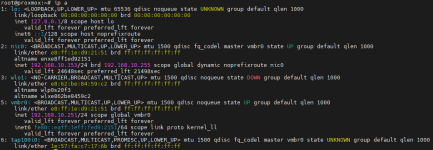
what about "ip a" after reboot now?
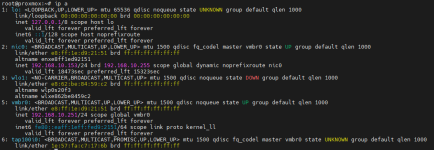
Of course, I can ignore the one more extra IP address, but the inner perfectionist really wants to fix it)))

Please share this in code blocks
Bash:
ps aux | grep -Ei "network|dhc|wicd|conn|iwd|wpa"
dpkg -l | grep -Ei "network|dhc|wicd|conn|iwd|wpa"
systemctl list-units | grep -Ei "network|dhc|wicd|conn|iwd|wpa"
find /etc/network/interfaces* -type f -exec tail -n+1 {} +It was dhcpcd, I don't know where it came from, but after disabling it, the second IP address disappeared. Thanks a lot for the help.