I've used GlusterFS for years, and run 3 test labs and 3 production environments with PVE + GlusterFS that work beautifully and are stable and fast with a low-resource footprint. Removing GlusterFS support is a HUGE dissapointment for me.I have not used glusterfs "recently" (within the last few years), but I have used it in the past, and the results were unstable at best, abysmal at worst, and the management was miserable. We had consistent crashes of the daemons under benchmark loads, but even for backup storage it was finnicky and we found it unreliable and fragile.
The gluster mailing list is utterly dead, the website is dead, and the repo is more or less dead. it's in "critical maintenance fix" mode, which redhat said would happen.
I don't think ceph is unusably slow, but one critical issue that I see repeatedly is that people always set it up with very few OSDs, which is not what it was designed for.
In my homelab (or more accurately, home prod), I get very usable performance out of 24x 500gb 2.5" laptop SATA drives, paired with 8x 500gb SATA SSDs for DB/WAL across 4 hosts - which is not an especially unreasonable number of disks imo, and someone running fewer or less demanding workloads would likely be fine with half as many disks.
The RBD volumes on this ceph cluster back an elasticsearch + graylog cluster, with the bulk of the message volume being netflow from a pair of opnsense router VMs, so the workload is about 6-10x more write than read most of the time. I'm not really using cephfs as RBD volumes are more performant to begin with for backing VMs and containers.


Glusterfs is still maintained. Please don't drop support!
- Thread starter kayson
- Start date
You are using an out of date browser. It may not display this or other websites correctly.
You should upgrade or use an alternative browser.
You should upgrade or use an alternative browser.

You will have better luck lobbying QEMU to support gluster than proxmox. If qemu was going to maintain support for gluster, then it would be far easier for proxmox to. They have it listed as deprecated here: https://www.qemu.org/docs/master/about/deprecated.html (although they didn't say exactly when, or technically even if it will stop being supported).
They have it listed as deprecated here: https://www.qemu.org/docs/master/about/deprecated.html (although they didn't say exactly when, or technically even if it will stop being supported).
In an earlier post in this thread it was mentioned that they will propably drop at some qemu 10.x version:
https://qemu-project.gitlab.io/qemu/about/deprecated.html#gluster-backend-since-9-2
Qemu will remove support (possibly during the 10.x release cycle)
once something is deprecated in QEMU, it is only guaranteed to be there for one more release (see the note up top in the link I provided).
Given that PVE 9 is based on qemu10 it's propably not feasible to support anymore because there might be a point where it would stop working after a minor update. Thus it's better to drop support right from the start of PVE 9 relase cycle, so users with GlusterFS in PVE 8 have still around one year to change their setup before PVE8 won't get any updates anymore.
Gilberto Ferreira
Famous Member
Yes you can also use ocfs or gfs or any other file system supported by Linux, that's nothing new  They are not integrated and (propably) not tested or supported in the GUI though, meaning that in case of problems you are on your own. This might be ok in a homelab or if you have a team of seasoned Linuxadmins but not so much in typical corporate environments migrating from vmware with mostly Windows workloads.
They are not integrated and (propably) not tested or supported in the GUI though, meaning that in case of problems you are on your own. This might be ok in a homelab or if you have a team of seasoned Linuxadmins but not so much in typical corporate environments migrating from vmware with mostly Windows workloads.
Last edited:
Sorry for resurrecting this old thread, but I am testing both ceph and gluster right now on my 4930K system (because it's what I have that I can spin up quickly with as few variables between systems as possible).That said, I wouldn't think glusterfs to be good for vms, except maybe a few low I/O ones... what kind of performance (ie: fio benchmark) can you get inside of a vm? Maybe I am under estimating it for random I/O....
Subjectively, the Win11 23H2 installed *much* faster on gluster than it is installing on ceph.
Gluster is set up with a distributed dispersed gvol
gluster volume create gv0 dispersed 3 redundancy 1 server{1..3}:/export/sdb1/brickAnd ceph is set up as rbd using erasure coding(2,1) as well.
All 6 HDDs are HGST 1 TB SATA 3 Gbps 7200 rpm HDDs. (Again, this is what I have readily available, and I also wanted to minimise the number of independent/different variables between the two storage solutions/methods as much as possible.
Motherboard is a P9X79 WS motherboard with 64 GB of RAM (I forget generation and speed).
The HDDs are passed through as JBOD to Proxmox 7.4-20 off of a LSI MegaRAID SAS 12 Gbps 9361-8i SAS HW RAID HBA.
Disks are passed through into the cluster VMs.
3 Proxmox 7.4-20 VMs is for the ceph cluster and 3 is for the gluster cluster.
The Win11 VM on gluster is already installing the Win11 updates.
The Win11 VM on ceph is still installing.
re: ceph on consumer hardware and/or needing more than three OSDs and/or needing enterprise grade harware
I think that people who say this aren't looking at nor calculating how much of their storage device capability they're able to achieve with ceph.
Suppose that you have an enterprise grade U.2 or E1.S EDSFF NVMe SSD that's nominally capable of roughly 12 GB/s reads and writes.
If you're only getting ~600 MB/s, you're only using about 5% of the drive's capability.
If you are adding in 20 drives just to hit the 12 GB/s mark, then you are, in my opinion, just throwing money to mask the fundamental point that ceph is only using ~5% of what your drive is actually capable of.
People who say ceph works are also the same people who say that you need large, enterprise deployment for it to work. But I would encourage them to calculate how much of each of the drive's capability they able to actually use and then go from there.
And the performance problems re: erasure coding on ceph, is a well known problem so much so that the devs has a page dedicated to this topic (along with improvements and proposed improvements to try and help speed things up with how their erasure coding works in practical applications/actual deployments).
I'll be running CrystalDiskMark from within said Win11 VMs (once the updates are all done so that the updates can't interfere with CDM benchmarking), so stay tuned for that.
(I've been on the gluster mailing list since oh gosh like 2017. It periodically has activity on there, usually when people run into issues. But as a technology, if it works enough for people, then as long as other linux updates doesn't break it, then it'll continue to work.
(My first foray into gluster was back on version 3.7 where back they, they still allowed you to create a distributed stripped gvol using ramdrives. Now they don't allow that anymore. And also support for RDMA has been removed either as of gluster 8 with maybe gluster 7 being the last version where that was formally supported. I'm currently running gluster11.1 now.)
For my test ceph cluster, I'm using ceph 17.2 (because that's the latest that is supported by Proxmox 7.4-20. (I'm not running newer versions of Proxmox because the 9361-8i isn't supported in Proxmox 8 (more specifically, the linux kernel that ships by default), and as a result of the issues with 9361-8i on pve8, likewise, I haven't migrated to pve9 neither. (in case someone is going to wonder and/or ask about why I'm running pve7.4-20.)
More to come...
*edit*
More test system config details:
Each VM has 2 CPU cores assigned to it. The 4930K is a 6-core/12-thread CPU. Each node of the respective cluster has 16 GB of RAM assigned to it. (Since I am only testing with one Win11 VM, it's fine. Current system RAM usage with all 6 nodes up and running is 46 GB.)
I am using the
virtio-nic between each of the nodes, in their respective clusters, so that synchronisation won't be limited by GbE.The Win11 VM only has 2 CPU cores and 8 GB of RAM allocated to it, again, just for this testing purposes only.
Last edited:
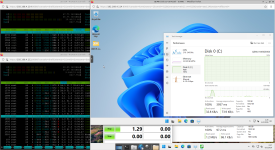
The screenshot shown above shows the difference between ceph (top right) and gluster (bottom right).
ceph was stil booting up the Win11 VM (and/or running the first round of updates) meanwhile the Win11 VM running on gluster was already running the CrystalDiskMark.
Note the difference in latency.
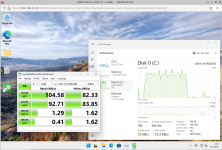
Here are the CrystalDiskMark results in Win11 with gluster.
It's not going to be super fast given that I am using HGST 1 TB SATA 3 Gbps HDDs, but the sequential reads and writes are at least high enough that it's passable.
The ceph results are going to be much worse, but I am going to have to run that tomorrow since the Win11 VM is still trying to run the Win11 updates.
Last edited:

Interesting read!More to come...
Though I am not sure about your goal. Using pre-historic software for learning or as an experiment is... nice. Not more.
(( PVE 7.x is out-of-support for two years now (https://forum.proxmox.com/threads/proxmox-ve-support-lifecycle.35755/), the "newest" blog entry on https://www.gluster.org/ is from 2020. And Red Hat itself still says "31-Dec-24" (https://access.redhat.com/support/policy/updates/rhs) ))
Last edited:
Sadly last version 11.1 from download is from 2023, for fedora you get it as rpm 11.2 but it is as it is and as long there will be no developers work on to support actual OS and kernel versions a gluster installation maybe it's a short way until it's unwanted incompatibel to a coming OS update - pretty bad future to gluster this time and maybe forever.
I thought I was reading a 10yo post. How do you get Win11 to run on a 4th gen Intel?
Two things:Though I am not sure about your goal. Using pre-historic software for learning or as an experiment is... nice. Not more.
1) As I mentioned, I'm running Proxmox 7.4-20 on the host system because kernel 6.8 that ships with Proxmox 8 by default doesn't work with the aforementioned 9361-8i.
Who cares if it's old, if it works (vs. it not working)?
If it is a choice between something that works vs. something newer that doesn't work, I will always pick what works because something that's newer that doesn't work is quite literally, useless to me (AFAIC).
If it doesn't work, then it's a hard showstopper, which is a problem unto itself.
2) The goal here is to demonstrate with data, from within a VM, that gluster is still viable from a technology standpoint. Whilst most people think that ceph is all the rage these days, ceph has it own suite of (performance) issues that many people and companies are masking this fundamental performance problem by throwing money at it. (Again, you can run the math yourself to answer the question "how much of the drive's capability am I actually getting, with ceph?" It's pretty easy to calculate this.)
i.e. if I can get 100 MB/s sequential reads and and 83 MB/s sequential writes with 11 year old HDDs, imagine what I'd be able to get with a U.2 or E1.S EDSFF NVMe SSD.
If the drive is capable of upto 150 MB/s, then I am getting 66% of the drive's rated performance capability (for sequential reads) and 55% of the drive's performance capability for sequential writes.
Now apply that idea to a E1.S EDSFF NVMe SSD that's capable of 12 GB/s sequential reads. At 66% of the drive's capability, you're looking at 7.92 GB/s sequential reads. (Yes, I know that it doesn't scale like this, as there are other considerations when you're trying to read data this fast, but the point is that you're using more of the drive's capability that you paid for, without having to throw tons of money to mask a fundamental performance problem that is ceph.)
So?(( PVE 7.x is out-of-support for two years now (https://forum.proxmox.com/threads/proxmox-ve-support-lifecycle.35755/), the "newest" blog entry on https://www.gluster.org/ is from 2020. And Red Hat itself still says "31-Dec-24" (https://access.redhat.com/support/policy/updates/rhs) ))
Last I heard, I don't know if 9361-8i is support with Proxmox 9. (wasn't there a problem with Proxmox 9 with the e1000 NIC driver or something like that?)
i.e. Newer isn't always better.
It is, for this reason, why a lot of companies don't deploy the bleeding edge technology for mission critical, production systems, because newer can break stuff and cause stuff to stop working which would be a huge problem, for said business.
The same is true for a homelab.
You don't think that your wife and kids will tell you that the internet doesn't work because you upgraded to Proxmox 9 where it had said issue with the e1000 NIC driver, which then, in turn, takes down your local/self-hosted DNS?
You can probably clock how long it will be between when you upgraded to when you first hear about it from your wife and/or kids that the internet doesn't work, with an egg timer.
What's with people's fascination with the false equivalency that "newer = better"? Sometimes newer is just newer, just as "more" isn't always better, ad simile.Sadly last version 11.1 from download is from 2023, for fedora you get it as rpm 11.2 but it is as it is and as long there will be no developers work on to support actual OS and kernel versions a gluster installation maybe it's a short way until it's unwanted incompatibel to a coming OS update - pretty bad future to gluster this time and maybe forever.
Remember now "newer" also yielded CVEs 2026-31431, 2026-43284, and 2026-43500 due in part to the newer kernel release whereas older kernels didn't have the same vulnerabilities baked in.
(i.e. if you run a fresh install of Proxmox 7.4-20, you can run the scripts to test whether Proxmox 7.4-20 has these exploits and from my testing, they don't.)
Again, if it works, why break it?
Easy. Proxmox.I thought I was reading a 10yo post. How do you get Win11 to run on a 4th gen Intel?
(Note, by the way, how nobody, who has replied since I posted, has commented on the technical advantage that gluster has over ceph, in terms of performance (or at minimum, sequential performance) using a 13 year old CPU, with a 13 year old motherboard, with 11 year old HDDs (original release date was in 2007, so 19 year old HDD technology) and I can still wring out 100 MB/s sequential reads with gluster and 83 MB/s sequential writes, using a gluster distributed dispersed gvol.
Now just imagine what you can do with the latest and greatest hardware.
If people want to provide said hardware, I can deploy it and test it for the community here. But make no mistake about it - getting 100 MB/s with 11-13 year old hardware with a distributed dispersed volume is faster than what ceph can muster. And given the lack of commentary/responses about the technical data, people literally can't/aren't arguing about the performance.
Most of the discussion points has nothing to do with the distributed dispersed gvol's performance, which tells you quite a lot, almost everything that you need to know about it.)
(I have an older Supermicro 4-node, 2U cluster (dual Xeon E5-2690, 128 GB per node, Mellanox ConnectX-4 100 Gbps Infiniband) that I could've used for testing, but it would've taken more time for me to have to harvest the hardware that has since been re-deployed, to bring the entire cluster back up and running, and people will still complain about that, I'm certain of that. Therefore; given that people were going to complain about the hardware anyways, it didn't really matter what I tested with, because regardless of what I used, people were going to complain about it anyways. So I used what made it easy for me to run these tests.)
Again, the only things that people have been focused on, in this discussion are:
1) The age of the software (gluster version or which version of Proxmox I'm using) or how many commits gluster has, on github. (If a project is stable, why would this matter?)
2) The age of the hardware that I am using to run these tests because a) it's what I have readily available, and b) it was easy for me to set up, to run these tests.
@kayson posted his results and people were complaining about how he ran his tests.
So, I ran it from within said Win11 VM and people are still complaining about it.
Can't win with y'all.
But in either case, no one is actually discussion the point that matters: gluster is faster than ceph.
Last edited:
Gilberto Ferreira
Famous Member
The gluster project is not dead. It's slow... Not dead... Long live to GlusterFS!

I've been on the glusterfs mailing list since 2019 and I monitor the traffic on said mailing list.The gluster project is not dead. It's slow... Not dead... Long live to GlusterFS!
View attachment 98155
Again, there are times when there's more activity on said mailing list than other times (usually when people have issues and/or questions).
(Sidebar: I've also joined/subscribed to the ceph mailing list as well.)
It is unfortunate that gluster has deprecated RDMA support because they don't have the people nor the hardware to be able to maintain it, just as it is unfortunate that I can't use ramdrives anymore for gluster bricks, whereas when I first started playing with it, I was able to create a 110 GB ramdrive (from 128 GB of RAM from my Supermicro 4-node, 2U server/cluster, and then exported the gvol to my 100 Gbps IB network as a NFSoRDMA export. (That was to "solve" the SSD burn issue where FEA scratch disks burn through SSDs like no tomorrow.) This was available back with gluster v3.7.
In comparison though, ceph has also deprecated cache tiering. I had a thought/experiment (but I haven't tried running it yet) where I would use ZFS as the underlying storage backend (because ZFS on Linux, at least, has ARC), and then export iSCSI targets to the network that ceph then would be able to use, as a dumb workaround to the fact that ceph has deprecated cache tiering.
(There was a discussion on the ceph mailing list about using
dm-cache, but I didn't really follow that discussion because when I google it, only one result comes up from the docs itself, but there is another result from redhat.)So, the process of deploying
dm-cache wasn't very clear to me, in terms of what the deployment script/steps looks like.One of the guys from 45Drives published a YouTube video talking about fast erasure coding with ceph. Again, as I mentioned, the performance issues with ceph and erasure coding is documented by the ceph devs here.
For ceph, 5% of 150 MB/s from the drive would be 7.5 MB/s. x3 (for EC(2,1) would be 21.5 MB/s.
For gluster, since I was getting 100 MB/s from three disks, I miscalculated above where instead of it being 66% of a single drive's capability, it would be 33 MB/s (100 MB/s divided by 3 (
disperse 3 redundancy 1)), that works out to be 33 MB/s out of 150 MB/s which will work out to be 22.2% of the drive's capability.Either way, 22.2% of the drive's capability (with gluster) is still better than the 5% of the drive's capability (with ceph).
(If I were to test with RDMA, I'd have to rollback to gluster v7 to get that up and running, but as the gluster devs noted, network is usually not the limiting performance factor for gluster.)
Your SAS controller is supported in current flavors of Linux and will be for quite some time to come. This isn't Windows, there is hardware from the 90s that is still supported in Linux.
As for performance, you're comparing apples and oranges, Gluster is relatively unstable, as you say yourself, only maintained by a handful of people, it does not give you necessarily the same data guarantees something like Ceph gives you. Gluster is a clustered filesystem, Ceph is a scale-out object-based SDS.
In any clustered filesystem or scale-out system, your storage can only be as fast as your slowest (typically network) link. Yes, Gluster will say it's writing at disk speeds, what does that mean: your storage is not spread. Gluster works with databricks, similar to something like GPFS, if the databrick goes out (eg your RAID or server breaks down) the entire databrick is down and your data becomes inaccessible. Now both GPFS and Gluster can stripe or make a RAID out of your databricks, but then that requires coordination either at the client or at the server level, but client -> server is then once again limited by your network speeds. IF it is faster than your network, something is lying. You can make Ceph benchmark 200 Gbps over a gigabit network, but something is lying to you, typically you're benchmarking caches, async writes or something similar.
On a gigabit or 10G network, your Ceph and your Gluster should be about equally fast, your disks are plenty fast, provided they properly commit to disk. Once you get to SSD/NVMe with 100G+ networks, Gluster can't sustain that.
Gigabit peaks out at ~80-120MB/s, 10G at 800-1200MB/s, but your CPU would be hard pressed of actually pushing that amount of data over 10G.
Also, InfiniBand 100G is 4x25G but that is signal speed, not data speed, since it is a 10b symbol/8b data rate system, you effectively get 4x20G of theoretical throughput, but you have to have 4 processes to read/write at the same time, which on a spinning disk, you have 1 channel. RDMA is irrelevant at 100G these days, 400 and 800G is where RDMA (RoCE) lives.
As for performance, you're comparing apples and oranges, Gluster is relatively unstable, as you say yourself, only maintained by a handful of people, it does not give you necessarily the same data guarantees something like Ceph gives you. Gluster is a clustered filesystem, Ceph is a scale-out object-based SDS.
In any clustered filesystem or scale-out system, your storage can only be as fast as your slowest (typically network) link. Yes, Gluster will say it's writing at disk speeds, what does that mean: your storage is not spread. Gluster works with databricks, similar to something like GPFS, if the databrick goes out (eg your RAID or server breaks down) the entire databrick is down and your data becomes inaccessible. Now both GPFS and Gluster can stripe or make a RAID out of your databricks, but then that requires coordination either at the client or at the server level, but client -> server is then once again limited by your network speeds. IF it is faster than your network, something is lying. You can make Ceph benchmark 200 Gbps over a gigabit network, but something is lying to you, typically you're benchmarking caches, async writes or something similar.
On a gigabit or 10G network, your Ceph and your Gluster should be about equally fast, your disks are plenty fast, provided they properly commit to disk. Once you get to SSD/NVMe with 100G+ networks, Gluster can't sustain that.
Gigabit peaks out at ~80-120MB/s, 10G at 800-1200MB/s, but your CPU would be hard pressed of actually pushing that amount of data over 10G.
Also, InfiniBand 100G is 4x25G but that is signal speed, not data speed, since it is a 10b symbol/8b data rate system, you effectively get 4x20G of theoretical throughput, but you have to have 4 processes to read/write at the same time, which on a spinning disk, you have 1 channel. RDMA is irrelevant at 100G these days, 400 and 800G is where RDMA (RoCE) lives.
Last edited:
Gilberto Ferreira
Famous Member
Botton line: use whatever fits you.
I am using GlusterFS, Ceph, Drbd + Pacemaker + iSCSI + OCFS2, and guest what?
Works for me in N scenario.
And again: use whatever fits you and your customers...
I am using GlusterFS, Ceph, Drbd + Pacemaker + iSCSI + OCFS2, and guest what?
Works for me in N scenario.
And again: use whatever fits you and your customers...
I gave up on all the software-defined storage layers.
Went back to direct-2-nvme, and good old solid backup schedules. I employ hardware-raid1 and 10 where data-uptime criticality applies.
I tend to carry this ethos across to both production and labbing.
The only time I let software control anything harware relative is SDN.
My middle name is 'kiss'.
Went back to direct-2-nvme, and good old solid backup schedules. I employ hardware-raid1 and 10 where data-uptime criticality applies.
I tend to carry this ethos across to both production and labbing.
The only time I let software control anything harware relative is SDN.
My middle name is 'kiss'.
Sure. I am mostly on "Debian Stable" for a reason.i.e. Newer isn't always better.
Obviously you have your reasons and you know a lot of details, including the background. I am absolutely fine to let you choose your way to go, even when I would never go that route

See here, here, here, and here.Your SAS controller is supported in current flavors of Linux and will be for quite some time to come.
The citations above begs to differ.This isn't Windows, there is hardware from the 90s that is still supported in Linux.
I never said it was unstable.Gluster is relatively unstable, as you say yourself
So?only maintained by a handful of people
What's the "so what?" of it being only maintained by quote "a handful of people"?
(Again, if it's stable, why does this matter? You haven't been able to answer nor address this point.)
Such as?it does not give you necessarily the same data guarantees something like Ceph gives you
If you are using replication with ceph, what's the real difference between replication in ceph (where the data chunks would be distributed across your OSDs that's presented to the ceph cluster) vs. creating a distributed replicated gvol?
I would like to see the presentation of your data that supports your statement/claim.
What object?Ceph is a scale-out object-based SDS
People say that. I don't think that people understand what "object" means in this context.
If you're using Ceph RBD, what's the "object" in a RBD?
If you're using CephFS, what's the "object" in said CephFS?
If you're creating a qcow2 VM disk and you store it on CephFS vs. gluster, both would be storing said qcow2 VM disk, as a file, on the respective filesystem. So how would that be "comparing apples to oranges" when you're literally doing the same thing?
And oh BTW, if you want block storage with gluster, you can accomplish this by using iSCSI on gluster.
How it works, ultimately, under the hood, between iSCSI on ceph and iSCSI on gluster, would be nearly identical and the only difference is that ceph has/uses RBD whereas gluster, as you noted, is a filesystem, but your iSCSI target extent would be a "file", residing on said filesystem. (How it is stored, under the hood, if you're using a distributed replicated gvol, would be basically the same. It's replicated and distributed. So other than RBD, what would the real difference be?
For reference, erasure coding with ceph can't sustain that neither.Once you get to SSD/NVMe with 100G+ networks, Gluster can't sustain that.
And gluster can (well, I was limited with SATA 6 Gbps SSDs, so the most that I was able to get with four nodes with a single Intel 545p series 1 TB SATA 6 Gbps SSD was round like 32 Gbps, something like that, over my 100 Gbps IB system interconnect.
Hence why I was testing it with 110 GB ramdrives, where I was able to hit, I think it was something like 85-86 Gbps out of 100 Gbps possible. (At those rates for storage subsystems, there are other factors that come into play like the QPI link between the two CPU sockets on the Supermicro X9 motherboard that was in each of the blades in my cluster.
(It was actually faster for me to go over 100 Gbps IB (over RDMA) than to go over the QPI link.)
Ergo RDMA (and/or SMB direct).Gigabit peaks out at ~80-120MB/s, 10G at 800-1200MB/s, but your CPU would be hard pressed of actually pushing that amount of data over 10G
Sort of, yes and no.Also, InfiniBand 100G is 4x25G but that is signal speed, not data speed, since it is a 10b symbol/8b data rate system, you effectively get 4x20G of theoretical throughput, but you have to have 4 processes to read/write at the same time, which on a spinning disk, you have 1 channel. RDMA is irrelevant at 100G these days,
If you run
ib_send_bw, you don't need to run four parallel instances of it to push 95.64 Gbps out of 100 Gbps possible. (Tested with SLES12SP1 back in like 2018 when I first deployed 100 Gbps IB in the basement of my house.)If you're migrating VM memory state(s) over 100 Gbps IB, you can (because of compression) actually hit 133 Gbps out of 100 Gbps possible. I've already done that.
(The VM disks lived on shared ceph NVMe SSD storage, so you're left with only needing to migrate the memory state of the VM over to the other node(s), which again, because of compression, can actually go above what 100 Gbps IB can accomplish over the physical 100 Gbps link.
Heck, per your statement, even with me accomplishing 86 Gbps out of a possible 80 Gbps data link possible, I'm already overdriving the signal by 7.5% without doing anything special.
(And I'm also using the Debian "inbox" drivers and NOT the MLNX_OFED drivers.)
On a $/Gbps basis, 100 Gbps IB is cheaper than 10 Gbps. Yes, the NIC, cables, and switch(es) cost more in terms of absolute price, but in term of price efficiency, 100 Gbps is more cost efficient than 10G, 25G, 40G, or even 50G networking.which on a spinning disk, you have 1 channel. RDMA is irrelevant at 100G these days
So whilst, yes, it was expensive when I bought all my 100 Gbps IB stuff, back in 2018-2019 (the 36-port MSB-7890 switch was $2269.23 USD back then), that still only worked out to be $0.630342/Gbps.
If you want a 4 port 10 GbE switch at that price efficiency, the switch would have to cost no more than $2.52, which of course, NEVER happens.
So why buy something that's not cost efficient?
(Sidebar: the virtio-nic that's available in Proxmox, shows up in Win10+, Linux, and MacOS as a 10 GbE NIC. In Win7, it actually shows up as a 100 GbE NIC.)
So why buy price inefficient 10 GbE networking gear when you can virtualise it using Proxmox instead?
Save your money.
RoCE is an afterthought.400 and 800G is where RDMA (RoCE) lives.
IB has had RDMA significantly longer than Ethernet has RoCE.
(Sidebar, if you set
LINK_TYPE on a Mellanox NIC that supports VPI, you can set the port to be a 100 GbE NIC port (which technically is ethernet encapsulated in an IB message, so you get between 1-3% EoIB encapsulation overhead. But with that, you will then be able to create a Linux network bridge (which apparently is only available for ethernet devices, and not available for IB devices/ports), but as you noted, it will only run at a max of 25 Gbps line rate, 20 Gbps data rate, where I've also been able to hit it with 8 parallel streams and get 23 Gbps out of 20 Gbps data rate possible (using iperf).)And I only did that because Debian's
opensm doesn't support virtualisation (whereas the opensm for RHEL and RHEL-derivatives) does support virtualisation. And in talking with the linux rdma-core team/guys, they have no plans to enable virtualisation in the Debian version of opensm.sigh....
So...that either means that I need to deploy a dummy system, who's job will be principally, to run the RHEL based
opensm (most likely on CentOS or Rocky Linux), or that I would need to swap my MSB-7890 with a MSB-7800 (which I had, but the one that I had bought had an issue where it would reboot itself every hour, on the hour, so I returned it and got my MSB-7890 that I have since then.There's a reason why IB has long been the Top500 standard rather than faster and faster ethernet and this remains the trend/pattern today, still.
(Many of today's 800 GbE implements is ethernet encapsulated into an IB message.)
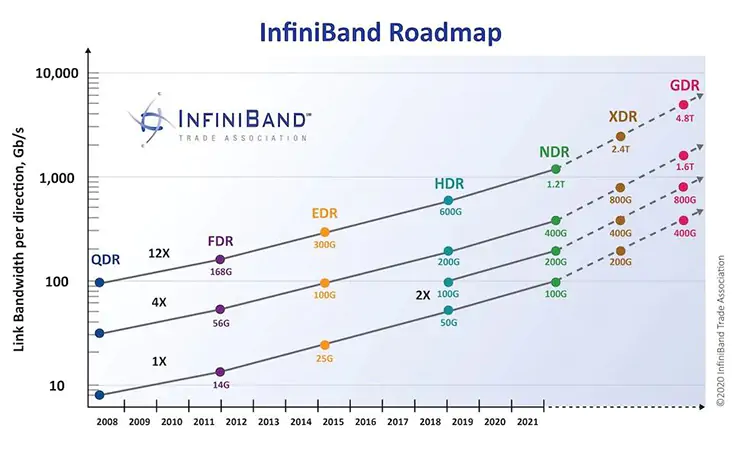
1.6 Tbps IB has been on the IB roadmap since at least 2020. And that assumes the "nominal" 4x link. 12x links has been a thing since pretty much forever (for IB).
Seemed to have been a time-specific bug, because I currently do have at least one server with a MegaRAID SAS which is conveniently still in the Linux kernel: https://github.com/torvalds/linux/blob/master/drivers/scsi/megaraid/megaraid_sas.h - it works on modern Ubuntu kernels, you seem to be pointing to a very time-specific bug in the kernel around 6.8 which seems to have been resolved regarding JBOD mode? I actually have multiple servers running with Proxmox that have some form of MegaRAID controller in them (not my choice, conversion from VMware garbage).
NVIDIA Ethernet is cheaper than NVIDIA InfiniBand fabric and NVIDIA is pretty much the most expensive solution out there today. Arista is cheaper and they're still not a 'cheap' option whilst Arista has even lower latency options. Talking datacenter networks here. We just purchased ~300 usable ports worth of NVIDIA 400G IB switches with optics - that's a $600k investment and we don't even have the annual management software license or the NIC-side (ConnectX 8) and NIC-side optics or cabling, all-in all, I'm estimating $1.2M over a 5 year period. There is no 400G Ethernet fabric that costs $4k/link, it's about half to a quarter of that cost depending on your switch gear. I think it's a waste of money, but the religion of IB is strong amongst some people.
My point was you can't push 100Gbps from a single spinning disk that gives at best 1-10Mbps of throughput (if not reading from cache).
NVIDIA Ethernet is cheaper than NVIDIA InfiniBand fabric and NVIDIA is pretty much the most expensive solution out there today. Arista is cheaper and they're still not a 'cheap' option whilst Arista has even lower latency options. Talking datacenter networks here. We just purchased ~300 usable ports worth of NVIDIA 400G IB switches with optics - that's a $600k investment and we don't even have the annual management software license or the NIC-side (ConnectX 8) and NIC-side optics or cabling, all-in all, I'm estimating $1.2M over a 5 year period. There is no 400G Ethernet fabric that costs $4k/link, it's about half to a quarter of that cost depending on your switch gear. I think it's a waste of money, but the religion of IB is strong amongst some people.
My point was you can't push 100Gbps from a single spinning disk that gives at best 1-10Mbps of throughput (if not reading from cache).
Last edited:
I played with gluster3.7 back in like 2018-2019 in an attempt to solve a very specific problem: burning through SSDs because of FEA scratch data.I gave up on all the software-defined storage layers.
Went back to direct-2-nvme
RAM doesn't have the same kind of finite write endurance limit like NAND flash based SSDs have. (If RAM has a write endurance limit, it is orders of magnitude higher than NAND flash based SSDs.)
I deploy ceph because my OASLOA mini PCs only has a single 2242 M.2 NVMe SSD slot. (Said mini PC is smaller than a magic 8-ball.)
As a result, adding more storage to said mini PC wasn't an (available) option.
For smaller LXCs and VMs that aren't disk/I/O intensive, it's fine. (Windows AD DC, DNS, AdGuardHome).
But for other LXCs/VMs where it has become more disk/I/O intensive, Ceph's erasure coding performance issues starts to rear its ugly head.
Given that I can use 22% of an 11 year old HDD's performance capabilities, if I applied that to said 2242 M.2 NVMe SSD, it'll be a lot better than the current ~5% performance that I am getting from said 2242 M.2 NVMe SSD. Like literally 4x better.
So in playing with it and having "lived" with it for a few years, I've also learned what a lot of ceph advocates won't admit (that ceph has a pretty major erasure coding performance problem) that many either don't recognise, don't know, or don't want to talk about it.
And like @Domino, I use HW RAID, ZFS (SW RAID), ceph, and now gluster (again), but this gives me an idea (or at least an incentive) to actually move off of ceph and back on to gluster, given the performance benefits that gluster provides over ceph.
(Again, a lot of people talk about ceph in the context of replication. There aren't as many people who talk about ceph from the context of erasure coding.)
The reason boils down to something very simple (per @Domino's KISS principle): stop breaking stuff.Obviously you have your reasons and you know a lot of details, including the background. I am absolutely fine to let you choose your way to go, even when I would never go that route
I can't tell you how many times things have broken because of an update (in Linux).
I mean, the forums here are littered with posts/threads about stuff breaking. (Same with Wendell's Level1Techs forums, and similar with Lawrence's Lawrence Systems forums, not to mention the github issues page for the various projects.)
At least I was able to use my 4930K to test PVE8, only to find out that the 9361-8i breaks with the kernel that ships with PVE8, so it's a good thing that I tested it out first before even considering or thinking about deploying it on my PROD system (because if I didn't test it, it would've broken my PROD system/server).
(Yet another thread about stuff breaking in LInux/PVE.)
So, now, "complexities" arise due to other (sometimes physical) limitations. Sometimes it's due to financial/monetary constraints. (What's the most cost efficient solution that also minimises cost?) Sometimes it's because new stuff breaks stuff ("if it ain't broke, don't break it"), and then keep things as simple as possible.
If the older hardware still works "enough", then why buy new?
(I'd rather invest that money that I was going to spend, in to the kids' college fund.)