Hello,
I notice on some instances of Windows Server 2016 the loss of the network when the replication starts.
When I log in the icon has an exclamation point and I have to disable the network and reactivate it.
Did it happen to you?
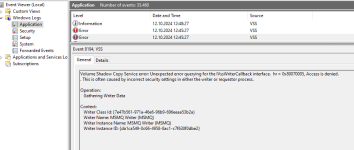
Some Windows logs:
Thanks!
I notice on some instances of Windows Server 2016 the loss of the network when the replication starts.
When I log in the icon has an exclamation point and I have to disable the network and reactivate it.
Did it happen to you?
Some Windows logs:
Log Name: Application
Source: VSS
Date: 07/02/2022 10:03:56
Event ID: 8194
Task Category: None
Level: Error
Keywords: Classic
User: N/A
Computer: ARXIVAR-DB
Description:
Volume Shadow Copy Service error: Unexpected error querying for the IVssWriterCallback interface. hr = 0x80070005, Access is denied.
. This is often caused by incorrect security settings in either the writer or requestor process.
Operation:
Gathering Writer Data
Context:
Writer Class Id: {e8132975-6f93-4464-a53e-1050253ae220}
Writer Name: System Writer
Writer Instance ID: {8195ebd8-9aaa-4a17-b753-9400978e68b7}
Event Xml:
<Event xmlns="http://schemas.microsoft.com/win/2004/08/events/event">
<System>
<Provider Name="VSS" />
<EventID Qualifiers="0">8194</EventID>
<Level>2</Level>
<Task>0</Task>
<Keywords>0x80000000000000</Keywords>
<TimeCreated SystemTime="2022-02-07T09:03:56.866107500Z" />
<EventRecordID>2883550</EventRecordID>
<Channel>Application</Channel>
<Computer>ARXIVAR-DB</Computer>
<Security />
</System>
<EventData>
<Data>0x80070005, Access is denied.
</Data>
<Data>
Operation:
Gathering Writer Data
Context:
Writer Class Id: {e8132975-6f93-4464-a53e-1050253ae220}
Writer Name: System Writer
Writer Instance ID: {8195ebd8-9aaa-4a17-b753-9400978e68b7}</Data>
<Binary>2D20436F64653A20575254575254494330303030313238392D2043616C6C3A20575254575254494330303030313234332D205049443A202030303030313235322D205449443A202030303030353037322D20434D443A2020433A5C57696E646F77735C53797374656D33325C737663686F73742E657865202D6B204E6574776F726B53657276696365202020202020202D20557365723A204E616D653A204E5420415554484F524954595C4E4554574F524B20534552564943452C205349443A532D312D352D3230</Binary>
</EventData>
</Event>
__________________________________________________________________________________
Log Name: System
Source: Microsoft-Windows-Time-Service
Date: 06/02/2022 21:39:14
Event ID: 134
Task Category: None
Level: Warning
Keywords:
User: LOCAL SERVICE
Computer: ARXIVAR-DB
Description:
NtpClient was unable to set a manual peer to use as a time source because of DNS resolution error on 'time.windows.com,0x8'. NtpClient will try again in 30 minutes and double the reattempt interval thereafter. The error was: No such host is known. (0x80072AF9) Event Xml:
<Event xmlns="http://schemas.microsoft.com/win/2004/08/events/event">
<System>
<Provider Name="Microsoft-Windows-Time-Service"
Guid="{06EDCFEB-0FD0-4E53-ACCA-A6F8BBF81BCB}" />
<EventID>134</EventID>
<Version>0</Version>
<Level>3</Level>
<Task>0</Task>
<Opcode>0</Opcode>
<Keywords>0x8000000000000000</Keywords>
<TimeCreated SystemTime="2022-02-06T20:39:14.239646500Z" />
<EventRecordID>391677</EventRecordID>
<Correlation />
<Execution ProcessID="1060" ThreadID="1156" />
<Channel>System</Channel>
<Computer>ARXIVAR-DB</Computer>
<Security UserID="S-1-5-19" />
</System>
<EventData Name="TMP_EVENT_MANUAL_PEER_DNS_ERROR">
<Data Name="ErrorMessage">No such host is known.
(0x80072AF9)</Data>
<Data Name="RetryMinutes">30</Data>
<Data Name="DomainPeer">time.windows.com,0x8</Data>
</EventData>
</Event>
_______________________________________________________________
Log Name: System
Source: Microsoft-Windows-Time-Service
Date: 04/02/2022 17:42:44
Event ID: 134
Task Category: None
Level: Warning
Keywords:
User: LOCAL SERVICE
Computer: ARXIVAR-DB
Description:
NtpClient was unable to set a manual peer to use as a time source because of DNS resolution error on 'time.windows.com,0x8'. NtpClient will try again in 15 minutes and double the reattempt interval thereafter. The error was: No such host is known. (0x80072AF9) Event Xml:
<Event xmlns="http://schemas.microsoft.com/win/2004/08/events/event">
<System>
<Provider Name="Microsoft-Windows-Time-Service"
Guid="{06EDCFEB-0FD0-4E53-ACCA-A6F8BBF81BCB}" />
<EventID>134</EventID>
<Version>0</Version>
<Level>3</Level>
<Task>0</Task>
<Opcode>0</Opcode>
<Keywords>0x8000000000000000</Keywords>
<TimeCreated SystemTime="2022-02-04T16:42:44.963294400Z" />
<EventRecordID>391117</EventRecordID>
<Correlation />
<Execution ProcessID="1060" ThreadID="1556" />
<Channel>System</Channel>
<Computer>ARXIVAR-DB</Computer>
<Security UserID="S-1-5-19" />
</System>
<EventData Name="TMP_EVENT_MANUAL_PEER_DNS_ERROR">
<Data Name="ErrorMessage">No such host is known.
(0x80072AF9)</Data>
<Data Name="RetryMinutes">15</Data>
<Data Name="DomainPeer">time.windows.com,0x8</Data>
</EventData>
</Event>
Thanks!