Unable to restore VM

libtech

New Member
Aug 27, 2025
15
0
1
Hi Community,
First time I am trying to restore a VM from the backup, and I am getting the following error. About a year ago, I switched from RHEL KVM to Proxmox VE and also installed Proxmox Backup on a mini PC with 1 TB of storage and integrated it with Proxmox VE. Promox is still to me; I am not sure if I missed something during installation, configuration, or integration. How can I restore the VM, and how can I fix the issue so it won't happen again? Appreciate your help.
Logical volume "vm-148-disk-0" created.
new volume ID is 'local-lvm:vm-148-disk-0'
Logical volume "vm-148-disk-1" created.
new volume ID is 'local-lvm:vm-148-disk-1'
Logical volume "vm-148-disk-2" created.
new volume ID is 'local-lvm:vm-148-disk-2'
restore proxmox backup image: /usr/bin/pbs-restore --repository root@pam@192.168.50.18:backup1 vm/124/2026-05-03T08:06:30Z drive-scsi0.img.fidx /dev/pve/vm-148-disk-0 --verbose --format raw --skip-zero
connecting to repository 'root@pam@192.168.50.18:backup1'
using up to 4 threads
open block backend for target '/dev/pve/vm-148-disk-0'
starting to restore snapshot 'vm/124/2026-05-03T08:06:30Z'
download and verify backup index
fetching up to 16 chunks in parallel
progress 1% (read 268435456 bytes, zeroes = 0% (0 bytes), duration 2 sec)
progress 2% (read 536870912 bytes, zeroes = 1% (8388608 bytes), duration 5 sec)
restore failed: reading file "/mnt/datastore/backup1/.chunks/aabe/aabec9020cadc776a9ab4169df2133a5ecdcad77d6777210d2aab5037a02bc07" failed: No such file or directory (os error 2)
Logical volume "vm-148-disk-2" successfully removed.
temporary volume 'local-lvm:vm-148-disk-2' successfully removed
Logical volume "vm-148-disk-1" successfully removed.
temporary volume 'local-lvm:vm-148-disk-1' successfully removed
Logical volume "vm-148-disk-0" successfully removed.
temporary volume 'local-lvm:vm-148-disk-0' successfully removed
error before or during data restore, some or all disks were not completely restored. VM 148 state is NOT cleaned up.
TASK ERROR: command '/usr/bin/pbs-restore --repository root@pam@192.168.50.18:backup1 vm/124/2026-05-03T08:06:30Z drive-scsi0.img.fidx /dev/pve/vm-148-disk-0 --verbose --format raw --skip-zero' failed: exit code 255
 
Code:
restore failed: reading file "/mnt/datastore/backup1/.chunks/aabe/aabec9020cadc776a9ab4169df2133a5ecdcad77d6777210d2aab5037a02bc07" failed: No such file or directory (os error 2)
Please try to run a verify job on your PBS.
 
Last edited:
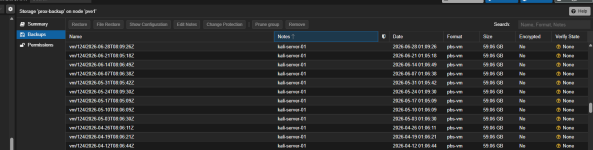
Can you please elaborate? How can I run a verify job? I have the last 12 backups, and I tried all except the last one, which is a faulty one.
Screenshot 2026-06-28 102020.png
Here is the content of aabe directory and I don't see 07

root@backup:~# ls -al /mnt/datastore/backup1/.chunks/aabe/
total 15624
drwxr-x--- 2 backup backup 4096 Jun 7 01:20 .
drwxr-x--- 65538 backup backup 1069056 Jun 28 10:23 ..
-rw-r--r-- 1 backup backup 2075693 Mar 8 01:05 aabe13ff45a2c39e027c3edd519cb42c810116f2c7766498e05224bf560cc81f
-rw-r--r-- 1 backup backup 1169279 May 24 01:06 aabe165f8ceae22176e0bdf6550713ce1a32ec92b4150f183f926da7896c6447
-rw-r--r-- 1 backup backup 28807 Mar 22 01:07 aabe3c688419ea672509f9e7cecfc1759247fb58bcf44dd04dd52c678482d315
-rw-r--r-- 1 backup backup 410376 May 31 01:05 aabe7a4d15c579cd9c9c6a1ad56c54be7e7d182a5e495e842193bb1ecfdfa37f
-rw-r--r-- 1 backup backup 1689358 Mar 29 01:12 aabe84414ac081b6170f880f9a35800d46d578de60711d281429d9fb1cb67903
-rw-r--r-- 1 backup backup 3302659 Mar 22 01:30 aabe8f8c0817bb6cf9cc22b11cb5ea84bda18467bb90d0848cf4134ed1d6acc9
-rw-r--r-- 1 backup backup 262883 Mar 22 01:15 aabe93c66320c518f74bc5424f7343846a125c81207870b3bbdea46a2a97620d
-rw-r--r-- 1 backup backup 2766409 Jun 7 01:20 aabedb9e4df1b7857b0d831f9ffc717e73e6fc6c3f59debc51ac49d0af028caf
-rw-r--r-- 1 backup backup 2121942 Apr 5 01:25 aabee1c53cf46346ceb649be1e2fc3bdd5d5e4707eb62e37b600daed6263d8d6
 
Last edited:
Visit your PBS and manually run a verification job. You can find it via Sidebar > Datastore > Verify Jobs.
Alternatively verify backups manually through the Content tab as per docs. Right now none of the backups are verified.
View attachment 98671
My apologies, earlier I didn't understand where to run the verify job. I just ran verify job jobs for the last 30 days, and I am getting output "chunk xxxxx was marked as corrupt." Since these corrupted backups can't be fixed, and I have more than a hundred backup files there. What can I do to make backups so they remain uncorrupted moving forward? Thanks

2026-06-28T10:33:43-07:00: chunk 556855009193ee0e8e72894ef7ca14c3dcc00e08acf325f9c97fef5f5b68b24f was marked as corrupt
2026-06-28T10:33:43-07:00: chunk 7aa645a63a1450c2ddfdcf2376e30d9b665472aea8e32a8f53d84004fcf03f41 was marked as corrupt
2026-06-28T10:33:43-07:00: chunk 1a75bb9c6f22976592882761f39343cc2f333811649d416f457884e59ebc7d99 was marked as corrupt
2026-06-28T10:33:43-07:00: chunk 9a12826fa0f1f251b455706f018f008e53b3c7ddacfbd6c5269d89a569cc7975 was marked as corrupt
 
Hard to say. What's the storage on PBS look like?
Bash:
lsblk -o+FSTYPE,LABEL,MODEL
df -hT

# Sanitize if needed
cat /etc/proxmox-backup/datastore.cfg
 
I just enabled the verify job option. Here is the output of the commands. I am also running "Prune & GC j" job, and I am getting a lot of warnings such as "unable to access non-existent chunk xxxx."

root@backup:~# lsblk -o+FSTYPE,LABEL,MODEL
NAME MAJ:MIN RM SIZE RO TYPE MOUNTPOINTS FSTYPE LABEL MODEL
sda 8:0 0 7.3T 0 disk WDC WD80EAAZ-00BXBB0
└─sda1 8:1 0 7.3T 0 part /mnt/datastore/backup1 xfs
sdb 8:16 1 119.5G 0 disk Flash Drive FIT
├─sdb1 8:17 1 1007K 0 part
├─sdb2 8:18 1 1G 0 part /boot vfat
└─sdb3 8:19 1 118.5G 0 part LVM2_member
├─pbs-swap 252:0 0 4G 0 lvm [SWAP] swap
└─pbs-root 252:1 0 99.8G 0 lvm / ext4
sr0 11:0 1 1024M 0 rom HL-DT-ST DVD+/-RW GTA0N
root@backup:~# df -hT
Filesystem Type Size Used Avail Use% Mounted on
udev devtmpfs 3.9G 0 3.9G 0% /dev
tmpfs tmpfs 786M 2.5M 783M 1% /run
/dev/mapper/pbs-root ext4 98G 33G 60G 36% /
tmpfs tmpfs 3.9G 0 3.9G 0% /dev/shm
tmpfs tmpfs 5.0M 0 5.0M 0% /run/lock
/dev/sdb2 vfat 1022M 12M 1011M 2% /boot
/dev/sda1 xfs 7.3T 1.6T 5.8T 22% /mnt/datastore/backup1
tmpfs tmpfs 786M 0 786M 0% /run/user/1000
root@backup:~# cat /etc/proxmox-backup/datastore.cfg
datastore: backup1
path /mnt/datastore/backup1
verify-new true
 
Please use code blocks (like I did above), not quotes for this. They preserve the formatting which is important for readability.
I'm not familiar with XFS but maybe it had a problem and you can run a file system check/repair.
See if you can find some errors in the kernel log and also check the SMART data of the drive(s).
Bash:
journalctl -b0 -kr
smartctl -a /dev/sda
smartctl -a /dev/sdb
As for the corrupted backups see here: https://forum.proxmox.com/threads/resolving-corrupt-chunks.164036/
 
The only thing I am seeing is the below error from journalctl, the other two commands don't show any errors.
Jun 26 07:58:42 backup kernel: [Firmware Bug]: TSC_DEADLINE disabled due to Errata; please update microcode to version: 0x22 (or later)
 
Whether or not you can recover the backup of this VM will likely depend on how much data was lost, but to avoid this problem in the future you will need to reconsider your PBS hardware setup of a single 128GB USB stick for the OS and a single 8TB HDD for the backup datastore. It is not robust because there is no data redundancy, which is particularly risky for deduped workloads such as PBS.

Absolute minimum would be mirrored drives for the PBS datastore using ZFS.

In my opinion a very good solution is to install PVE on the backup server hardware directly, and run PBS as a VM. Mirrored SSDs for the OS and mirrored hard drives for the PBS datastore at minimum. Do not allocate all of the drive space to the PBS VM.
This allows you to restore and run VMs directly on the host in a disaster recovery scenario where your main hosts are down or for performing restore testing, as well as a very long list of other virtualization advantages such as snapshots before upgrades and easy hardware migrations.

I would also suggest setting up a second PBS server to pull and sync backups from the first PBS server, ideally offsite.

Finally, check out some PBS setup tutorials and guides, because you need to have properly scheduled and configured tasks for Prune, GC and Verify jobs.