

Hi folks,
What is the maximum value for the disk size of a VM, in a shared storage environment with LVM type ?
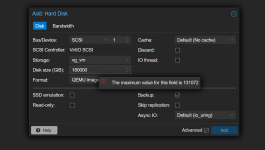
In our environment (multiple host, with a shared lvm storage type - DELL ME5084), when i try to create a new hard drive from the GUI, it said : "the maximum vlue for this field is 131072", so 140 TB
If i try the command from cli (here a 180 TB disk ), i get another error :
It seems for example with lvm-thin, we should create hard drive with more size but lvm-thin is not able to run on shared storage ...
So it seems with shared LVM Storage type, i can't go further than 140 TB, is there another solution to bypass this ?
Thank you !
V.
What is the maximum value for the disk size of a VM, in a shared storage environment with LVM type ?
In our environment (multiple host, with a shared lvm storage type - DELL ME5084), when i try to create a new hard drive from the GUI, it said : "the maximum vlue for this field is 131072", so 140 TB
If i try the command from cli (here a 180 TB disk ), i get another error :
Code:
# qm set 122 --scsihw virtio-scsi-pci --scsi1 vg_vm:180000
update VM 122: -scsi1 vg_vm:180000 -scsihw virtio-scsi-pci
  Rounding up size to full physical extent <175.81 TiB
  Logical volume "vm-122-disk-1.qcow2" created.
Formatting '/dev/vg_vm/vm-122-disk-1.qcow2', fmt=qcow2 cluster_size=65536 extended_l2=off preallocation=metadata compression_type=zlib size=193273528320000 lazy_refcounts=off refcount_bits=16
  Logical volume "vm-122-disk-1.qcow2" successfully removed.
unable to create image: qemu-img: /dev/vg_vm/vm-122-disk-1.qcow2: Could not resize image: Cannot grow device files
It seems for example with lvm-thin, we should create hard drive with more size but lvm-thin is not able to run on shared storage ...
So it seems with shared LVM Storage type, i can't go further than 140 TB, is there another solution to bypass this ?
Thank you !
V.
Attachments
Last edited:

