it's mandatory , as this is the point of the topic.Might try using Virtio SCSI


Redhat VirtIO developers would like to coordinate with Proxmox devs re: "[vioscsi] Reset to device ... system unresponsive"
- Thread starter ylluminate
- Start date
-
- Tags
- virtio virtio disk virtio scsi
You are using an out of date browser. It may not display this or other websites correctly.
You should upgrade or use an alternative browser.
You should upgrade or use an alternative browser.
didn't helps neither unfortunately.it's mandatory , as this is the point of the topic.
then your problem is elsewhere.
that's not this topic.
slow destination backup can slowdown VM up to crash.
create new topic, or append to existing topics about it.
that's not this topic.
slow destination backup can slowdown VM up to crash.
create new topic, or append to existing topics about it.
the recommended way for primary backup, is local backup, then secondary backup can sync from primary backup, which not disturb the VM.
Assuming it is an option with however you are backing up, have you tried turning on backup fleecing? https://pve.proxmox.com/pve-docs/chapter-vzdump.html#_vm_backup_fleecingIndeed, the problem has appeared soon after we changed the provider to Starlink which has very low upstream bandwidth and the backup we do is cloud based. so ineed that migh be a reason. thanks for the hint.

If you want permanent fix, already mentioned in this thread:
- Use SATA disk emulation with Default controller (LSI 53C895A),
- Do not use virtio- emulation in Windows VM,
- Other VMs works fine with virtio (Linux),
This can be fix up to Windows Server 2025,
for Windows Server 2025 there is no fix (There is no driver for legacy SATA controller - LSI 53C895A).
It will drop performance? Yes,but it will be stable and error free.
It is very sad to see, the upstream KVM/QEMU devs cannot solve this long exsisting problem, but other Virt. platform did ( Vmware )

I can answer the "Windows Server 2025" question: use "nvme disk" emulation subsystem:
PVE v8 , PVE v9 - will work ( requires qemu 9.2+ )
https://www.qemu.org/docs/master/system/devices/nvme.html
Code:
-drive file=disk0.qcow2,if=none,id=nvm
-device nvme,serial=deadbeef,drive=nvm
So in time, the problem solved (get rid of SAS/SATA emulation).
Last edited:
Anyone here advise from that huge long thread what the current state of play is with MS SQL server and PVE?
My thread and details here: https://forum.proxmox.com/threads/sql-server-2022-database-corruption.185694/#post-865582
My thread and details here: https://forum.proxmox.com/threads/sql-server-2022-database-corruption.185694/#post-865582
See #287Anyone here advise from that huge long thread what the current state of play is with MS SQL server and PVE?
My thread and details here: https://forum.proxmox.com/threads/sql-server-2022-database-corruption.185694/#post-865582
Use SATA disk emulation.

0.1.302 came out last week. We haven't tried it yet.
https://fedorapeople.org/groups/vir...ownloads/archive-virtio/virtio-win-0.1.302-1/
https://www.reddit.com/r/Proxmox/s/rIy1Ujf8D4
https://fedorapeople.org/groups/vir...ownloads/archive-virtio/virtio-win-0.1.302-1/
https://www.reddit.com/r/Proxmox/s/rIy1Ujf8D4
it's August Windows Update reveals trim error, not Virt SCSI driver.
Myself have trim failure since few years, with some configurations, only setting discard_granularity in args: fix it.
Myself have trim failure since few years, with some configurations, only setting discard_granularity in args: fix it.
discard_granularity was still needed on driver .266, at least for the CPU usage/timeouts. We are using Ceph for VM storage.
ref:
2024 post: https://www.alldiscoveries.com/how-...frag-on-windows-server-virtualized-with-qemu/
and various threads here like: https://forum.proxmox.com/threads/server-2022-defrag-trim-pegging-cpu-and-ram.161514/post-818884
https://bugzilla.proxmox.com/show_bug.cgi?id=5552
ref:
2024 post: https://www.alldiscoveries.com/how-...frag-on-windows-server-virtualized-with-qemu/
and various threads here like: https://forum.proxmox.com/threads/server-2022-defrag-trim-pegging-cpu-and-ram.161514/post-818884
https://bugzilla.proxmox.com/show_bug.cgi?id=5552
The TRIM issue occurs because Microsoft introduced some trim functions not yet implemented in virtio's driver. It's not related to ZFS's backend.It fixes the SQL problem but not the TRIM one. The TRIM problem is only if you are using ZFS as I understand.
Version .271 is still the only one with none of these problems.
I've added what I found in this github issue: https://github.com/virtio-win/kvm-guest-drivers-windows/issues/1574#issuecomment-5478445229
Only affects updated W11 and Windows Server 2022/2025.
Virtio 271, 285 or 302 doesn't make a difference in this TRIM issue, all fail.
Hello I've have installed this new driver on our Test servers and have done the following in terms of multi-day testing:
- Boot-volume operation on vioscsi 0.1.302
- Multiple reboots and device checks
- Five active VirtIO SCSI controllers
- Overnight operational soak
- Multiple PBS snapshot backups
- Guest-agent filesystem freeze and thaw under heavy I/O
- 4 KiB random mixed read/write workloads
- 1 MiB sequential mixed read/write workloads
- Single-controller and dual-controller tests
- Up to 256 outstanding I/O requests
- More than 245 million DiskSpd operations
- Approximately 606 MiB/s sustained dual-controller sequential throughput
- A one-hour random workload completing 207.5 million operations
- Repeated successful DBCC CHECKDB checks
- No Event ID 129 RAID-port resets
- No Event ID 153 I/O retries
- No DiskSpd I/O errors
- No disk, Storport, vioscsi, NTFS, or Volmgr warnings
- No missing or unhealthy disks
- No SQL database consistency errors
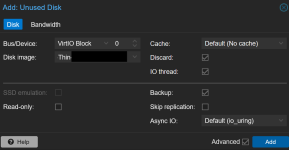
@emunt6 hello, thank you for this summary comment, I just reached the bottom of this rabbit hole. Could you tell pls if nvme is the best possible choice or the "virtio block" is also good? Its 2026 so I discussing with Gemini too and it says "virtio block" is better option compared to nvme because it has hypervisor integration. What do you think?I can answer the "Windows Server 2025" question: use "nvme disk" emulation subsystem:
PVE v8 , PVE v9 - will work ( requires qemu 9.2+ )
https://www.qemu.org/docs/master/system/devices/nvme.html
Code:-drive file=disk0.qcow2,if=none,id=nvm -device nvme,serial=deadbeef,drive=nvm
So in time, the problem solved (get rid of SAS/SATA emulation).
Last edited:

VirtIO Block != VirtioSCSI - afaik VirtioSCSI has better performance and is recommended choice.@emunt6 hello, thank you for this summary comment, I just reached the bottom of this rabbit hole. Could you tell pls if nvme is the best possible choice or the "virtio block" is also good? Its 2026 so I discussing with Gemini too and it says "virtio block" is better option compared to nvme because it has hypervisor integration. What do you think?
View attachment 99822
Thats clear. My WS2025VMs are crashing with Proxmox 9 + Windows server 2025 + VirtioSCSI 285 during heavy disk I/O sitations and my understanding that its happening because virtioscsi driver is not properly supporting Windows Server 2025. And as a workaround mentioned in #287 I try to set the disk type to something else. There were mentioned NVME and I was asking if Virtio Block is good or not too.VirtIO Block != VirtioSCSI - afaik VirtioSCSI has better performance and is recommended choice.