[SOLVED] RAIDz2 zpool not showing full capacity after zpool attach

alia80

Member
Sep 21, 2021
23
2
23
56
I had a zpool with 4x8TB SATA drives in a RAIDz2 with a total capacity of 16TB. I updates to PVE 9 and ZFS to 2.3 and attached 2 additional drives to the zpool using:

Bash:
zpool upgrade <poolname>
zpool attach <poolname> raidz2-0 /dev/disk/by-id/<drive1>

I waited after each drive addition for re-silvering and scrub. However, the addition of each drive only added 4TB of new space resulting in a total capacity of 24TB instead of the 32TB I was expecting. I tried to resolve this using the following steps:

Bash:
zpool set autoexpand=on <poolname>
zpool online -e <poolname> /dev/disk/by-id/<drive1>
zpool online -e <poolname> /dev/disk/by-id/<drive2>
reboot

However, the resulting zpool is still showing only 24TB of total capacity. I came across a ZFS re-balancing script which just re-writes each file but zfs 2.3+ has a zfs rewrite, which can do the same job. I tried to rewrite some files using a loop:

Bash:
find . -type f -size -400M -exec zfs rewrite -v {} >>./zfs_rewrite.list \;
reboot

I only did this for a few files but it it does not seem to be making a difference.

Does anyone have any insight into why I can't see the expected 32TB capacity and how to mitigate this?
 
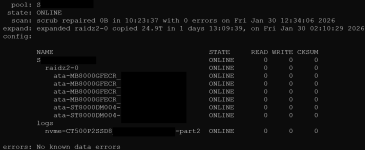
Please share zpool status -v and zpool list -v. Attach was probably not the right choice for what you wanted to do.
 
Last edited:
Sorry, I confuse attach/add too often. I'd take a look at this too to get the whole picture
Bash:
zfs list -ospace,type,logicalused,compression,compressratio,reservation,refreservation -rS used
 
I am incrementally using zfs rewrite to rewrite all the files but I don't see any change so far in the capacity. I even moved some files off the pool but it made no difference to the total reported capacity.

Does anyone have any other suggestions?
 
First compare your expectations with this one: https://wintelguy.com/zfs-calc.pl

For 6 * 8000 GB it gives 43.655746 TiB raw - which is shown in the second screenshot of #3. The construction of your single vdev worked as expected.

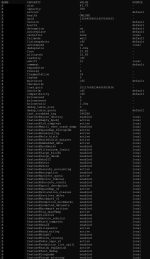
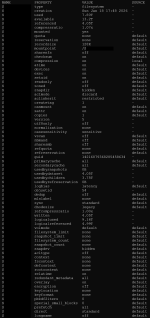
Check zpool get all S and zfs get all S to verify there are no artificial limits set.

If you miss space then the reason may be suboptimal "padding". Unfortunately I can not explain it well, but it has been discussed here more than once. For instance: https://forum.proxmox.com/threads/z...available-space-than-given.121532/post-528282

Your "zfs rewrite" only works for datasets (with files in it), not with zvols. (Not yet, I believe.) You need to copy/move those zvols too. Only then that data gets redistributed onto all 6 drives. Currently it uses only the "old" four drives - and keeps the old netto/brutto factor.
 
First compare your expectations with this one: https://wintelguy.com/zfs-calc.pl

For 6 * 8000 GB it gives 43.655746 TiB raw - which is shown in the second screenshot of #3. The construction of your single vdev worked as expected.

Check zpool get all S and zfs get all S to verify there are no artificial limits set.

If you miss space then the reason may be suboptimal "padding". Unfortunately I can not explain it well, but it has been discussed here more than once. For instance: https://forum.proxmox.com/threads/z...available-space-than-given.121532/post-528282

Your "zfs rewrite" only works for datasets (with files in it), not with zvols. (Not yet, I believe.) You need to copy/move those zvols too. Only then that data gets redistributed onto all 6 drives. Currently it uses only the "old" four drives - and keeps the old netto/brutto factor.
Here is a listing of all the properties, I had added a quota on a subdirectory but have since removed it to see if it was causing issues:

zpool get all S
Screenshot 2026-02-03 175947_edited.png

zfs get all S
Screenshot 2026-02-03 180007_edited.png
 
i have now re-written or moved nearly 100% of the data on pool with the exception of VM disks and so far no difference in reported capacity. Does anyone have any additional ideas? Would exporting and re-importing the pool help?
 
I moved a lot of data off the pool and used zfs rewrite to rewrite all the files hoping it would recover the reported capacity but none of it worked. The only interesting thing was that when I copied files to another pool the reported size of directories was different if I checked using du -s. However the files were fine on either pool and the reported size using samba matched.

Finally I just moved all the files off the pool and destroyed it and recreated it. Now it is reporting the correct capacity. Hopefully someone can explain this or fix it in zfs.

I am not sure if marking it solved is appropriate but that seems to be the only option to mark it closed.
 
  • Like
Reactions: UdoB
It is really sad that it seem to be still a NOT solved problem.

We also tried the exact same way, but it isn't possible to get the correct size in pool/vdev after attaching.
If i see the posts in other forums, like truenas it doesn't seem a Problem there. Maybe a Problem with the own/modified package of zfs from Proxmox?
zfs-2.4.1-pve1 and zfs-kmod-2.4.1-pve1

Raidz2 with 4 Disks (all 16tb) attached first new 16tb - only 8tb shown usable...

Hope there will be an answer or a patch in near future...
 
I now did the same successfully with a raidz2 pool made of 8 disks with 14 TB, adding a ninth one with 16 TB (just because 14 TB drives were more expensive).

After the expansion step (i.e. "zpool attach", which took about 1.5 days to complete), I gained the expected amount of free space, i.e. 7/9 * 14 TB = 10,9 TB.

The second step (realigning the existing data with zfs rewrite) can theorectically bring up to 3-4% more free capacity, but with a few caveats:

1. Read the man page of zfs rewrite, especially "-x" and "-P". As of today, "-C" and "-S" are not yet supported on PVE. Surprisingly, the tool operates on files, not on ZFS entities (see point #5). Also, the process takes a long time, so use screen or do something to detach the terminal.
2. Existing snapshots should be destroyed first, because they obviously would have a detrimental effect.
3. Files with hardlinks obviously should not be rewritten, either (like Dirvish backups). because zfs rewrite handles each file sequentially.
4. Small files (i.e. size < 1 GB) do not bring the desired effect, because sometimes, they do not even have a 6/8 ratio of net data to used space, which will not change with a 7/9 layout for small files. You can watch that zfs rewrite only analyzes these files, but does not rewrite their data by looking at "zpool iostat <pool> 10", which will show less bandwidth written than read.
5. ZFS volumes are not touched by zfs rewrite. They must be handled via zfs send/receive, best with an interspersed "pv -b 1G" on spinning disks.
6. LXC subvols are often not worth the effort, because they take ages to convert while the container must be stopped. The space of these will eventually even out, anyway.

Thus, you should essentially limit the zfs rewrite operation to file-based directories with large files (e.g. media storage). Expect that to run for a few days. I my case, I gained an additional 2 TB with an initiall 102 TB array with 12 TByte free. After expansion, it was at 115 TB and 24 TB free, after rewrite, it now shows 26 TB free.

IDK what went wrong with the OPs setup, maybe the process does only work one disk at a time for the expansion phase.
 
Last edited:
I now did the same successfully with a raidz2 pool made of 8 disks with 14 TB, adding a ninth one with 16 TB (just because 14 TB drives were more expensive).

After the expansion step (i.e. "zpool attach", which took about 1.5 days to complete), I gained the expected amount of free space, i.e. 7/9 * 14 TB = 10,9 TB.


First of all, thanks for the reply—I really appreciate the effort to help. But the explanation itself didn’t really solve my problem, because according to that, my pool should have expanded correctly after the expansion.

First off: How did you arrive at the expected size of 7/9 of the 14TB HDD?
The HDD/ZFS overhead on my 16TB drives is less than 10%. Also, according to 5 different ZFS RAID calculators, I should theoretically have about 60 TB of usable storage. But there’s only 46 TB...

Just a quick summary.

- I have a ZFS RAIDZ2 (4x 16 TB HDDs)

I wanted to expand this pool with a total of 2 additional 16 TB hard drives. (6x 16TB)
I performed the process for each hard drive INDIVIDUALLY. I am aware that the ZFS header must be deducted.
Before expanding, the pool had a usable size of approx. ~30TB

Command: [B]zpool attach <poolname> raidz2-0 /dev/disk/by-id/wwn-0x5000xxxxxxxx [/B]
it took also ~36 hours per attached Drive

After first attachment i had 38tb and after the second attachment i had 46tb.... what goes wrong?

ZFS Versions:
zfs-2.4.1-pve1
zfs-kmod-2.4.1-pve1


I Also tried this on a Test PC with new installed and empty PBS, 4x14tb HDD's - tried to attach 1x14tb HDD gained usable ~7tb space after....
 
The 7/9 ratio is just plain math: When you look at the end result with 7 disks + 2 parity, you will notice that the net capacity is 7/9th of the raw disk capacity. So when you add the 9th disk with 14 TB, you will not gain 14 TB more free space, but only 7/9ths of that.

That is irrespective of whatever was previously on the 8 existing disks. The ratio on those is still at 6/8, until you rewrite the data.

So you did add one disk at a time, like I did with only one disk. The strange part is that you should have gained 3/5 * 16 TB = 9,6 TB in the first step and 4/6 of 16 TB = 10.7 in the second. Remember: Initially, you could only use half of your raw disk size with only 4 disks - that is still only 60% with 5 disks and 66% with 6. Also, with existing data on the pool before expansion, the overall ratio is even worse than that.

Also, there are rounding errors with TB vs. Tibibyte, plus ZFS overhead.
 
Last edited:
  • Like
Reactions: Johannes S