Question about running Proxmox on a single consumer SSD

scopedberg

New Member
Nov 27, 2025
4
0
1
New York
Afternoon and happy thanksgiving. So recently i wanted to install Proxmox on a computer for server purposes. (Mainly running Home Assistant, Homebridge, pihole and windows ltsc. I can do it without windows too as this mainly is just for home purposes. Seeing online, consumer SSDs apparently arent reccomended as they might die fast. Im not planning to use the ZFS file system so not sure if this might affect my purpose or not which is why im asking here. Is it fine to run both the main OS and guest VM or containers on a single SSD? Its a Sandisk SSD Plus, SATA 3 and its 2.5. Thanks. Sorry if this has been answered somewhere, pretty new to proxmox stuff and currently learning.
 
Last edited:
While I currently use ZFS on enterprise SSDs I've also been running LVM based installs on bad (and small) SSDs for quite some time without real issues.
This topic is a bit controversial because some people have lots of dying disk issues while others seem to have none. It just depends on your workload. I recommend testing what your own IO looks like. You can then calculate the life here and think about "optimizations" if necessary. Write amplification has to be accounted for. Used DC drives <= 512GB can sometimes be had cheaper than consumer drives with the same size so I see no good reason not to use them. If you already have a SSD and you encounter no immediate issues with it I see no reason not to use it either. I have to use a 256GB OEM NVMe (PM981) in one of my Mini PCs as ZFS (won't give that up) boot drive and it works fine. Still has 95% health. The workload is very minimal though.
TLDR: If you buy new get a used DC drive, if not simply try it out with what you have.
 
Last edited:
While I currently use ZFS on enterprise SSDs I've also been running LVM based installs on bad (and small) SSDs for quite some time without real issues.
This topic is a bit controversial because some people have lots of dying disk issues while others seem to have none. It just depends on your workload. I recommend testing what your own IO looks like. You can then calculate the life here and think about "optimizations" if necessary. Write amplification has to be accounted for. Used DC drives <= 512GB can sometimes be had cheaper than consumer drives with the same size so I see no good reason not to use them. If you already have a SSD and you encounter no immediate issues with it I see no reason not to use it either. I have to use a 256GB OEM NVMe (PM981) in one of my Mini PCs as ZFS (won't give that up) boot drive and it works fine. Still has 95% health. The workload is very minimal though.
TLDR: If you buy new get a used DC drive, if not simply try it out with what you have.
Thank you. I will test and calculate the life. Pretty sure my use case shouldn’t wear the SSD that much. Gonna be using it for a few years only before I might get a full decent way to run proxmox.
 
Hi scopedberg,
my experience is similar to Impacts. I currently run PVE on my Laptops (home and work), and a Homeserver with "non enterprise" SSDs in a BTRFS RAID 1 Setup.
For my Homeserver I also ensure to have regular backups, via USB-Drives.
My Laptop work is backed up via git.

I consider the Enterprise Hardware recommendation mostly for productive setups. E.g. write intense database traffic. Non the less, it might be recommendable to not choose the hard drives only by the pricing, due to ongoing chip frauds and maybe invest some time for research.

BR, Lucas
 
Last edited:
  • Like
Reactions: scopedberg
Nothing wrong with a consumers ssd as long as you accept a lower performance, an earlier replace and not the same level of data security compared to enterprise ssds with powerloss protection. 3.2.1 backup should be done in all cases.

Despite a slightly higher write amplification, I would prefer ZFS over ext4 as it offers the two huge advantages Copy on Write (crash resistent, snap versioning) and checksums (validation, bitrot protection)
 
I use consumer SSDs (Samsung 990s) in a ZFS mirror for my boot drive. VMs go on a different disk.

I do install log2ram to cut down on disk usage.
 
  • Like
Reactions: scopedberg
I think it is fine, if you will not use zfs.
Personaly I am using mdadm raid 1 (yes I know...), 2x MX500 2TB and LVM on top for VM. Running fine for 3 years.
 
  • Like
Reactions: scopedberg
Nothing wrong with a consumers ssd as long as you accept a lower performance, an earlier replace and not the same level of data security compared to enterprise ssds with powerloss protection. 3.2.1 backup should be done in all cases.

Despite a slightly higher write amplification, I would prefer ZFS over ext4 as it offers the two huge advantages Copy on Write (crash resistent, snap versioning) and checksums (validation, bitrot protection)
Thank you for the info! Yeah I thought the same thing too, but not having power loss protection is fine for me, not gonna really need it as I’ll make occasional backups and have a stable system.
 
I have two nodes with consumer M.2 NVME SSDs in them. Both are used for the OS/boot as well as VM storage. Both are using ZFS, not LVM or an alternative. Personally I don't run any nodes in HA, I have the corosync, pve-ha-crm, and pve-ha-lrm services disabled. Maybe that makes a difference. But I have not experienced any inordinate or unsual wear in my consumer grade SSDs. I also don't really have a concern about power loss as I have cascading power backup sources (a Cyberpower Pure Sine Wave UPS plugged into an Ecoflow Delta 2 power station). I also have a NUT server running on all my nodes.

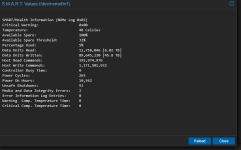
This one is used as my K3S testing cluster. The drives are a mirrored pair of Teamgroup MP44 drives. The data suggests I have at least 7-10 more years f usage on these, which is fine by me. I doub't I will keep this hardware around that long

1764704086274.png

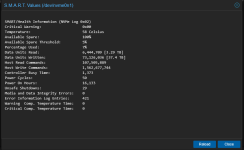
The other is my ansible and Open Media Vault node. It doesn't see much use other than running those two VMs. It has a single Sabrent Rocket PCI 4.0 drive in it. I think this one has many more years of useful life as well

1764704193653.png
 
Last edited: