

Hello! Basically, my Proxmox VE (9.2.3) shut itself down and rebooted itself randomly with what seems to be no reason for doing so. This is actually the second time it has done this, and if I remember correctly the first time was similar to what is happening now. The first time I just got tired trying to figure it out and just shrugged my shoulders, now that it's the second time I want to know why. I post this because when I check the logs it doesn't really seem like anything is causing this reboot other than maybe SMART values, but the SMART values from what I see on my drives aren't bad and they should be fine. It gets consistent power (UPS), it doesn't over heat (idle's 99% of the time @ 40C), and it doesn't seem like any of the two GPU pass-throughs that I have for two VM's are causing this issue. I do collect a lot of metrics, but those are stored on my NAS and do not fill up my Proxmox install drive.
When I look at the logs, it's basically just smartctl scans, my monitoring user for the PVE Prometheus exporter, and one section for when I turned on my monitor that has the USB hub on it that I use to pass through USB devices to a Windows 11 VM.
I also noticed that - like last time - a good bit before it shut down, it updated the package database, and on boot when I try to
launch my LXC's, they refuse to open for a while until they just decide to work again. I in no way ever expect this to be the reason for the shutdown, but I might as well add it.
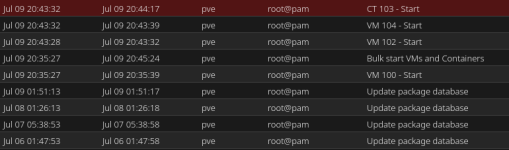
I attached my Proxmox logs from about ~50 minutes before the shut down, and my SMARTCTL long scan for my boot drive to show it's fine. If anyone can help me understand why Proxmox just shuts down and reboots it would be greatly appreciated. It's not the end of the world, but it's annoying when it happens .
.
When I look at the logs, it's basically just smartctl scans, my monitoring user for the PVE Prometheus exporter, and one section for when I turned on my monitor that has the USB hub on it that I use to pass through USB devices to a Windows 11 VM.
I also noticed that - like last time - a good bit before it shut down, it updated the package database, and on boot when I try to
launch my LXC's, they refuse to open for a while until they just decide to work again. I in no way ever expect this to be the reason for the shutdown, but I might as well add it.
Code:
run_buffer: 569 Script exited with status 2
lxc_init: 1037 Failed to run lxc.hook.pre-start for container "103"
__lxc_start: 2208 Failed to initialize container "103"
TASK ERROR: startup for container '103' failed
I attached my Proxmox logs from about ~50 minutes before the shut down, and my SMARTCTL long scan for my boot drive to show it's fine. If anyone can help me understand why Proxmox just shuts down and reboots it would be greatly appreciated. It's not the end of the world, but it's annoying when it happens
.
