

proxmox load almost all memory

PostmanPaul

Active Member
Dec 18, 2016
4
0
41
45
I´m using the newest proxmox.. and have 64GB memory. i have 2 computers on it.
1x 6GB
1x 2GB

Still it use 22GB memory and grows more and more. when i reboot. it uses around 10GB.
i hade 32GB innit before and it almost eat it alive!

Is there something wrong if proxmox load on memory or a bug?

Please advice me around this. Can give access to the box if needed.

Greets Örn ( PostmanPaul ) :)

P.S when i finish this and took the pic. 24GB is loaded.

When i finish this all. almost 26GB loaded!!
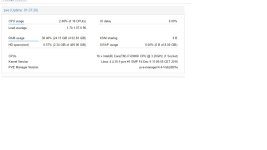

proxmoxMemBug.jpg
 
Also i get error....

[ 122.670892] pcieport 0000:00:01.0: [12] Replay Timer Timeout
[ 123.252431] pcieport 0000:00:01.0: AER: Corrected error received: id=0008
[ 123.252457] pcieport 0000:00:01.0: PCIe Bus Error: severity=Corrected, type=Data Link Layer, id=0008(Transmitter ID)
[ 123.252586] pcieport 0000:00:01.0: device [8086:6f02] error status/mask=00001000/00002000
[ 123.252706] pcieport 0000:00:01.0: [12] Replay Timer Timeout
[ 1088.469683] pcieport 0000:00:01.0: AER: Corrected error received: id=0008
[ 1088.469689] pcieport 0000:00:01.0: PCIe Bus Error: severity=Corrected, type=Data Link Layer, id=0008(Transmitter ID)
[ 1088.469742] pcieport 0000:00:01.0: device [8086:6f02] error status/mask=00001000/00002000
[ 1088.469781] pcieport 0000:00:01.0: [12] Replay Timer Timeout
[ 3200.968607] perf interrupt took too long (2513 > 2500), lowering kernel.perf_event_max_sample_rate to 50000
[ 4617.010131] pcieport 0000:00:01.0: AER: Corrected error received: id=0008
[ 4617.010174] pcieport 0000:00:01.0: PCIe Bus Error: severity=Corrected, type=Data Link Layer, id=0008(Transmitter ID)
[ 4617.010242] pcieport 0000:00:01.0: device [8086:6f02] error status/mask=00001000/00002000
[ 4617.010307] pcieport 0000:00:01.0: [12] Replay Timer Timeout
 
root@pve:~# free -h
total used free shared buffers cached
Mem: 62G 49G 13G 59M 912K 140M
-/+ buffers/cache: 49G 13G
Swap: 8.0G 0B 8.0G


and


root@pve:~# arcstat.py
time read miss miss% dmis dm% pmis pm% mmis mm% arcsz c
16:54:13 0 0 0 0 0 0 0 0 0 31G 31G
 
Or you can change this live by:
echo size > /sys/module/zfs/parameters/zfs_arc_max

example 10G
echo 10737418240 > /sys/module/zfs/parameters/zfs_arc_max