Proxmox defaults, set it and forget it

Nov 2, 2024
6
1
3
Dear all,

I'd like to set some defaults within PVE, but neither the manual nor the forum provided info on this:

  1. I want to have all VMs hard drives, created or reassigned, to be configured with

    "cache=directsync"

    When creating a VM,
    adding a HDD
    or detaching a disk and running "reassign Owner"

    the default cache policy kicks in

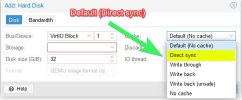
    "Default (No Cache)"

    Is there a way to adjust this policy setting to default to "Direct Sync"


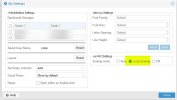
  2. within the user setting of the pve GUI (right top corner -> user@pve -> My settings)

    I'm able to set "noVNC Settings" to

    "Local Scaling"

    however, this setting does not survive a logout/login or a reboot.

    is there a way to set this permanently?

I'm fine using nano / vim to adjust any config.

As the title says, I'd like to "set it and forget it" and therefore I'm looking for a way that survives updates & upgrades.

thankfull for every hint!

Cheers
 

Attachments

  • 250129_110855.jpg
    250129_110855.jpg
    40.3 KB · Views: 15
  • 250129_111218.jpg
    250129_111218.jpg
    24.5 KB · Views: 15
Hi improver, you can edit /usr/share/pve-manager/js/pvemanagerlib.js (search for noVNC and directsync) but your changes were gone after next pve update again.
 
  • Like
Reactions: improver
Thanks a lot, waltar and Johannes S!

I've gone through pve-manager.js and found the scaling value @ line 20497

JavaScript:
init: function(view) {
        var me = this;
        var sp = Ext.state.Manager.getProvider();

        var username = sp.get('login-username') || Proxmox.Utils.noneText;
        me.lookupReference('savedUserName').setValue(Ext.String.htmlEncode(username));
        var vncMode = sp.get('novnc-scaling') || 'auto';
        me.lookupReference('noVNCScalingGroup').setValue({ noVNCScalingField: vncMode });


changing this value activates "local scaling" per default

JavaScript:
var vncMode = sp.get('novnc-scaling') || 'scale';


I've found "direct sync" in line 5130

JavaScript:
Ext.define('PVE.form.CacheTypeSelector', {
    extend: 'Proxmox.form.KVComboBox',
    alias: ['widget.CacheTypeSelector'],
    comboItems: [
    ['__default__', Proxmox.Utils.defaultText + " (" + gettext('No cache') + ")"],
    ['directsync', 'Direct sync'],
    ['writethrough', 'Write through'],
    ['writeback', 'Write back'],
    ['unsafe', 'Write back (' + gettext('unsafe') + ')'],
    ['none', gettext('No cache')],
    ],
});

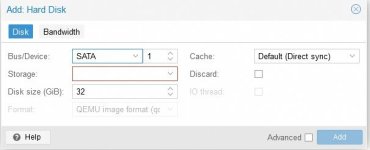
So I've changed line 5129 to

JavaScript:
 ['__default__', Proxmox.Utils.defaultText + " (" + 'Direct sync' + ")"],

the odd thing is, I don't get a reference within the Hardware Tab of the VM (argument "cache=directsync")
which seems, that the argument is not being passed to the vm.

editing the HDD after adding it to the VM
and selecting "direct sync" also adds the argument "cache=directsync".

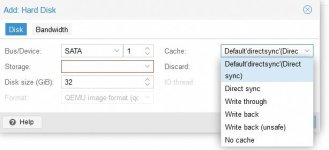
I've also tried to edit the line like

JavaScript:
['__default__', Proxmox.Utils.defaultText + "'directsync'(" + 'Direct sync' + ")"],

which yields "Default'directsync'(Direct sync)
but still does not add argument "cache=directsync" to the HDD.

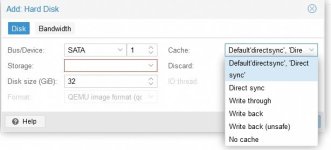
another try was

JavaScript:
['__default__', Proxmox.Utils.defaultText + "'directsync', 'Direct sync'"],

which yields "Default'directsync', 'Direct sync'
but again does not add argument "cache=directsync" to the HDD.

What would be the correct syntax to have "direct sync" as default, which also adds the argument "cache=directsync" to the HDD?

Cheers
 

Attachments

  • 250130_200417.jpg
    250130_200417.jpg
    21.4 KB · Views: 5
  • 250130_204052.jpg
    250130_204052.jpg
    27.7 KB · Views: 3
  • 250130_204937.jpg
    250130_204937.jpg
    26.3 KB · Views: 3
  • 250130_200434.jpg
    250130_200434.jpg
    4.9 KB · Views: 4
Last edited:
thanks louie1961,

due to the lack of ansible knowledge and the needed environment this is currently not an option for me.
If it is possible to be done within the host itself, I'd prefer this for now.

Cheers
 
thanks louie1961 for encouraging me to learn ansible.

could you please point me to an ansibles cookbook/ variable/ whatever the command is that ansibles uses @ the clientVM that achieves this setting?

Still I'd prefer an independent "on the host" solution, which can be applied anywhere.

Cheers
 
I used Jay's excellent Ansible series at Learnlinuxtv.com https://www.youtube.com/watch?v=3RiVKs8GHYQ

There a dozen or so videos to watch, but they are all short. The most difficult part of setting up Ansible is configuring SSH on all the machines to be managed, creating an ansible user that can run root command without passwords, and associating that user with an SSL key pair to log on to all of the other machines via SSH without passwords. Its not hard per se, although there could be a learning curve if you are not familiar with SSH or SSL key pairs. Its just time consuming more than anything, Ansible works by creating an inventory of machines to be managed, making sure your new ansible user can log into all of them and then creating YAML playbooks to perform the tasks you want to perform. Anything with an IP address that you can SSH into can be managed by ansible. In my environment, I have all of my VMs in the inventory plus all of the Proxmox hosts. The main things I have ansible do are: 1. apt update and apt upgrade. If a new kernel was installed, I have all machines reboot, and then after reboot, all machines run apt autoremove to get rid of old kernels and deprecated packages.

YAML playbooks are quite easy to find on google. I know a little bit of YAML from docker compose. But honestly I just downloaded to or three playbooks that looked interesting. A lot of people have these stored in the open on their Git Hub pages. I then just cobbled together the features I wanted and tested the YAML file with a little trial and error. Ansible is very powerful, and you don't have to load any software agents for it to work, you just need to be able to SSH into the device. Jay's series is quite complete and educational. You can literally do anything with Ansible from spinning up new VMs, to tearing them down, updating, etc. You will be able to do everything you want. Just do it from your laptop or another control device. I don't think ansible can update itself. I keep one VM set up as the control node, and I end up having to update that one VM manually. But all my other VMs and proxmox nodes (I have 4 of them) all get updated daily
 
  • Like
Reactions: Johannes S
thank you louie1961 for your detailed insight view and sharing experience.

jays resource is amazing. I have his playlist on ansible on my todo list for quite long time.

I'll take your recommendation to finally jump into it.

Right now, I'm managing all my stuff on every host/ client via crontab. This way, every single machine is independent.

Perhaps I am a bit too conservative when it comes to "ssh keypair passwordless" logins.

Cheers
 
  • Like
Reactions: Johannes S
coming back to let everybody know:

all of those adjustments are not working reliably, therefore I'm sticking to the standard.

If this is read by devs:

please ad an option to virtual HardDisks to be able to select policy "cache=directsync" as default.

Thanks in advance!

Cheers