

With the current prices of RAM, I tend to slim down my VM/LXC installations if at all possible.
Podman is a lightweight alternative to Docker, but there are a few pitfalls I discovered. Contrary to Docker, it uses no daemon and when you install it as an LXC, it has even less footprint.
There is a nice installation script on https://community-scripts.github.io/ for Podman LXC, however, such as it it, will cause problems:
1. You cannot stop or restart containers cleanly, you will always get some strange errors.
2. When you use Traefik for TLS termination, it will not forward traffic to restarted containers.
Together, these bugs will make tools like Watchtower fail miserably when it tries to update containers automatically.
You could resolve those problems by creating the Podman LXC as a privileged container, but this obviously has security implications beyond those already caused by the fact that the preferred way of hosting this would be a VM, not an LXC, anyway.
However, I found that the main problem is the missing MKNOD feature in the default installation. Thus, if you follow along, you will get a working unprivileged Podman LXC with pre-installed Portainer.
So, first you start the installation on your PVE CLI with the script from here:
https://community-scripts.github.io/ProxmoxVE/scripts?id=podman&category=Containers+&+Docker
Then, you use advanced install. Customize to your liking, but be sure to use "Allow device node creation", which will result in features: nesting=1,keyctl=1,mknod=1 in the LXC's conf file. Of course, nesting and keyctl must be enabled, as well, but that is the default anyway. You do not need to make the LXC privileged.
In a last step, you can add Portainer automatically.
In order to make your installation as close as it gets to a Docker/Portainer drop-in replacement, execute these steps via CLI in the LXC:
If you use Docker and Portainer like me (i.e. mostly with composer templates), you must use "restart: always" instead of "restart: unless-stopped", because there is no state persistence over LXC reboots, even with podman-restart enabled. Only those containers with "restart: always" will be restarted.
Because of a spurious timing issue I found some containers starting up too early after reboot. You can fix that by using "systemctl edit podman-restart.service" and filling in the follwing snippet:
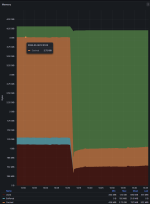
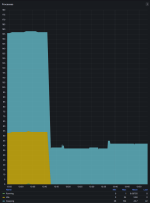
I find the results very convincing (the left part of these diagrams were with Docker VM, the right part was Podman LXC, both with essentially the same containers):
P.S.: If you use Telegraf to monitor your LXC and also want to use [inputs.docker], you will also need:
This is neccessary to allow access to /run/podman/podman.sock for Telegraf. Otherwise, you cannot use the [inputs.docker] section.
Podman is a lightweight alternative to Docker, but there are a few pitfalls I discovered. Contrary to Docker, it uses no daemon and when you install it as an LXC, it has even less footprint.
There is a nice installation script on https://community-scripts.github.io/ for Podman LXC, however, such as it it, will cause problems:
1. You cannot stop or restart containers cleanly, you will always get some strange errors.
2. When you use Traefik for TLS termination, it will not forward traffic to restarted containers.
Together, these bugs will make tools like Watchtower fail miserably when it tries to update containers automatically.
You could resolve those problems by creating the Podman LXC as a privileged container, but this obviously has security implications beyond those already caused by the fact that the preferred way of hosting this would be a VM, not an LXC, anyway.
However, I found that the main problem is the missing MKNOD feature in the default installation. Thus, if you follow along, you will get a working unprivileged Podman LXC with pre-installed Portainer.
So, first you start the installation on your PVE CLI with the script from here:
https://community-scripts.github.io/ProxmoxVE/scripts?id=podman&category=Containers+&+Docker
Then, you use advanced install. Customize to your liking, but be sure to use "Allow device node creation", which will result in features: nesting=1,keyctl=1,mknod=1 in the LXC's conf file. Of course, nesting and keyctl must be enabled, as well, but that is the default anyway. You do not need to make the LXC privileged.
In a last step, you can add Portainer automatically.
In order to make your installation as close as it gets to a Docker/Portainer drop-in replacement, execute these steps via CLI in the LXC:
Bash:
apt install podman-docker
service enable podman-restart --now
touch /etc/containers/nodocker
loginctl enable-linger 0
If you use Docker and Portainer like me (i.e. mostly with composer templates), you must use "restart: always" instead of "restart: unless-stopped", because there is no state persistence over LXC reboots, even with podman-restart enabled. Only those containers with "restart: always" will be restarted.
Because of a spurious timing issue I found some containers starting up too early after reboot. You can fix that by using "systemctl edit podman-restart.service" and filling in the follwing snippet:
Code:
[Unit]
After=network-online.target podman.socket user-runtime-dir@0.service
Wants=network-online.target podman.socket
I find the results very convincing (the left part of these diagrams were with Docker VM, the right part was Podman LXC, both with essentially the same containers):
P.S.: If you use Telegraf to monitor your LXC and also want to use [inputs.docker], you will also need:
Code:
usermod -aG root telegraf
echo 'd /run/podman 0750 root root - -' | sudo tee /etc/tmpfiles.d/podman-telegraf.conf
systemd-tmpfiles --create /etc/tmpfiles.d/podman-telegraf.conf
This is neccessary to allow access to /run/podman/podman.sock for Telegraf. Otherwise, you cannot use the [inputs.docker] section.
Last edited:
