pct list endless

decibel83

Renowned Member
Oct 15, 2008
210
1
83
Hi,
on my Proxmox host I cannot run pct list anymore because it's endless and I don't have any output:

Code:
root@node11:~# pct list

(no return to console...)

If I try to run it with strace I get one endless timeout but I cannot realize which program is creating it:

Code:
root@node11:~# strace pct list
execve("/usr/sbin/pct", ["pct", "list"], [/* 19 vars */]) = 0
brk(NULL)                               = 0x562d5ca9d000
access("/etc/ld.so.nohwcap", F_OK)      = -1 ENOENT (No such file or directory)
mmap(NULL, 12288, PROT_READ|PROT_WRITE, MAP_PRIVATE|MAP_ANONYMOUS, -1, 0) = 0x7ff2ffe02000
access("/etc/ld.so.preload", R_OK)      = -1 ENOENT (No such file or directory)
open("/etc/ld.so.cache", O_RDONLY|O_CLOEXEC) = 3
fstat(3, {st_mode=S_IFREG|0644, st_size=39906, ...}) = 0
mmap(NULL, 39906, PROT_READ, MAP_PRIVATE, 3, 0) = 0x7ff2ffdf8000
close(3)                                = 0
[...]
close(5)                                = 0
close(8)                                = 0
close(11)                               = 0
getpid()                                = 4241
close(6)                                = 0
select(16, [7 9], NULL, NULL, {tv_sec=1, tv_usec=0}) = 0 (Timeout)
[...]

I don't have any errors in the syslog, but this node is displayed as unknown into the Proxmox GUI:
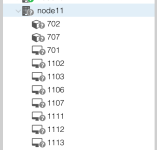
Screenshot 2018-10-21 at 19.21.38.png

This is my pveversion:

Code:
root@node11:/# pveversion -v
proxmox-ve: 5.2-2 (running kernel: 4.13.4-1-pve)
pve-manager: 5.2-9 (running version: 5.2-9/4b30e8f9)
pve-kernel-4.15: 5.2-10
pve-kernel-4.15.18-7-pve: 4.15.18-27
pve-kernel-4.15.18-1-pve: 4.15.18-19
pve-kernel-4.13.13-5-pve: 4.13.13-38
pve-kernel-4.13.13-3-pve: 4.13.13-34
pve-kernel-4.13.13-2-pve: 4.13.13-33
pve-kernel-4.13.4-1-pve: 4.13.4-26
corosync: 2.4.2-pve5
criu: 2.11.1-1~bpo90
glusterfs-client: 3.8.8-1
ksm-control-daemon: not correctly installed
libjs-extjs: 6.0.1-2
libpve-access-control: 5.0-8
libpve-apiclient-perl: 2.0-5
libpve-common-perl: 5.0-40
libpve-guest-common-perl: 2.0-18
libpve-http-server-perl: 2.0-11
libpve-storage-perl: 5.0-30
libqb0: 1.0.1-1
lvm2: 2.02.168-pve6
lxc-pve: 3.0.2+pve1-2
lxcfs: 3.0.2-2
novnc-pve: 1.0.0-2
proxmox-widget-toolkit: 1.0-20
pve-cluster: 5.0-30
pve-container: 2.0-28
pve-docs: 5.2-8
pve-firewall: 3.0-14
pve-firmware: 2.0-5
pve-ha-manager: 2.0-5
pve-i18n: 1.0-6
pve-libspice-server1: 0.12.8-3
pve-qemu-kvm: 2.11.2-1
pve-xtermjs: 1.0-5
qemu-server: 5.0-36
smartmontools: 6.5+svn4324-1
spiceterm: 3.0-5
vncterm: 1.5-3

Could you help me please?
 
Hi,
on my Proxmox host I cannot run pct list anymore because it's endless and I don't have any output:

Code:
root@node11:~# pct list

(no return to console...)

From the screenshot I conlucdr you run a cluster - is the cluster healthy? check by

Code:
pvecm status

If no, check your network etc.

If yes, restart some services:

Code:
systemctl restart pvestatd.service
systemctl restart corosync.service 
systemctl restart pveproxy.service
systemctl restart pve-cluster.service
 
From the screenshot I conlucdr you run a cluster - is the cluster healthy? check by

Yes, the cluster is healthy:

Code:
root@node11:/# pvecm status
Quorum information
------------------
Date:             Fri Oct 26 21:53:55 2018
Quorum provider:  corosync_votequorum
Nodes:            11
Node ID:          0x00000002
Ring ID:          8/2380
Quorate:          Yes

Votequorum information
----------------------
Expected votes:   11
Highest expected: 11
Total votes:      11
Quorum:           6 
Flags:            Quorate

Membership information
----------------------
    Nodeid      Votes Name
0x00000008          1 192.168.60.1
0x0000000a          1 192.168.60.2
0x00000007          1 192.168.60.3
0x00000009          1 192.168.60.4
0x00000001          1 192.168.60.5
0x00000003          1 192.168.60.6
0x00000004          1 192.168.60.7
0x00000005          1 192.168.60.8
0x0000000b          1 192.168.60.9
0x00000006          1 192.168.60.10
0x00000002          1 192.168.60.11 (local)

If no, check your network etc.

If yes, restart some services:

I restarted them and now the node11 is green in the web interface.
But I've already tried it before writing you the first time (sorry I didn't mention this and after some minutes the situation came back to what you see in my screenshot.

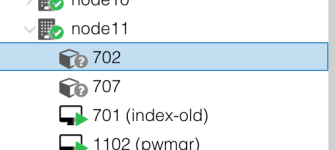
And, even if now the node11 is green I cannot run pct at all, and containers are displayed in grey with a question mark:

Screenshot 2018-10-26 at 21.53.35.png
 
  • Like
Reactions: samirfor
Has anyone been able to figure out how to fix this without a full reboot?

This seems to me to be something related to kernel upgrade. Maybe I'm wrong, I don't know.
 
I have exactly the same problem when a backup job starts. It happens randomly.
Were you able to solve this issue ?
 
I have exactly the same problem when a backup job starts. It happens randomly.
Were you able to solve this issue ?
When a backup job starts, in the WebGUI the node gets marked with a grey dot question mark icon and the same is for all resources on it?
 
When a backup job starts, in the WebGUI the node gets marked with a grey dot question mark icon and the same is for all resources on it?
Yes, exactly. I'm suspecting that it's about I/O pressure but I'm not sure.

When I try to debug it, I always have to reboot the whole server eventually to make services available again. It's really annoying.

Some another weird thing that I noticed: Services are not externally accessible for inbound connections, but it seems that they can initial connections on their side.

There is nothing in any journalctl unit when it happens. Restarting pvestatd makes the VMs available again, but containers are still greyed out.
Any attempt to use pct commands will hang.

What I'm suspecting is that pvestatd gets stuck with a lxc-info command, which triggers the grey question marks. However, I don't know why the pct/lxc-info commands are hanging.
 
You may try to limit the speed of a backup. If I remember correctly this limit affects also the read speed on the source side.

Datacenter --> Backup --> Edit:Backup Job --> Advanced --> Bandwidth Limit

The other mechanism to reduce stress is to use Fleecing - in the same dialog - but this does work only for VMs.
 
You may try to limit the speed of a backup. If I remember correctly this limit affects also the read speed on the source side.

Datacenter --> Backup --> Edit:Backup Job --> Advanced --> Bandwidth Limit

The other mechanism to reduce stress is to use Fleecing - in the same dialog - but this does work only for VMs.
So far I've already limited the backup IO.
The problem is when I try to solve it, there is really no activity on the disks as IO is very low
 
Where do you store the backups to, e. g. remote storage?
What I'm suspecting is that pvestatd gets stuck with a lxc-info command, which triggers the grey question marks. However, I don't know why the pct/lxc-info commands are hanging.
You might use strace to check where it hangs:
strace -f -p $(pgrep pvestatd) or
if you know a specific pct command to trigger the stall strace -f pct <command> <ctid> or
lxc-info command strace -f lxc-info -n <ctid>
The output will stop at exit of the process latest or earlier if it stalls at some call.
 
Hi,
another way to find out where pvestatd is at, is to check the process tree (e.g. with ps faxl) if it has spawned a child process. And you can use the following to see where in the Perl code it is:
Code:
apt install perl-stacktrace
perl-stacktrace $(pgrep pvestatd)