Dear Proxmox Community.
I freshly installed Proxmox VE 5.1-35 as future virtualisation environment and used the search button for fast navigation.
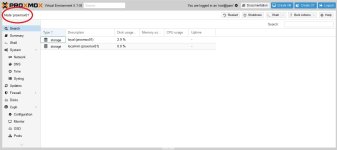
Now I cannot see the dropdown menu for choosing the view anymore. Pls. see attached Screenshot.
I googled the topic, but couldn't find a way to reset to standard Datacenter view.
How could I arcieve that? Any suggestions are welcome.
Kind regards, JH.
I freshly installed Proxmox VE 5.1-35 as future virtualisation environment and used the search button for fast navigation.
Now I cannot see the dropdown menu for choosing the view anymore. Pls. see attached Screenshot.
I googled the topic, but couldn't find a way to reset to standard Datacenter view.
How could I arcieve that? Any suggestions are welcome.
Kind regards, JH.