i change languagePlease post English text (I see Cyrillic) - it increases the chance for a helpful reply ;-)
You probably mean migrated FROM Hyper-V & started in PVE.After migrating and converting the virtual machine and starting it in hyperv
Hi Martin, thanks for sharing your experience. I hope it helps.Hey DEZERTIR,
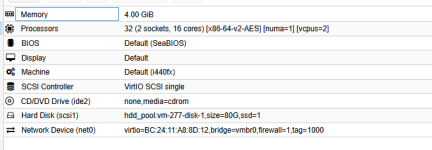
I've migrated a few VMs from Hyper-V to Proxmox before and ran into pretty much the exact same issue—after conversion and boot, changing RAM via the GUI does nothing, even with qemu-agent installed. Reboots didn't help either.
I ended up switching approaches and used Vinchin Backup & Recovery for a full machine migration and format conversion. It worked perfectly first try; RAM, CPU, and disk settings all adjusted normally in Proxmox, and the agent was recognized right away. Saved me a ton of time fiddling with configs manually.
If you're still stuck on this, give their migration feature a shot— the interface is clean too. I can share the steps I used back then if you need.
Good luck, hope you sort it out soon!
We use essential cookies to make this site work, and optional cookies to enhance your experience.