Issue with ZFS sub-datasets in LXC

pludikovsky

Member
Nov 8, 2022
9
2
23
I have this setup for a storage container:
Code:
# zfs list
NAME                                     USED  AVAIL  REFER  MOUNTPOINT
rpool                                   5.16T  5.61T   128K  /rpool
rpool/ROOT                              6.54G  5.61T   128K  /rpool/ROOT
rpool/ROOT/pve-1                        6.54G  5.61T  6.54G  /
rpool/data                              5.14T  5.61T   149K  /rpool/data
[…]
rpool/data/subvol-112-disk-1            3.10T  5.61T   192K  /rpool/data/subvol-112-disk-1
rpool/data/subvol-112-disk-1/data       96.4G  53.6G  96.4G  /rpool/data/subvol-112-disk-1/data
rpool/data/subvol-112-disk-1/docker     24.7G  7.29G  24.7G  /rpool/data/subvol-112-disk-1/docker
rpool/data/subvol-112-disk-1/games       136G   120G   136G  /rpool/data/subvol-112-disk-1/games
[…]

The sub-DS were set up as separate mountpoints for the LXC container, and that worked until recently. Today, however, I get this error when trying to start the container:
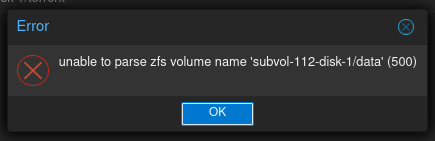
unable to parse zfs volume name 'subvol-112-disk-1/data' (500)
1794990054025.png

When trying to attach the mountpoint to the running container (started without any of the sub-DS):
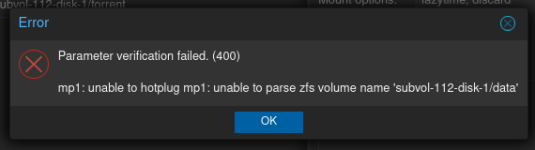
Parameter verification failed. (400)

mp1: unable to hotplug mp1: unable to parse zfs volume name 'subvol-112-disk-1/data'
1794989943210.png

pvedaemon log is limited to this
Code:
Nov 18 08:17:03 pmx pvedaemon[43495]: Could not rescan volume size - unable to parse zfs volume name 'subvol-112-disk-1/data'
Nov 18 08:18:42 pmx pvedaemon[43495]: Could not rescan volume size - unable to parse zfs volume name 'subvol-112-disk-1/data'

The questions I now have:
  • When & why was this changed?
  • Any way to get back the old behaviour?
 
Please post your Proxmox Version "pveversion -v" and your container config "pct config <CTID>".

I have to admit, I've never seen a configuration like this before. I'm familiar with these two options:

Mount/create another subvol into the CT via WebUI:
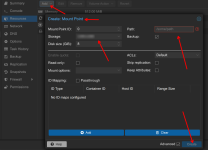
1795000026780.png

Bind a dataset to the CT, vor example:

First create a dataset:
Code:
zfs create ssd-pool/some-data

Mount the dataset into CT:
Code:
pct set 200 -mp0 /ssd-pool/some-data,mp=/some-data

That result this container config:
Code:
arch: amd64
cores: 4
features: nesting=1
hostname: mytestct
memory: 1024
mp0: /ssd-pool/some-data,mp=/some-data
mp1: ssd-pool:subvol-200-disk-1,mp=/mount-of-a-subvol,backup=1,size=3G
net0: name=eth0,bridge=vmbr0,firewall=1,hwaddr=BA:24:12:EA:6C:50,ip=dhcp,ip6=auto,type=veth
ostype: ubuntu
rootfs: ssd-pool:subvol-200-disk-0,size=6G
swap: 0
unprivileged: 1


Both works here: pve-manager/9.2.26/41a0e2e09b9e6f9d (running kernel: 7.0.14-26-pve)

Based on your “zfs list” output, everything suggests that you've created datasets under the subvol. I don't think that was ever the intended way to do it.
I suspect there might have been a timing issue with the mount, because the subvol has to be mounted first, and only then the datasets. But as I said, I've never seen it done that way before.
Please correct me if I'm wrong ;)
 
Code:
# pveversion 
pve-manager/9.2.26/41a0e2e09b9e6f9d (running kernel: 7.0.14-28-pve)
# pct config 112
arch: amd64
cores: 4
features: mount=nfs;cifs,nesting=1
hostname: files
memory: 2048
mp0: local-zfs:subvol-112-disk-1,mp=/srv/storage/,mountoptions=lazytime;discard,size=0T
mp1: local-zfs:subvol-112-disk-1/data,mp=/srv/storage/data,mountoptions=lazytime;discard,size=150G
mp2: local-zfs:subvol-112-disk-1/docker,mp=/srv/storage/docker,mountoptions=lazytime;discard,size=32G
mp3: local-zfs:subvol-112-disk-1/games,mp=/srv/storage/games,mountoptions=lazytime;discard,size=256G
mp4: local-zfs:subvol-112-disk-1/media,mp=/srv/storage/media,mountoptions=lazytime;discard,size=2T
mp5: local-zfs:subvol-112-disk-1/nextcloud,mp=/srv/storage/nextcloud,mountoptions=lazytime;discard,size=750G
net0: name=eth0,bridge=vmbr0,gw=192.168.1.1,hwaddr=BC:24:11:ED:30:F8,ip=192.168.1.212/24,type=veth
onboot: 1
ostype: debian
rootfs: local-zfs:subvol-112-disk-0,mountoptions=discard;lazytime,size=8G
startup: order=2
swap: 0

Yes, I have datasets under the subvol, the background was that the data was sent over from an old host using zfs send | zfs receive.

I did a bit of digging, and it seems at some point the regex in PVE::Storage::ZFSPoolPlugin was changed/added, and it now won't work unless the name matches exactly with the scheme Proxmox creates the volumes as.
 
Yeah, well, I'd recommend moving the datasets. Then it should work again.

The config looks okay to me.