EFI Disk Timeout during Boot

LG-ITI

New Member
Jan 5, 2026
12
0
1
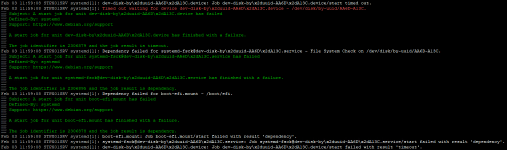
I currently have an issue during reboots of my Proxmox Hosts where the Hosts are getting a timeout error when thrying to mount the EFI Disk during Boot, causing them to go into emergency mode.
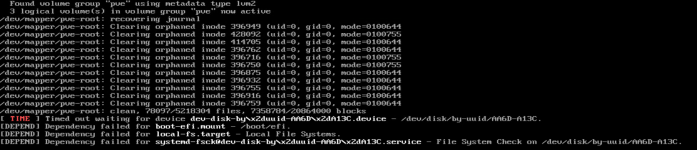
1769774847653.png

I didn't have this issue when rebooting the Hosts last month, so I'm guessing its caused by the change I've made to the /etc/lvm/lvm.conf file when setting up multipath.
Here's my configuration:

Code:
devices {
     # added by pve-manager to avoid scanning ZFS zvols and Ceph rbds
     global_filter=[
          "a|/dev/sda.*|",
          "r|/dev/sd.*|",
          "r|/dev/zd.*|",
          "r|/dev/rbd.*|"
     ]
}

As you can see, I've only added the '"a|/dev/sda.*|",' and '"r|/dev/sd.*|",' rows to the existing configuration. My intention was for lvm to filter out the volumes "sdX" which should only be accessed by their multipath.

I've currently been able to work around this issue by adding the nofail Option to my EFI Drive in the /etc/fstab file.
I don't have any issues mounting the EFI drive after boot has completed, although trying it with "systemctl start boot-efi.mount" does still fail with the same message that's shown in the screenshot. "Timed out waiting for device dev-disk-by ..."

Hopefully someone has an idea as to what's causing this issue and how to fix it.
 
LVM shouldn't be an issue here. The recovering journal, Clearing orphaned inode ... part hints at a unclean shutdown and possible file corruption, which might be worth investigating further, if it keeps happening.
My first guess is that the uuid is wrong in /etc/fstab. I would double-check that against the output of ls -l /dev/disk/by-uuid.
 
  • Like
Reactions: LG-ITI
LVM shouldn't be an issue here. The recovering journal, Clearing orphaned inode ... part hints at a unclean shutdown and possible file corruption, which might be worth investigating further, if it keeps happening.
The "recovering journal" message from the screenshot was only shown the first time the error occured on that host.
My first guess is that the uuid is wrong in /etc/fstab. I would double-check that against the output of ls -l /dev/disk/by-uuid.
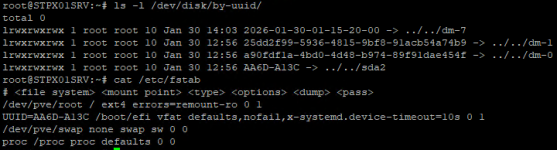
I agree that this could have been the cause of the issue. However the output of ls -l /dev/disk/by-uuid and /etc/fstab do match:
1769783351190.png
 
What is the output of mount | grep -i efi after mounting the ESP? Could you take a look at the system logs - both during boot and after mounting manually - and post them?
 
Last edited:
What is the output of mount | grep -i efi after mounting the ESP? Could you take a look at the system logs - both during boot and after mounting manually - and post them?

Output of mount | grep -i efi after mounting with mount /boot/efi:
1770116215890.png

I didn't do a reboot to check the system logs, because the server is currently in use but the systemctl start boot-efi.mount command seems to be getting the same error even without a reboot so here's the journalctl -xe Output of that command:
1770116682347.png

Also, why did you add the parameter x-systemd.device-timeout=10s?
I've added the 10s timeout to speed up the boot process. The timeout errors did occur even before adding the option.
 
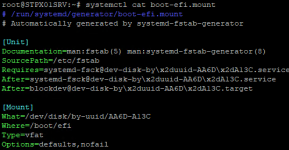
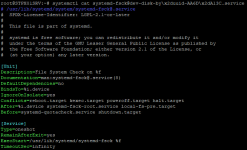
This is really weird. Whats the output of systemctl cat boot-efi.mount and systemctl cat $a where $a are the units in boot-efi.mount's After and Require?
 
systemctl cat boot-efi.mount:
1770121688689.png

systemctl cat systemd-fsck@dev-disk-by\x2duuid-AA6D\x2dA13C.service:
1770121778217.png

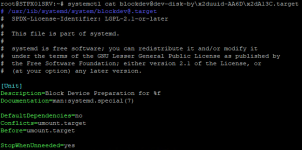
systemctl cat blockdev@dev-disk-by\x2duuid-AA6D\x2dA13C.target:
1770121841714.png
 
Thanks for bearing with me. Those units all look correct, can you post your dmesg output? Best attach a text file.
 
Last edited:
My entire dmesg output is actually just these 8 messages repeating:
1770127292619.png

I don't know if this would be pointing to an issue or if this is the expected behaviour for my multipath iscsi connection.

Edit:
I've rebooted my secondary Proxmox Node in order to get the dmesg output of a fresh boot. I've added it as the dmesg.txt file attached here.
 

Attachments

Last edited:
The dmesg output we are interested in got overwritten by this. can you try to do the following (everything as root):

1. Reboot

systemctl reboot

2. try to mount the efi disk using systemctl

systemctl start boot-efi.mount

3. mount the efi disk

mount /boot/efi

4. grab dmesg

dmesg > /root/dmesg.txt

Attach dmesg.txt. To copy it from your proxmox host to your computer you can run scp root@<proxmox-host>:/root/dmesg.txt ~/Downloads/ if you are running linux, otherwise you can upload it to some file host (like 0x0.st or x0.at) and download it from your desktop: curl -X POST https://x0.at --form file=@/root/dmesg.txt --form id_length=12.
 
Last edited:
Thanks.

> I've rebooted my secondary Proxmox Node in order to get the dmesg output of a fresh boot. I've added it as the dmesg.txt file attached here.

sorry I didn't see that edit 'til now.

[ 15.188874] systemd[1]: Expecting device dev-disk-by\x2duuid-2F12\x2dEF90.device - /dev/disk/by-uuid/2F12-EF90...

It seems like your system tries to mount another EFI partition, I assume this secondary host has the same problem? Can you attach the journal since boot of that host journalctl -b if you haven't rebooted since issuing the commands of my previous message.
 
I don't think thes 2F12-EF90 is another EFI partition, it's just the EFI Partition of my secondary Node.
The systemctl cat boot-efi.mountand cat /etc/fstabcommands both show this UUID in place of the AA6D-A13C UUID of my primary Host.

Would you like to see the journalctl -boutput anyway?
 
I don't think thes 2F12-EF90 is another EFI partition, it's just the EFI Partition of my secondary Node.
The systemctl cat boot-efi.mountand cat /etc/fstabcommands both show this UUID in place of the AA6D-A13C UUID of my primary Host.

Would you like to see the journalctl -boutput anyway?
Yes, that's what I meant :). Yes please, if it's not too much of a hassle.

 
Sorry for the late reply. I've rebooted the PX02 Host and executed the systemctl start boot-efi.mount and mount /boot/efi commands again before getting the journalctl -blog.
 

Attachments

The logs sadly give not a lot of useful information.

Did you install updates during that one month? You can see if that is the case in /var/log/dpkg.log. It is very likely that the log got rotated, to view older log files run zless /var/log/dpkg.log.$n, where $n 1... with 1 being the logs after the uncompressed ones.

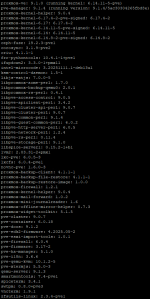
Can you provide the output of pveversion --verbose and dpkg -s systemd | grep -i version.

You can try downgrading to kernel 6.14 (apt install proxmox-kernel-6.14) and booting that.
A fsck cant hurt, unmount the efi partition and run fsck.vfat /dev/disk/by-uuid/<uuid> as root.
 
Sorry for not replying sooner. I was on holiday for a few days at the start of the week.

pveversion --verbose:
1770902317588.png

dpkg -s systemd | grep -i version:
1770902393228.png

Downgrading to the 6.14 Kernel and rebooting sadly still ended in a timeout during EFI Boot.
 
If I got this right, you have your boot disk attached via a HPE RAID controller. Is it at all possible to attach the disk directly and see if maybe the controller is/was an issue?