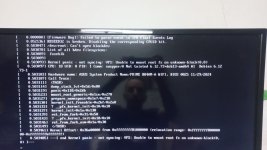
Cant install proxmox multiple errors

juankorn

New Member
Aug 2, 2024
7
1
3
Hi everyone, im kinda newby with this and I hope I can get some clarification.

I have a brand new pc.
Ryzen 9 9950x
Asus prime B840M-A WIFI
64gb DDR4 (16x4)
1ssd 240
2x 1TB SSD kingston datacenter

I downloaded proxmox 9.1 and tried to install it.
I get multiple errors.
Past the "Loading initial ramdisk" message I get a "kernel panic please reboot your computer vfs unable to mount root fs on unknown-block(0 0)"
Sometimes I choose "Install proxmox VE (Graphical)" and screen blinks black and back to main menu. If I choose again it freezes.
Other times I reach to actually start the installation. But get an error when its creating mounts.

Tried with version 8.x 9.x. Balena etcher, ventoy, rufus to no avail.
I've installed multiple times proxmox, always with balena, but never had this kind of problem. In fact, I've never had any problem before.

I did tried this thing
"https://forum.proxmox.com/threads/loading-initial-ramdisk-freeze.170163/post-794297" with nomodeset noapic edit on the GRUB. But its the same.
I really dont know what to do.

One thing that i didnt test is to disable UEFI and go CSM. But this motherboard doesnt allow me to enable it if I dont have a GPU wich I dont have right now. Maybe I can test that tomorrow. But I want to know if there is anything else that I can do.

Thanks in advance.
 
Hi, @juankorn
As a test, try to install some other Linux distro (e.g. Debian or Ubuntu).
At least you'll know if the issue is Proxmox related, or some general one.
Thanks for the advice !
Downloaded last debian 13.4.0-amd64-netinst and gives me a kernel panic error. So its not a proxmox thing.
 

Attachments

  • WhatsApp Image 2026-04-20 at 15.38.26.jpeg
    WhatsApp Image 2026-04-20 at 15.38.26.jpeg
    117.6 KB · Views: 16
Asus prime B840M-A WIFI
64gb DDR4 (16x4)
Looking at this site - it appears that the B840M-A WIFI M/B uses DDR5 & not DDR4. These are NOT interchangeable.

I have a brand new pc.
So firstly - you need to perform a complete HW test - including testing ALL the RAM , CPU & the various disks.

Also I would update the BIOS to the latest available. (Looks like Version 1654 from 2026/04/20)

As the poster above suggested - also try another (simple) Linux install & see where it goes.

Good luck.
 
  • Like
Reactions: juankorn
Looking at this site - it appears that the B840M-A WIFI M/B uses DDR5 & not DDR4. These are NOT interchangeable.


So firstly - you need to perform a complete HW test - including testing ALL the RAM , CPU & the various disks.

Also I would update the BIOS to the latest available. (Looks like Version 1654 from 2026/04/20)

As the poster above suggested - also try another (simple) Linux install & see where it goes.

Good luck.
DDR5 yes, that was a typo. Im actually on the middle of a bios update. The linux install goes with kernel panic too.
It will be bad if I have something not working right since its brand new. Can happen but it really sucks.

PC rebooted after bios update and no video right now. I just hope, i just really hope that it didn't brick.
 
If the system remains „black“ even after an hour or more remove the power cable, hold the power button for a few seconds and remove the bios battery. Put it back in, attach the power cable and try to power it on. If the system comes back to life, try a Debian installation without any memory or other overclocking options, only in bios defaults.
 
  • Like
Reactions: gfngfn256
i just really hope that it didn't brick.
Unlikely - but not impossible. Reset BIOS if necessary (as pointed out by poster above).
More importantly - this sounds like a HW issue on a new PC.
The first thing todo would be to reseat all the connectors, CPU socket & pins check & reseat, same for RAM, check cabling & replace if necessary.
Maybe try with one stick of RAM at a time. This is sometimes useful in eliminating faulty RAM/socket.
Use some live-media that is capable of testing all HW - maybe Hiren's BootCD PE?
 
  • Like
Reactions: juankorn
Well here's the update.

Yesterday i tried to do the bios flashback. Wasnt doing anything so I left it all night. Today it was still flashing (i guess?). I brought a gpu from home and installed it. But no video. That mobo is dead.
I had the same motherboard in a sealed box to build another server. Used that mother with the same cpu and ram without the gpu and Installed proxmox without any issue.
It was a faulty motherboard all along. But now i have a faulty motherboard that maybe RMA will say, no, its because you killed it when updating the bios, bye.

Thanks to people here trying to help me. Now i have to win a fight.
 
Just some points on your warranty:

1. Your M/B wasn't working prior to flashing.

2. The fact that the BIOS bricked the M/B (no image at all) is almost certainly a consequence of point 1 above.

3. Even if it was working before, & you performed a regular BIOS update (using an official manufacture-released BIOS file) which bricked the M/B; your warranty would still NOT be voided, as updating the BIOS is to be considered a regular service maintenance.

4. From a legal point-of-view, I'm not sure you need to disclose the fact that after the update - no image is present at all. Your claim should probably state: "M/B failed to function correctly out-of-the box, attempting to update the BIOS did not help".

On a side note: Have you tried resetting the BIOS (as above)? Also, it appears your M/B has a BIOS FlashBack™ function, as shown here. You should probably follow that procedure - to attempt to revive the M/B. That may or may not work.
 
  • Like
Reactions: juankorn
Just some points on your warranty:

1. Your M/B wasn't working prior to flashing.

2. The fact that the BIOS bricked the M/B (no image at all) is almost certainly a consequence of point 1 above.

3. Even if it was working before, & you performed a regular BIOS update (using an official manufacture-released BIOS file) which bricked the M/B; your warranty would still NOT be voided, as updating the BIOS is to be considered a regular service maintenance.

4. From a legal point-of-view, I'm not sure you need to disclose the fact that after the update - no image is present at all. Your claim should probably state: "M/B failed to function correctly out-of-the box, attempting to update the BIOS did not help".

On a side note: Have you tried resetting the BIOS (as above)? Also, it appears your M/B has a BIOS FlashBack™ function, as shown here. You should probably follow that procedure - to attempt to revive the M/B. That may or may not work.
Thanks for the info.
Yes, i tried to do a bios flashback yesterday. It was like working i guess. The only led the m/b has is in the flashback button. When i pressed it, it will blink 5 times and then stays on. According to the manual it was a malfunction and i should try again. Tried several times and then i decided to leave it all the night. And today I found it like yesterday with the led on. Unplugg it and now it wont turn on. When i press the biosflash the pc turns on and does nothing. Thats when i put a new m/b with all the same parts and it worked fine. Im still thinking if I should say about the bios update.

As a side note, when i was taking the mother from the case the stupid usb3 plug got so attached that it came out with the plastic from the mother. Thankfully I was able to put it back there.
 
Well, the BIOS flashing is really unfortunate, I'm sorry for you.

Reason for chiming in:
I have the same issues: "kernel panic please reboot your computer vfs unable to mount root fs on unknown-block(0 0)"
This error always occurs with a fresh installation of version 9.1-1 on the first boot.

Hardware:
  • MacBook Pro 14" (2014), 16GB RAM, 256GB NVME SSD
  • Asus ChromeBox3 (teemo), 4GB RAM, 120GB NVME SSD
During the installation everything is detected as I expected it, and I did no customizations. Just a plain first installation.

I also tried PVE 8.4-1 on the Chromebox, but this version just hung after "Loading Kernel / Loading Initramfs" (similar message, no kernel panic)

Both devices previously (like minutes before) worked well with Manjaro (MacBook) and Linux Mint (ChromeBox).

What could be the issue? This is my very first try with Proxmox.
 
Last edited:
I've never used Flashback but I assume you researched before you tried.

From what I can find, you need to format a single partition FAT32 USB drive & then after unzipping the BIOS download, use the BIOSRenamer tool included. See here.

You must also insert the USB drive in the correct port as shown here on page 30.

You must then press the BIOS FlashBack™ button for three seconds until the FlashBack LED blinks three times.

I assume you did all of this correctly.
 
  • Like
Reactions: juankorn
For the kernel-panic issue I found this:


And this solved it for me! (yes, I installed via Ventoy)
--> Remove the parameter rdinit=/vtoy/vtoy from GRUB and everything works!
--> https://forum.proxmox.com/threads/p...ll-via-ventoy-kernel-panic.174830/post-817405
 
I've never used Flashback but I assume you researched before you tried.

From what I can find, you need to format a single partition FAT32 USB drive & then after unzipping the BIOS download, use the BIOSRenamer tool included. See here.

You must also insert the USB drive in the correct port as shown here on page 30.

You must then press the BIOS FlashBack™ button for three seconds until the FlashBack LED blinks three times.

I assume you did all of this correctly.
Yes yes, i did all that but it didnt work. I even updated the other motherboard with that usb and it worked fine.
 
  • Like
Reactions: gfngfn256