Hi everyone, im kinda newby with this and I hope I can get some clarification.
I have a brand new pc.
Ryzen 9 9950x
Asus prime B840M-A WIFI
64gb DDR4 (16x4)
1ssd 240
2x 1TB SSD kingston datacenter
I downloaded proxmox 9.1 and tried to install it.
I get multiple errors.
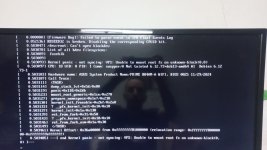
Past the "Loading initial ramdisk" message I get a "kernel panic please reboot your computer vfs unable to mount root fs on unknown-block(0 0)"
Sometimes I choose "Install proxmox VE (Graphical)" and screen blinks black and back to main menu. If I choose again it freezes.
Other times I reach to actually start the installation. But get an error when its creating mounts.
Tried with version 8.x 9.x. Balena etcher, ventoy, rufus to no avail.
I've installed multiple times proxmox, always with balena, but never had this kind of problem. In fact, I've never had any problem before.
I did tried this thing
"https://forum.proxmox.com/threads/loading-initial-ramdisk-freeze.170163/post-794297" with nomodeset noapic edit on the GRUB. But its the same.
I really dont know what to do.
One thing that i didnt test is to disable UEFI and go CSM. But this motherboard doesnt allow me to enable it if I dont have a GPU wich I dont have right now. Maybe I can test that tomorrow. But I want to know if there is anything else that I can do.
Thanks in advance.
I have a brand new pc.
Ryzen 9 9950x
Asus prime B840M-A WIFI
64gb DDR4 (16x4)
1ssd 240
2x 1TB SSD kingston datacenter
I downloaded proxmox 9.1 and tried to install it.
I get multiple errors.
Past the "Loading initial ramdisk" message I get a "kernel panic please reboot your computer vfs unable to mount root fs on unknown-block(0 0)"
Sometimes I choose "Install proxmox VE (Graphical)" and screen blinks black and back to main menu. If I choose again it freezes.
Other times I reach to actually start the installation. But get an error when its creating mounts.
Tried with version 8.x 9.x. Balena etcher, ventoy, rufus to no avail.
I've installed multiple times proxmox, always with balena, but never had this kind of problem. In fact, I've never had any problem before.
I did tried this thing
"https://forum.proxmox.com/threads/loading-initial-ramdisk-freeze.170163/post-794297" with nomodeset noapic edit on the GRUB. But its the same.
I really dont know what to do.
One thing that i didnt test is to disable UEFI and go CSM. But this motherboard doesnt allow me to enable it if I dont have a GPU wich I dont have right now. Maybe I can test that tomorrow. But I want to know if there is anything else that I can do.
Thanks in advance.