

Bulk adding SDN VLANs/VNets

Aug 24, 2020
8
1
23
Philadelphia, PA
I have a currently 4-node proxmox cluster (more coming soon), and I have on each node a bridge connected to a bond for two adapters dedicated for my VM's to talk to each other. I need to create about 100 vlans, and with the migrations from my old vmware stacks, I may add up to 300 vlans.

My linux bond is bond0, which is connected to vmbrSRVC. It's identical for each server. I prepped one server then copied the interfaces file to every other server and only incremented its ips.
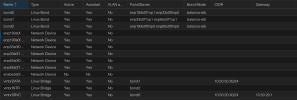
Screenshot 2025-04-25 at 22.54.13.png

I go in and create my SDN Zone, that I just called VMNet (for now), then I made my VNets connected to VMNet.
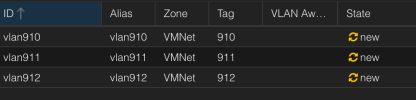
Screenshot 2025-04-25 at 22.57.10.png

Afterwards I can go in and obviously apply them. However it may be a bit tedious to do that 1 by 1.

Is there a way to bulk add vlans, maybe from commandline? Modifying a config file?

I do not need stacked vlans and I'm not using the DHCP features. That will come from virtual firewalls.
 
I did find /etc/pve/sdn and my vnets.cfg has this so far:
Code:
vnet: vlan910
        zone VMNet
        alias vlan910
        tag 910
        vlanaware 1

vnet: vlan911
        zone VMNet
        alias vlan911
        tag 911
        vlanaware 1

vnet: vlan912
        zone VMNet
        alias vlan912
        tag 912
        vlanaware 1

vnet: vlan913
        zone VMNet
        alias vlan913
        tag 913
        vlanaware 1

vnet: vlan914
        zone VMNet
        alias vlan914
        tag 914
        vlanaware 1

#1 Can I just have AI or something expand that to all my vlans. How do I then update it across all hosts, unless I have to copy/paste it?

#2 Do these *need* to be vlan aware? If I am tagging them then I don't think so. I want to specifically avoid any ability to stack vlans or have a nefarious actor to jump vlans.
 
So I did this:
Python:
#!/usr/bin/env python3

zone_name = "VMNet"

with open("vnets.cfg", "w") as f:
     for vlan_id in range(701, 999):
         vnet_name = f"vlan{vlan_id}"
         f.write(f"vnet: {vnet_name}\n")
         f.write(f"\tzone {zone_name}\n")
         f.write(f"\talias {vnet_name}\n")
         f.write(f"\ttag {vlan_id}\n")
         f.write(f"\tvlanaware 0\n")
         f.write("\n")

And it made the config. But my oh my do the servers not want to ifreload that. They are stuck networking reloading for minutes now.

EDIT: OK, That was bad.... I reverted it and still had to reboot.
 
Last edited:
Late to the party, but just in case someone else ends up here...

I was able to accomplish what the OP is attempting, with the exception that I created a separate zone for each VLAN all connected to a single, VLAN-aware bridge (vmbr0). I used the following PowerShell script to create my zones.cfg and vnets.cfg files:

Rich (BB code):
# Save your input file with headers named VlanId and VlanName, e.g.:
#
# VlanId,VlanName
# 10,Management
# 20,Servers
# 30,DMZ


# Configuration Paths
$csvPath   = ".\vlans.csv"
$zonesFile = ".\zones.cfg"
$vnetsFile = ".\vnets.cfg"

# Verify CSV exists
if (-not (Test-Path $csvPath)) {
    Write-Error "CSV file not found at $csvPath"
    exit
}

# Import CSV data
$vlans = Import-Csv -Path $csvPath

# Lists to hold file contents
$zonesContent = [System.Collections.Generic.List[string]]::new()
$vnetsContent = [System.Collections.Generic.List[string]]::new()

foreach ($vlan in $vlans) {
    # Trim potential whitespace
    $id   = $vlan.VlanId.Trim()
    $name = $vlan.VlanName.Trim()

    # Construct zones.cfg entry
    $zoneBlock = @"
vlan: vlan$id
    bridge vmbr0
    ipam pve
"@
    $zonesContent.Add($zoneBlock)

    # Construct vnets.cfg entry
    $vnetBlock = @"
vnet: VNet$id
    zone vlan$id
    alias $name
    tag $id
"@
    $vnetsContent.Add($vnetBlock)
}

# Write output files separated by a blank line
$zonesContent -join "`n`n" | Set-Content -Path $zonesFile -Encoding UTF8
$vnetsContent -join "`n`n" | Set-Content -Path $vnetsFile -Encoding UTF8

Write-Host "Files created successfully:`n - $zonesFile`n - $vnetsFile" -ForegroundColor Green

Save these to the cluster filesystem at /etc/pve/sdn/ from any host in the cluster. The new zones & vnets will show up as unapplied changes in the web GUI at Datacenter -> SDN. Click Apply and you're done.