I started migrating from pure Bridge Network Setup towards Bond based Network Setup on several of my Hosts now, after I accidentally created a Network Loop by plugging in multiple NICs (physical Interface connected to
By default STP is set to off for Bridge Interfaces in Proxmox VE, so of course that created a massive Network Loop which almost took down my entire Homelab .
.
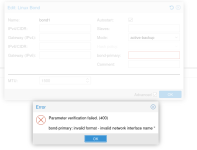
However, I am getting a very bad Behavior with Bonds, in case a physical Interface doesn't exist, particularly related to the
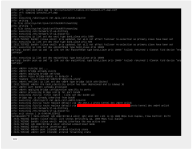
In fact I will be locked out of the Server if the
Sure, you can blame it on the Sysadmin Configuration Error, but I can totally see how this could play in other Situations as well:
Since the Mellanox ConnectX-2/ConnectX-4/ConnectX/4 LX as well as the Intel X710/XXV710 NICs only support a (relatively) small Number of VLANs, some additional Configuration is also required. In order to avoid breaking the Proxmox VE GUI, I found it better to put these manual Configurations in a separate File under
Previous Configuration (using only Linux Bridge)
Current/future Configuration (using Linux Bond + Linux Bridge)
[/CODE]
Note that I'm not 100% sure about setting the VLAN IDs for the Bond Interface.
If I did NOT do that, then all 4096 VLANs would show up in the output of
With
Without
I don't see any Error in dmesg at the Moment but that's also because I'm using
Pretty sure it would give a lot of Errors with the 10gbps NICs mentioned above.
vmbr0 in Proxmox Network Configuration) into a Physical Switch, all while trying to reduce Risk of Network Shutdown should a single NIC fail.By default STP is set to off for Bridge Interfaces in Proxmox VE, so of course that created a massive Network Loop which almost took down my entire Homelab
.However, I am getting a very bad Behavior with Bonds, in case a physical Interface doesn't exist, particularly related to the
bond-primary Setting (which NEEDS to be set via the Proxmox VE GUI, i.e. leaving it unset/empty is not acceptable to Proxmox VE).In fact I will be locked out of the Server if the
bond-primary Setting is set to an Interface which doesn't exist ! This completely negates the Point of creating a (supposedely) redundant Link in my Opinion. I know that Bonds can also be used for LAGG and increasing Bandwidth, but for my quite limited Needs, I think that active-backup is plenty.Sure, you can blame it on the Sysadmin Configuration Error, but I can totally see how this could play in other Situations as well:
- Kernel Upgrade leading to Network Interfaces changing Names, as it already happened in the past, particularly when upgrading to a new Debian Release (e.g. Bullseye -> Bookworm) and NOT using something like
/etc/udev/rules.d/30-net_persistent_names.rulesto avoid the "new" Predictable Network Interface Names - NIC Failed (broken Hardware)
- NIC Firmware compatibility Issue with newer Kernel
- ...
Since the Mellanox ConnectX-2/ConnectX-4/ConnectX/4 LX as well as the Intel X710/XXV710 NICs only support a (relatively) small Number of VLANs, some additional Configuration is also required. In order to avoid breaking the Proxmox VE GUI, I found it better to put these manual Configurations in a separate File under
/etc/network/interfaces.d/vmbr0 and (for the Linux Bond Setup) /etc/network/interfaces.d/bond0.Previous Configuration (using only Linux Bridge)
/etc/network/interfaces
Code:
# network interface settings; autogenerated
# Please do NOT modify this file directly, unless you know what
# you're doing.
#
# If you want to manage parts of the network configuration manually,
# please utilize the 'source' or 'source-directory' directives to do
# so.
# PVE will preserve these directives, but will NOT read its network
# configuration from sourced files, so do not attempt to move any of
# the PVE managed interfaces into external files!

auto lo
iface lo inet loopback

auto eno1
iface eno1 inet manual

auto eno2
iface eno2 inet manual

auto enp1s0f0np0
iface enp1s0f0np0 inet manual

auto enp1s0f1np1
iface enp1s0f1np1 inet manual

auto vmbr0
iface vmbr0 inet static
    address 192.168.2.9/20
    gateway 192.168.1.1
    bridge-ports eno1 eno2 enp1s0f0np0 enp1s0f1np1
    bridge-stp off
    bridge-fd 0
    bridge-vlan-aware yes
    bridge-vids 2-4094
#MAIN_BRIDGE

iface vmbr0 inet6 static
    address 2XXX:XXXX:XXXX:0001:0000:0000:0002:0009/64
    gateway 2XXX:XXXX:XXXX:0001:0000:0000:0001:0001

source /etc/network/interfaces.d/*
/etc/network/interfaces.d/vmbr0
Code:
auto vmbr0
iface vmbr0 inet static
  # Enable VLANs
  bridge-vlan-aware yes

  # Mellanox ConnectX2/3/... are limited to only 128 VLAN IDs (effectively the Error occurs above 125 VLAN IDs)
  bridge-vids 1 100-110 1000
Current/future Configuration (using Linux Bond + Linux Bridge)
/etc/network/interfaces
Code:
# network interface settings; autogenerated
# Please do NOT modify this file directly, unless you know what
# you're doing.
#
# If you want to manage parts of the network configuration manually,
# please utilize the 'source' or 'source-directory' directives to do
# so.
# PVE will preserve these directives, but will NOT read its network
# configuration from sourced files, so do not attempt to move any of
# the PVE managed interfaces into external files!

auto lo
iface lo inet loopback

auto eno1
iface eno1 inet manual

auto eno2
iface eno2 inet manual

auto enp1s0f0np0
iface enp1s0f0np0 inet manual

auto enp1s0f1np1
iface enp1s0f1np1 inet manual

auto bond0
iface bond0 inet manual
    bond-slaves eno1 eno2 enp1s0f0np0 enp1s0f1np1
    bond-miimon 100
    bond-mode active-backup

    # If enp1s0f0np0 doesn't exist, I will be locked out of the Server !
    bond-primary enp1s0f0np0
#MAIN_BOND

auto vmbr0
iface vmbr0 inet static
    address 192.168.2.9/20
    gateway 192.168.1.1
    bridge-ports bond0
    bridge-stp off
    bridge-fd 0
    bridge-vlan-aware yes
    bridge-vids 2-4094
#MAIN_BRIDGE

iface vmbr0 inet6 static
    address 2XXX:XXXX:XXXX:0001:0000:0000:0002:0009/64
    gateway 2XXX:XXXX:XXXX:0001:0000:0000:0001:0001

source /etc/network/interfaces.d/*
/etc/network/interfaces.d/vmbr0
Code:
[CODE]auto vmbr0
iface vmbr0 inet static
    # Enable VLANs
    bridge-vlan-aware yes

    # Mellanox ConnectX-2/ConnectX-3/ConnectX-4 LX & Intel X710/XXV710 are limited to only 128 VLAN IDs (effectively the error occurs above 125 VLAN IDs)
bridge-vids 1 100-110 1000/etc/network/interfaces.d/bond0
Code:
auto bond0
iface bond0 inet manual
    # Configure Bond Priorities
    # Higher priority is better. Values are up to 32 Bit Signed Integer.
    post-up ip link set dev eno1 type bond_slave prio 1000
    post-up ip link set dev eno2 type bond_slave prio 500
    post-up ip link set dev enp1s0f0np0 type bond_slave prio 10000
    post-up ip link set dev enp1s0f1np1 type bond_slave prio 10000

    # Enable VLANs
    bridge-vlan-aware yes

    # Mellanox ConnectX-2/ConnectX-3/ConnectX-4 LX & Intel X710/XXV710 are limited to only 128 VLAN IDs (effectively the error occurs above 125 VLAN IDs)
    bridge-vids 1 100-110 500-510 1000-1010
Note that I'm not 100% sure about setting the VLAN IDs for the Bond Interface.
If I did NOT do that, then all 4096 VLANs would show up in the output of
bridge vlan show (under bond0 Interface), which I believed could cause Issue with this Number of VLAN IDs Limitation mentioned above for several NICs.With
bond0 VLANs configured:
Code:
port              vlan-id
vmbr0             1 PVID Egress Untagged
bond0             1 PVID Egress Untagged
                  100
                  101
                  102
                  103
                  104
                  105
                  106
                  107
                  108
                  109
                  110
                  1000
Without
bond0 VLANs configured:
Code:
port              vlan-id
vmbr0             1 PVID Egress Untagged
bond0             1 PVID Egress Untagged
                  2
                  3
                  4
                  5
                  6
                  7
                  8
                  9
                  10
                  11
                  12
                  13
                  14
                  15
                  16
                  17
                  18
                  19
                  20
                  ...
                  ...
                  ...
I don't see any Error in dmesg at the Moment but that's also because I'm using
eno1 Interface (1gbps) which I think has no Issue with 4096 VLAN IDs.Pretty sure it would give a lot of Errors with the 10gbps NICs mentioned above.


 ? I feel most of your Comments are about VLAN, whereas the Problem I described is about the Bond (and potentially Bridge) Interface.