All ZFS Pools Showing as 97% Full in PVE

LBP321

New Member
Mar 13, 2026
4
0
1
Hello everyone,

I use Proxmox and Proxmox Backup Server. I have a single ZFS-formatted 8TB archive HDD that I use with Nextcloud that's showing 97% full, a RAID1 ZFS 8TB HDD pool that I use with PBS for backups that's showing 97% full, and a RAID6 ZFS 8TB HDD pool used as a secondary PBS backup that is also showing 97% full. Why is this? Both PBS instances are showing around 56% full when logged-in.
 
do you have "pictures"?
du you run zpool trim on every pool?
you do not use more as 80% of your space on HDDs without a VDEV ZFS Special Device nx SSD; n>=2
 

do you have "pictures"?


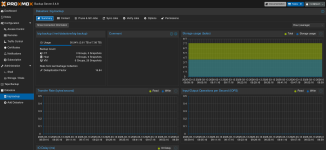
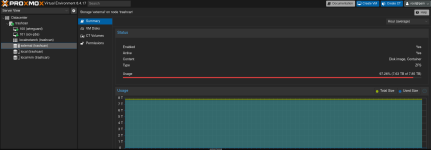
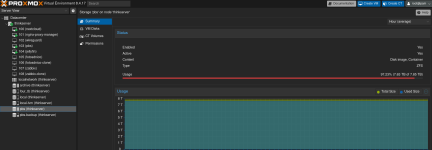
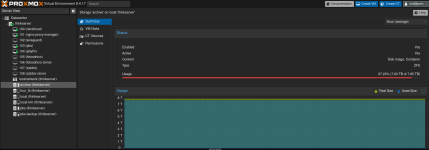
Here are screenshots from my main PVE:
Main PBS.png
PVE Archive.png

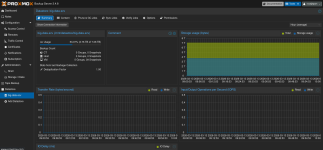
Here is a screenshot from the main PBS:
Main PBS-2.png

Here is a screenshot from the remote PVE with the remote PBS's storage:

Remote PBS.png
Here is a screenshot from the remote PBS:

Remote PBS-2.png

du you run zpool trim on every pool?
I have not. What does that do?

you do not use more as 80% of your space on HDDs without a VDEV ZFS Special Device nx SSD; n>=2
I don't know what this means, I'm sorry.

And have you setup 2 proxmox jobs for you PBS:

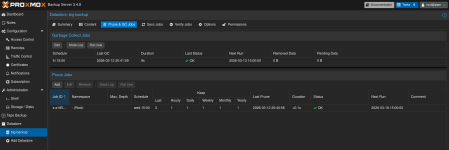
Yes. I have a weekly job for both. Here's a screenshot:
Prune and GC.png
 
I have a single ZFS-formatted 8TB archive HDD that I use with Nextcloud that's showing 97% full,
Is that the archive one?

a RAID1 ZFS 8TB HDD pool that I use with PBS for backups that's showing 97% full,
Which one is that? Also there is no RAID1 in ZFS, do you mean mirror?

and a RAID6 ZFS 8TB HDD pool used as a secondary PBS backup that is also showing 97% full.
No RAID6 in ZFS, do you mean RAIDZ2?

Why is this? Both PBS instances are showing around 56% full when logged-in.
So I don't fully understand your current setup, what is where, and what is the problem. So I will make a wild guesses instead. Correct me if I'm wrong.
- You have a RAIDZ2 on your PVE, named PBS (thinkserver).
- That is 8TB in size
- You have a PBS VM on the thinkserver
- That VM has a RAW disk on PBS (thinkserver) with the default 16k volblocksize
- You fill that PBS with 4TB of data
- You expect the PBS (thinkserver) to now be also used by 4TB.


But that expectation is wrong. Pool geometry and padding is a thing, especially for 16k volblocks.
That is why you should not use RAIDZ for blockstorage and use mirrors instead.
Unless you really understood the topic. But even then I would not bother and go with mirrors instead.

Another possible problem could be discard not enabled on the VM disk.
 
Is that the archive one?


Which one is that? Also there is no RAID1 in ZFS, do you mean mirror?


No RAID6 in ZFS, do you mean RAIDZ2?


So I don't fully understand your current setup, what is where, and what is the problem. So I will make a wild guesses instead. Correct me if I'm wrong.
- You have a RAIDZ2 on your PVE, named PBS (thinkserver).
- That is 8TB in size
- You have a PBS VM on the thinkserver
- That VM has a RAW disk on PBS (thinkserver) with the default 16k volblocksize
- You fill that PBS with 4TB of data
- You expect the PBS (thinkserver) to now be also used by 4TB.


But that expectation is wrong. Pool geometry and padding is a thing, especially for 16k volblocks.
That is why you should not use RAIDZ for blockstorage and use mirrors instead.
Unless you really understood the topic. But even then I would not bother and go with mirrors instead.

Another possible problem could be discard not enabled on the VM disk.
Yes, the single ZFS is the archive drive. pbs (thinkserver) is the main backup ZFS mirror (thank you for the correction). And the RAIDZ2 (again, thank you) is the remote backup storage external (trashcan). I should've explained my setup earlier, but here it is:

Main server (thinkserver)
Lenovo ThinkCentre
5 Physical Drives:
- 500GB Samsung SATA SSD (local), (local-lvm) - Main PVE OS drive, VM drives, ISOs, etc.
- 4TB NVMe (four_tb) (LVM-Thin) - Nextcloud main storage
- 8TB HDD (archive) (ZFS) - Nextcloud archive storage
- 2 8TB HDDs in ZFS Mirror (pbs) - PBS backup storage

Remote server (trashcan) - Remote PVE
Trash Can Mac Pro
7 physical drives:
- Main SSD - (local), (local-lvm) - Main PVE OS drive, VM drives, ISOs, etc.
6 2TB HDDs in RAIDZ2 (external [trashcan])

Hopefully that all makes sense.
 
We are getting there. So the local PBS is a mirror and the remote PBS uses a RAIDZ2 dataset, but that should be fine, since that stores mostly 4mb chunks.

What would worry me are that ZFS and external are danger zone, and that the RAIDZ instead of mirror with only HDDs could lead to pretty bad performance.

But I don't see any obvious storage efficiency problem. Maybe we go step by step, one by one. Where do you see more storage used than expected?
 
Yeah, the backup performance is rough... It takes about 10 hours now to run a backup. I'm not in a place to spend on upgraded hardware right now though, so I'm just working with it for now.

The three pools that I have concerns with are the archive, pbs, and external (trashcan) that I use with the remote PBS. I ran df -h in the Nextcloud VM, and the archive drive is showing as 59% full. In the local PBS web GUI, it's showing 51% full and the remote PBS web GUI is showing as 53% full. In the local PVE, it's showing the archive and PBS datastores as exactly 97.27% full, and the remote PVE is showing the remote PBS datastore as 97.26% full.