Hi everyone,
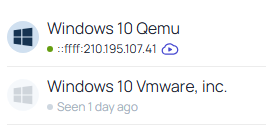
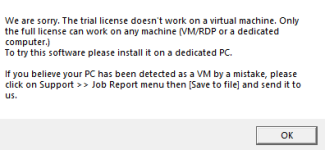
I'm running a Windows virtual machine on Proxmox to test some software. However, the software immediately detects that it's running inside a virtual machine and changes its behavior because of that.
I'm curious if there's a way to reduce or change the VM fingerprint so that the guest appears more like a physical machine. I'm not looking to do anything malicious, I just want to understand how VM detection works and whether there are legitimate configuration options in Proxmox or QEMU that affect what the guest reports.
Has anyone dealt with something similar before? Which hardware identifiers or VM characteristics are commonly used for detection, and are there any documented settings or best practices worth looking into?
I'd appreciate any explanations or resources that can help me better understand this topic.
Thanks in advance.
I'm running a Windows virtual machine on Proxmox to test some software. However, the software immediately detects that it's running inside a virtual machine and changes its behavior because of that.
I'm curious if there's a way to reduce or change the VM fingerprint so that the guest appears more like a physical machine. I'm not looking to do anything malicious, I just want to understand how VM detection works and whether there are legitimate configuration options in Proxmox or QEMU that affect what the guest reports.
Has anyone dealt with something similar before? Which hardware identifiers or VM characteristics are commonly used for detection, and are there any documented settings or best practices worth looking into?
I'd appreciate any explanations or resources that can help me better understand this topic.
Thanks in advance.