#!/usr/bin/env python3
import os, re, struct, subprocess, sys, time

WANT = 0x2625a
EXPECT = 0x1388
SYM = b"KeQueryTimeIncrement"
DELTA = 0x9c        # KeMinimumIncrement - KeMaximumIncrement
WINDOW = 0x400


def log(msg):
    print(f"[{time.strftime('%H:%M:%S')}] {msg}", flush=True)


def qemu_pid(dom):
    pid = subprocess.check_output(["pgrep", "-f", f"guest={dom},"]).decode().split()[0]
    log(f"domain {dom!r} -> qemu pid {pid}")
    return pid


def ram_regions(pid):
    out = []
    for line in open(f"/proc/{pid}/maps"):
        m = re.match(r"([0-9a-f]+)-([0-9a-f]+) rw-[sp]", line)
        if not m:
            continue
        a, b = int(m.group(1), 16), int(m.group(2), 16)
        if b - a >= 512 << 20:
            out.append((a, b - a))
            log(f"  candidate RAM region {a:#014x} size {(b-a)>>20} MiB")
    if not out:
        log("  NO RAM REGIONS FOUND (>=512 MiB rw mapping) -- wrong pid?")
    return out


def rd(fd, off, n):
    os.lseek(fd, off, os.SEEK_SET)
    return os.read(fd, n)


def parse_pe(fd, base):
    try:
        hdr = rd(fd, base, 0x1000)
        if len(hdr) < 0x1000 or hdr[:2] != b"MZ":
            return None
        e = struct.unpack_from("<I", hdr, 0x3c)[0]
        if e > 0xf00 or hdr[e:e + 4] != b"PE\0\0":
            return None
        if struct.unpack_from("<H", hdr, e + 24)[0] != 0x20b:
            return None
        edir = struct.unpack_from("<I", hdr, e + 24 + 112)[0]
        if not edir:
            return None
        ed = rd(fd, base + edir, 40)
        nrva = struct.unpack_from("<I", ed, 12)[0]
        name = rd(fd, base + nrva, 16).split(b"\0")[0]
        if not name.lower().startswith(b"ntoskrnl.exe"):
            return None
        log(f"  PE64 at {base:#014x} export name {name!r}")
        log("  -> ntoskrnl.exe MATCH")
        return ed
    except OSError:
        return None


def find_sym(fd, base, ed):
    nfun, nnam = struct.unpack_from("<II", ed, 20)
    afun, anam, aord = struct.unpack_from("<III", ed, 28)
    log(f"  export dir: {nfun} functions, {nnam} names")
    names = struct.unpack("<%dI" % nnam, rd(fd, base + anam, 4 * nnam))
    for i, nrva in enumerate(names):
        if rd(fd, base + nrva, len(SYM) + 1) == SYM + b"\0":
            o = struct.unpack_from("<H", rd(fd, base + aord + 2 * i, 2))[0]
            rva = struct.unpack_from("<I", rd(fd, base + afun + 4 * o, 4))[0]
            log(f"  {SYM.decode()} name index {i} ordinal {o} rva {rva:#x}")
            return rva
    log(f"  {SYM.decode()} NOT in export table")
    return None


def attempt(fd, pid, n):
    log(f"--- pass {n} ---")
    scanned = 0
    for start, size in ram_regions(pid):
        for off in range(start, start + size, 0x1000):
            scanned += 1
            ed = parse_pe(fd, off)
            if not ed:
                continue
            rva = find_sym(fd, off, ed)
            if not rva:
                continue
            code = rd(fd, off + rva, 16)
            log(f"  KeQueryTimeIncrement bytes {code[:8].hex()}")
            if code[0:2] != b"\x8b\x05":
                log("  unexpected prologue, cannot derive KeMaximumIncrement")
                continue
            disp = struct.unpack_from("<i", code, 2)[0]
            maxr = rva + 6 + disp
            log(f"  KeMaximumIncrement rva {maxr:#x} = "
                f"{struct.unpack('<I', rd(fd, off + maxr, 4))[0]:#x}")
            minr = maxr + DELTA
            if struct.unpack("<I", rd(fd, off + minr, 4))[0] != EXPECT:
                log(f"  +{DELTA:#x} not {EXPECT:#x}, scanning +/-{WINDOW:#x}")
                blob = rd(fd, off + maxr - WINDOW, 2 * WINDOW)
                hits = [i for i in range(0, len(blob) - 3, 4)
                        if struct.unpack_from("<I", blob, i)[0] == EXPECT]
                if len(hits) != 1:
                    log(f"  {len(hits)} candidates, ambiguous -- aborting")
                    continue
                minr = maxr - WINDOW + hits[0]
                log(f"  unique match at rva {minr:#x}")
            addr = off + minr
            cur = struct.unpack("<I", rd(fd, addr, 4))[0]
            log(f"  host addr {addr:#014x} currently {cur:#x} ({cur/10000:.2f} ms)")
            if cur != EXPECT:
                log(f"  MISMATCH: expected {EXPECT:#x}; not writing (image may not be "
                    f"physically contiguous, or already patched)")
                continue
            os.lseek(fd, addr, os.SEEK_SET)
            os.write(fd, struct.pack("<I", WANT))
            back = struct.unpack("<I", rd(fd, addr, 4))[0]
            if back != WANT:
                log(f"  WRITE FAILED: reads back {back:#x}")
                return False
            log(f"  PATCHED {cur:#x} -> {WANT:#x} ({WANT/10000:.2f} ms) verified")
            return True
    log(f"  scanned {scanned} pages, no ntoskrnl yet (guest still booting?)")
    return False


dom = sys.argv[1]
log(f"start: target {SYM.decode()} {EXPECT:#x} -> {WANT:#x}")
pid = qemu_pid(dom)
fd = os.open(f"/proc/{pid}/mem", os.O_RDWR)
try:
    for n in range(1, 61):
        if attempt(fd, pid, n):
            log("done")
            sys.exit(0)
        time.sleep(10)
finally:
    os.close(fd)
log("TIMED OUT after 10 minutes")
sys.exit(1)



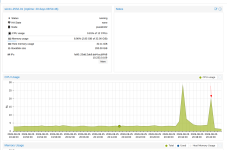
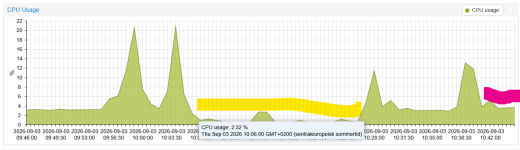
 ( yellow area) , tested to remove it as well and cpu usage went high again, no change when setting cpu to Host ( pink area)