[SOLVED] RAIDz2 zpool not showing full capacity after zpool attach

alia80

Member
Sep 21, 2021
18
2
23
56
I had a zpool with 4x8TB SATA drives in a RAIDz2 with a total capacity of 16TB. I updates to PVE 9 and ZFS to 2.3 and attached 2 additional drives to the zpool using:

Bash:
zpool upgrade <poolname>
zpool attach <poolname> raidz2-0 /dev/disk/by-id/<drive1>

I waited after each drive addition for re-silvering and scrub. However, the addition of each drive only added 4TB of new space resulting in a total capacity of 24TB instead of the 32TB I was expecting. I tried to resolve this using the following steps:

Bash:
zpool set autoexpand=on <poolname>
zpool online -e <poolname> /dev/disk/by-id/<drive1>
zpool online -e <poolname> /dev/disk/by-id/<drive2>
reboot

However, the resulting zpool is still showing only 24TB of total capacity. I came across a ZFS re-balancing script which just re-writes each file but zfs 2.3+ has a zfs rewrite, which can do the same job. I tried to rewrite some files using a loop:

Bash:
find . -type f -size -400M -exec zfs rewrite -v {} >>./zfs_rewrite.list \;
reboot

I only did this for a few files but it it does not seem to be making a difference.

Does anyone have any insight into why I can't see the expected 32TB capacity and how to mitigate this?
 
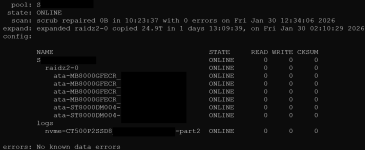
Please share zpool status -v and zpool list -v. Attach was probably not the right choice for what you wanted to do.
 
Last edited:
Sorry, I confuse attach/add too often. I'd take a look at this too to get the whole picture
Bash:
zfs list -ospace,type,logicalused,compression,compressratio,reservation,refreservation -rS used
 
I am incrementally using zfs rewrite to rewrite all the files but I don't see any change so far in the capacity. I even moved some files off the pool but it made no difference to the total reported capacity.

Does anyone have any other suggestions?
 
First compare your expectations with this one: https://wintelguy.com/zfs-calc.pl

For 6 * 8000 GB it gives 43.655746 TiB raw - which is shown in the second screenshot of #3. The construction of your single vdev worked as expected.

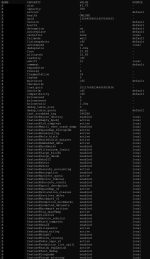
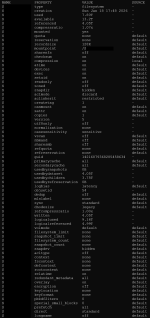
Check zpool get all S and zfs get all S to verify there are no artificial limits set.

If you miss space then the reason may be suboptimal "padding". Unfortunately I can not explain it well, but it has been discussed here more than once. For instance: https://forum.proxmox.com/threads/z...available-space-than-given.121532/post-528282

Your "zfs rewrite" only works for datasets (with files in it), not with zvols. (Not yet, I believe.) You need to copy/move those zvols too. Only then that data gets redistributed onto all 6 drives. Currently it uses only the "old" four drives - and keeps the old netto/brutto factor.
 
First compare your expectations with this one: https://wintelguy.com/zfs-calc.pl

For 6 * 8000 GB it gives 43.655746 TiB raw - which is shown in the second screenshot of #3. The construction of your single vdev worked as expected.

Check zpool get all S and zfs get all S to verify there are no artificial limits set.

If you miss space then the reason may be suboptimal "padding". Unfortunately I can not explain it well, but it has been discussed here more than once. For instance: https://forum.proxmox.com/threads/z...available-space-than-given.121532/post-528282

Your "zfs rewrite" only works for datasets (with files in it), not with zvols. (Not yet, I believe.) You need to copy/move those zvols too. Only then that data gets redistributed onto all 6 drives. Currently it uses only the "old" four drives - and keeps the old netto/brutto factor.
Here is a listing of all the properties, I had added a quota on a subdirectory but have since removed it to see if it was causing issues:

zpool get all S
Screenshot 2026-02-03 175947_edited.png

zfs get all S
Screenshot 2026-02-03 180007_edited.png
 
i have now re-written or moved nearly 100% of the data on pool with the exception of VM disks and so far no difference in reported capacity. Does anyone have any additional ideas? Would exporting and re-importing the pool help?
 
I moved a lot of data off the pool and used zfs rewrite to rewrite all the files hoping it would recover the reported capacity but none of it worked. The only interesting thing was that when I copied files to another pool the reported size of directories was different if I checked using du -s. However the files were fine on either pool and the reported size using samba matched.

Finally I just moved all the files off the pool and destroyed it and recreated it. Now it is reporting the correct capacity. Hopefully someone can explain this or fix it in zfs.

I am not sure if marking it solved is appropriate but that seems to be the only option to mark it closed.
 
  • Like
Reactions: UdoB