

[SOLVED] Can't create VMs on PVE 9.1.1 - Empty "Confirm" tab

YungErrorHunter

New Member
Dec 10, 2023
20
4
3
This bug from January 2016 seems to have made its way back into Proxmox 9.1.1 it seems: https://forum.proxmox.com/threads/since-last-update-empty-confirm-when-creating-vm.25849/

I'm setting up a new server, installed and updated proxmox to latest version. Tried to create a VM, but the confirm tab is empty:
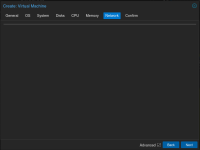
Screenshot from 2025-11-23 13-20-36.png

Setting width and height on the outer panel div to the same as the other tabs results in this:
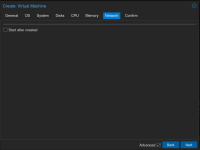
Screenshot from 2025-11-23 13-22-20.png

Clicking on the "Confirm" tab rather than using the "Next" button results in this:
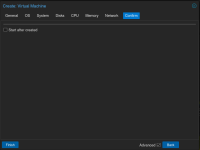
Screenshot from 2025-11-23 13-23-30.png
(Note that the checkbox is only here because of my inspect element change; But the "Finish" button is there without any changes.)

Pressing "Finish" does not do anything except spawn the following error: "Uncaught TypeError: deleteSet.keys().toArray is not a function" on /pve2/js/pvemanagerlib.js?ver=9.1.1:54671

Code:
~# pveversion -v
proxmox-ve: 9.1.0 (running kernel: 6.17.2-1-pve)
pve-manager: 9.1.1 (running version: 9.1.1/42db4a6cf33dac83)
proxmox-kernel-helper: 9.0.4
proxmox-kernel-6.17.2-1-pve-signed: 6.17.2-1
proxmox-kernel-6.17: 6.17.2-1
proxmox-kernel-6.14.11-4-pve-signed: 6.14.11-4
proxmox-kernel-6.14: 6.14.11-4
proxmox-kernel-6.14.8-2-pve-signed: 6.14.8-2
ceph-fuse: 19.2.3-pve1
corosync: 3.1.9-pve2
criu: 4.1.1-1
frr-pythontools: 10.3.1-1+pve4
ifupdown2: 3.3.0-1+pmx11
intel-microcode: 3.20250812.1~deb13u1
ksm-control-daemon: 1.5-1
libjs-extjs: 7.0.0-5
libproxmox-acme-perl: 1.7.0
libproxmox-backup-qemu0: 2.0.1
libproxmox-rs-perl: 0.4.1
libpve-access-control: 9.0.4
libpve-apiclient-perl: 3.4.2
libpve-cluster-api-perl: 9.0.7
libpve-cluster-perl: 9.0.7
libpve-common-perl: 9.0.15
libpve-guest-common-perl: 6.0.2
libpve-http-server-perl: 6.0.5
libpve-network-perl: 1.2.3
libpve-rs-perl: 0.11.3
libpve-storage-perl: 9.1.0
libspice-server1: 0.15.2-1+b1
lvm2: 2.03.31-2+pmx1
lxc-pve: 6.0.5-3
lxcfs: 6.0.4-pve1
novnc-pve: 1.6.0-3
proxmox-backup-client: 4.0.20-1
proxmox-backup-file-restore: 4.0.20-1
proxmox-backup-restore-image: 1.0.0
proxmox-firewall: 1.2.1
proxmox-kernel-helper: 9.0.4
proxmox-mail-forward: 1.0.2
proxmox-mini-journalreader: 1.6
proxmox-offline-mirror-helper: 0.7.3
proxmox-widget-toolkit: 5.1.2
pve-cluster: 9.0.7
pve-container: 6.0.18
pve-docs: 9.1.1
pve-edk2-firmware: 4.2025.05-2
pve-esxi-import-tools: 1.0.1
pve-firewall: 6.0.4
pve-firmware: 3.17-2
pve-ha-manager: 5.0.8
pve-i18n: 3.6.2
pve-qemu-kvm: 10.1.2-4
pve-xtermjs: 5.5.0-3
qemu-server: 9.1.0
smartmontools: 7.4-pve1
spiceterm: 3.4.1
swtpm: 0.8.0+pve3
vncterm: 1.9.1
zfsutils-linux: 2.3.4-pve1

Basically fresh install, no beta, community repository, all packages up-to-date as of this post.
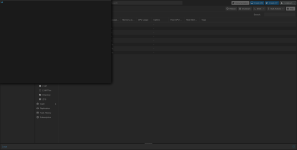
 
Clicking on "Create CT" after closing the "Create VM" popup, this is what I am presented with:
Screenshot from 2025-11-23 13-53-34.png

Lots of other UI elements (e.g. host Shell) also don't work, until I refresh the page. Then everything seems to work again (well, except creating a VM as described in OP). Just for testing I tried creating an LXC container, that works just fine. I've been using PVE 8.3.2 so far - No issues there.
 
Another update: It works fine on chromium (139.0.7258). It doesn't work on the latest firefox-esr in my OS repo (128.14.0esr).

Is this something that can be fixed or worked around, or is my only option to update my OS and move to firefox-esr 140.x.y, assuming it works there?
 
I can confirm it works with Firefox 140.5 on Debian 13.
Thank you. I've tried a clean profile but same behaviour. I now assume that it's probably got to do with some kind of JS function or similar capability that esr128 simply doesn't have.

Not a big deal though in that case, I should probably update anyway. At first I just thought it was possibly something on proxmox' side after finding the linked thread in 2016 displaying the exact same behaviour.

I'm marking this as solved for now, but if anyone else has more details or suspects it being a bug after all, feel free to comment!
 
This bug from January 2016 seems to have made its way back into Proxmox 9.1.1 it seems: https://forum.proxmox.com/threads/since-last-update-empty-confirm-when-creating-vm.25849/

I'm setting up a new server, installed and updated proxmox to latest version. Tried to create a VM, but the confirm tab is empty:
View attachment 93145

Setting width and height on the outer panel div to the same as the other tabs results in this:
View attachment 93146

Clicking on the "Confirm" tab rather than using the "Next" button results in this:
View attachment 93147
(Note that the checkbox is only here because of my inspect element change; But the "Finish" button is there without any changes.)

Pressing "Finish" does not do anything except spawn the following error: "Uncaught TypeError: deleteSet.keys().toArray is not a function" on /pve2/js/pvemanagerlib.js?ver=9.1.1:54671

Code:
~# pveversion -v
proxmox-ve: 9.1.0 (running kernel: 6.17.2-1-pve)
pve-manager: 9.1.1 (running version: 9.1.1/42db4a6cf33dac83)
proxmox-kernel-helper: 9.0.4
proxmox-kernel-6.17.2-1-pve-signed: 6.17.2-1
proxmox-kernel-6.17: 6.17.2-1
proxmox-kernel-6.14.11-4-pve-signed: 6.14.11-4
proxmox-kernel-6.14: 6.14.11-4
proxmox-kernel-6.14.8-2-pve-signed: 6.14.8-2
ceph-fuse: 19.2.3-pve1
corosync: 3.1.9-pve2
criu: 4.1.1-1
frr-pythontools: 10.3.1-1+pve4
ifupdown2: 3.3.0-1+pmx11
intel-microcode: 3.20250812.1~deb13u1
ksm-control-daemon: 1.5-1
libjs-extjs: 7.0.0-5
libproxmox-acme-perl: 1.7.0
libproxmox-backup-qemu0: 2.0.1
libproxmox-rs-perl: 0.4.1
libpve-access-control: 9.0.4
libpve-apiclient-perl: 3.4.2
libpve-cluster-api-perl: 9.0.7
libpve-cluster-perl: 9.0.7
libpve-common-perl: 9.0.15
libpve-guest-common-perl: 6.0.2
libpve-http-server-perl: 6.0.5
libpve-network-perl: 1.2.3
libpve-rs-perl: 0.11.3
libpve-storage-perl: 9.1.0
libspice-server1: 0.15.2-1+b1
lvm2: 2.03.31-2+pmx1
lxc-pve: 6.0.5-3
lxcfs: 6.0.4-pve1
novnc-pve: 1.6.0-3
proxmox-backup-client: 4.0.20-1
proxmox-backup-file-restore: 4.0.20-1
proxmox-backup-restore-image: 1.0.0
proxmox-firewall: 1.2.1
proxmox-kernel-helper: 9.0.4
proxmox-mail-forward: 1.0.2
proxmox-mini-journalreader: 1.6
proxmox-offline-mirror-helper: 0.7.3
proxmox-widget-toolkit: 5.1.2
pve-cluster: 9.0.7
pve-container: 6.0.18
pve-docs: 9.1.1
pve-edk2-firmware: 4.2025.05-2
pve-esxi-import-tools: 1.0.1
pve-firewall: 6.0.4
pve-firmware: 3.17-2
pve-ha-manager: 5.0.8
pve-i18n: 3.6.2
pve-qemu-kvm: 10.1.2-4
pve-xtermjs: 5.5.0-3
qemu-server: 9.1.0
smartmontools: 7.4-pve1
spiceterm: 3.4.1
swtpm: 0.8.0+pve3
vncterm: 1.9.1
zfsutils-linux: 2.3.4-pve1

Basically fresh install, no beta, community repository, all packages up-to-date as of this post.
I confirm. I have the same problem. Everything worked fine with version 9.0, but after updating to version 9.1.1, I couldn't create virtual machines anymore.
I tried browsers: Google Chrome 109.0.5414.120, Fierfox 115.30.0esr (64-bit). Nothing works in normal and private mode.
 
Having the same problem on Firefox 128.13.0esr (RHEL9.6)
On https://www.proxmox.com/en/products/proxmox-virtual-environment/requirements it says:
To use the web interface you need a modern browser, this includes:
  • Firefox, a release from the current year, or the latest Extended Support Release

According to https://www.firefox.com/en-US/firefox/140.5.0/releasenotes/, the latest ESR release is 140.5.0.

So to me it looks like 128.13.0 is not a supported release anymore.
 
Last edited:
On https://www.proxmox.com/en/products/proxmox-virtual-environment/requirements it says:


According to https://www.firefox.com/en-US/firefox/140.5.0/releasenotes/, the latest ESR release is 140.5.0.

So to me it looks like 128.13.0 is not a supported release anymore.

Yes that is unfortunate. I would say this is a pretty unexpected issue though, it worked on 9.0-1 and stopped on 9.1-1.
I would expect that there are a lot of VMWare refugees coming from the defence/government space that are on older, stable releases like RHEL8/9 or similar that will run into this problem as they look at migrating to Proxmox.
 
nano /usr/share/pve-manager/js/pvemanagerlib.js
find: deleteSet.keys().toArray().join(',')
replace: Array.from(deleteSet.keys()).join(',')
worked for me [win7 .chrome. 109.0.5414.120]
 
Last edited:
Really!?

Maybe it’s time to try Linux instead of using all kinds of workarounds to keep a dead horse alive, which will eventually become less and less feasible anyway… just saying ;)
 
Last edited: