[SOLVED] Resize Ubuntu VM disk

Thanks for your reply , my problem solved here's how :


1st step: increase/resize disque from GUI console
2nd step : Extend physical drive partition
check free space : $sudo fdisk -l
$growpart /dev/sda 3 (Extend physical drive partition )
$pvdisplay ( See phisical drive )
$sudo pvresize /dev/sda3 (Instruct LVM that disk size has changed)
$ pvdisplay ( check physical drive if has changed )


[U]3rd step: Extend Logical volume [/U]
$ lvdisplay (# View starting LV)
$ sudo lvextend -l +100%FREE /dev/ubuntu-vg/ubuntu-lv ( # Resize LV)
$ lvdisplay (# View changed LV)


4th step : Resize Filesystem
$ resize2fs /dev/ubuntu-vg/ubuntu-lv
$ fdisk -l (# Confirm results)
Thank you. This helped me resolve my issue.
 
Last edited:
Thanks for your reply , my problem solved here's how :


1st step: increase/resize disque from GUI console
2nd step : Extend physical drive partition
check free space : $sudo fdisk -l
$growpart /dev/sda 3 (Extend physical drive partition )
$pvdisplay ( See phisical drive )
$sudo pvresize /dev/sda3 (Instruct LVM that disk size has changed)
$ pvdisplay ( check physical drive if has changed )


[U]3rd step: Extend Logical volume [/U]
$ lvdisplay (# View starting LV)
$ sudo lvextend -l +100%FREE /dev/ubuntu-vg/ubuntu-lv ( # Resize LV)
$ lvdisplay (# View changed LV)


4th step : Resize Filesystem
$ resize2fs /dev/ubuntu-vg/ubuntu-lv
$ fdisk -l (# Confirm results)

https://github.com/tradersquareoff/ubuntu-disk-resize-proxmox
 
Thanks for your reply , my problem solved here's how :


1st step: increase/resize disque from GUI console
2nd step : Extend physical drive partition
check free space : $sudo fdisk -l
$growpart /dev/sda 3 (Extend physical drive partition )
$pvdisplay ( See phisical drive )
$sudo pvresize /dev/sda3 (Instruct LVM that disk size has changed)
$ pvdisplay ( check physical drive if has changed )


[U]3rd step: Extend Logical volume [/U]
$ lvdisplay (# View starting LV)
$ sudo lvextend -l +100%FREE /dev/ubuntu-vg/ubuntu-lv ( # Resize LV)
$ lvdisplay (# View changed LV)


4th step : Resize Filesystem
$ resize2fs /dev/ubuntu-vg/ubuntu-lv
$ fdisk -l (# Confirm results)
This works without a flaw. Thank you so much.
 
Thanks for your reply , my problem solved here's how :


1st step: increase/resize disque from GUI console
2nd step : Extend physical drive partition
check free space : $sudo fdisk -l
$growpart /dev/sda 3 (Extend physical drive partition )
$pvdisplay ( See phisical drive )
$sudo pvresize /dev/sda3 (Instruct LVM that disk size has changed)
$ pvdisplay ( check physical drive if has changed )


[U]3rd step: Extend Logical volume [/U]
$ lvdisplay (# View starting LV)
$ sudo lvextend -l +100%FREE /dev/ubuntu-vg/ubuntu-lv ( # Resize LV)
$ lvdisplay (# View changed LV)


4th step : Resize Filesystem
$ resize2fs /dev/ubuntu-vg/ubuntu-lv
$ fdisk -l (# Confirm results)
This solved my problem thank you for the help. This post should be pinned somewhere i thought a simple rezize via GUI would do it just like i do with the LXCs.
 
Just wanna say to the Sikjairi, TY!! I've actually come back to this post so many times and had it bookmarked. I was thankful because i needed to use it again today.

If at all possible I would just clean up the formatting since I'm sure there are noobies who are going to go and try to use it but get tripped up by the formatting, the $, parentheses at the end, etc.

Thank you again!!
 
Thanks for your reply , my problem solved here's how :


1st step: increase/resize disque from GUI console
2nd step : Extend physical drive partition
check free space : $sudo fdisk -l
$growpart /dev/sda 3 (Extend physical drive partition )
$pvdisplay ( See phisical drive )
$sudo pvresize /dev/sda3 (Instruct LVM that disk size has changed)
$ pvdisplay ( check physical drive if has changed )


[U]3rd step: Extend Logical volume [/U]
$ lvdisplay (# View starting LV)
$ sudo lvextend -l +100%FREE /dev/ubuntu-vg/ubuntu-lv ( # Resize LV)
$ lvdisplay (# View changed LV)


4th step : Resize Filesystem
$ resize2fs /dev/ubuntu-vg/ubuntu-lv
$ fdisk -l (# Confirm results)
Thanks, this works great! Kudos for you!
 
Hi there

Thanks for your instructions .

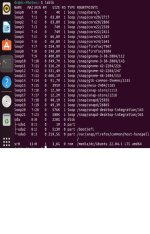
I have an issue ,when I try to make the pvresize , I have an error:failled to find physical volume /dev/sda3 .

lsblk attached

Thank in advance for your support
 

Attachments

  • proxoxphotos.jpg
    proxoxphotos.jpg
    186.6 KB · Views: 5
Hi there

Thanks for your instructions .

I have an issue ,when I try to make the pvresize , I have an error:failled to find physical volume /dev/sda3 .

lsblk attached

Thank in advance for your support
In your case, or better, in any case, it's needs to use growpart first.
Before use it, perhaps is need to install cloud-guest-utils
 
  • Like
Reactions: dasc