Can't get Nvidia GPU passthrough to work on LXC

fabian69420

New Member
Jun 18, 2026
6
0
1
Hey there, I recently added an NVidia RTX 3060 ti GPU to my working Proxmox server and I wanted to pass it through to my Debian LXC container to use with Jellyfin for 4k films.

How I have it configged right now: Proxmox running a Debian 13 LXC Container (unpriviledged), which runs a docker container containing Jellyfin.


I tried to follow the guide over here: https://jellyfin.org/docs/general/post-install/transcoding/hardware-acceleration/nvidia
Tried the Debian one and the Virtual environment one, but when I:

Code:
# modprobe nvidia

modprobe: FATAL: Module nvidia-current not found in directory /lib/modules/7.0.2-6-pve

modprobe: ERROR: Error running install command 'modprobe -i nvidia-current ' for module nvidia: retcode 1

modprobe: ERROR: could not insert 'nvidia': Invalid argument


# nvidia-smi

NVIDIA-SMI has failed because it couldn't communicate with the NVIDIA driver. Make sure that the latest NVIDIA driver is installed and running.

so it appears not to work, even though i downloaded the nvidia-driver package (even went through the trouble of setting up the auto-detect thing just to be sure) and the linux-header-amd64. oh- also the errors above i get on the Proxmox host as well as the debian container

I honestly don't know what else to add here, so if there's anything I need to add in order to receive help with this, please let me know.
 
hey, thanks for reaching out! i tried to use your guide, specifically the Nvidia-specific part of the GPU passthrough section. but still no worky. and i ran a lot of commands on the host as well as the container bc it wasnt clear to me where i should use them, so often i just tried both to see what sticks
 
Let's start with this from the node side
Bash:
lspci -vnnk | awk '/VGA/{print $0}' RS=
nvidia-smi
pct config CTIDHERE
 
this is what i get. also i used to think node meant CT/VM, so i re-checked but apparently the node is the host right? anyhow this is on the host:

Code:
# lspci -vnnk | awk '/VGA/{print $0}' RS=
nvidia-smi
pct config CTIDHERE
01:00.0 VGA compatible controller [0300]: NVIDIA Corporation GA104 [GeForce RTX 3060 Ti] [10de:2486] (rev a1) (prog-if 00 [VGA controller])
        Subsystem: PC Partner Limited / Sapphire Technology Device [174b:a632]
        Flags: fast devsel, IRQ 255, IOMMU group 12
        Memory at f5000000 (32-bit, non-prefetchable) [size=16M]
        Memory at fa00000000 (64-bit, prefetchable) [size=8G]
        Memory at fc00000000 (64-bit, prefetchable) [size=32M]
        I/O ports at f000 [size=128]
        Expansion ROM at f6000000 [disabled] [size=512K]
        Capabilities: [60] Power Management version 3
        Capabilities: [68] MSI: Enable- Count=1/1 Maskable- 64bit+
        Capabilities: [78] Express Legacy Endpoint, IntMsgNum 0
        Capabilities: [b4] Vendor Specific Information: Len=14 <?>
        Capabilities: [100] Virtual Channel
        Capabilities: [250] Latency Tolerance Reporting
        Capabilities: [258] L1 PM Substates
        Capabilities: [128] Power Budgeting <?>
        Capabilities: [420] Advanced Error Reporting
        Capabilities: [600] Vendor Specific Information: ID=0001 Rev=1 Len=024 <?>
        Capabilities: [900] Secondary PCI Express
        Capabilities: [bb0] Physical Resizable BAR
        Capabilities: [c1c] Physical Layer 16.0 GT/s <?>
        Capabilities: [d00] Lane Margining at the Receiver
        Capabilities: [e00] Data Link Feature <?>
        Kernel driver in use: vfio-pci
        Kernel modules: nvidia
07:00.0 VGA compatible controller [0300]: Advanced Micro Devices, Inc. [AMD/ATI] Raphael [1002:164e] (rev c4) (prog-if 00 [VGA controller])
        Subsystem: ASUSTeK Computer Inc. Device [1043:8877]
        Flags: bus master, fast devsel, latency 0, IRQ 81, IOMMU group 15
        Memory at fc10000000 (64-bit, prefetchable) [size=256M]
        Memory at fc20000000 (64-bit, prefetchable) [size=2M]
        I/O ports at d000 [size=256]
        Memory at f6500000 (32-bit, non-prefetchable) [size=512K]
        Capabilities: [48] Vendor Specific Information: Len=08 <?>
        Capabilities: [50] Power Management version 3
        Capabilities: [64] Express Legacy Endpoint, IntMsgNum 0
        Capabilities: [a0] MSI: Enable- Count=1/4 Maskable- 64bit+
        Capabilities: [c0] MSI-X: Enable+ Count=4 Masked-
        Capabilities: [100] Vendor Specific Information: ID=0001 Rev=1 Len=010 <?>
        Capabilities: [270] Secondary PCI Express
        Capabilities: [2a0] Access Control Services
        Capabilities: [2b0] Address Translation Service (ATS)
        Capabilities: [2c0] Page Request Interface (PRI)
        Capabilities: [2d0] Process Address Space ID (PASID)
        Capabilities: [410] Physical Layer 16.0 GT/s <?>
        Capabilities: [450] Lane Margining at the Receiver
        Kernel driver in use: amdgpu
        Kernel modules: amdgpu
NVIDIA-SMI has failed because it couldn't communicate with the NVIDIA driver. Make sure that the latest NVIDIA driver is installed and running.

400 Parameter verification failed.
vmid: type check ('integer') failed - got 'CTIDHERE'
pct config <vmid> [OPTIONS]

it can find both the dedicated Nvidia GPU and the intergrated AMD GPU. but the AMD one is irrelevant for this as its the nvidia card i wanna use
 
Kernel driver in use: vfio-pci
Seems like you configured it for PCI(e) passthrough or gave it to a VM. You need to reverse that for this to work. The driver should be nvidia.
CTID is a placeholder. Use your CT's ID here.
 
i removed the vfio-pci through
Code:
modprobe -r vfio-pci

then it became this:
Code:
01:00.0 VGA compatible controller: NVIDIA Corporation GA104 [GeForce RTX 3060 Ti] (rev a1)
        Subsystem: PC Partner Limited / Sapphire Technology Device a632
        Kernel modules: nvidia

but after a reboot it becomes:
Code:
01:00.1 Audio device: NVIDIA Corporation GA104 High Definition Audio Controller (rev a1)
        Subsystem: PC Partner Limited / Sapphire Technology Device a632
        Kernel driver in use: vfio-pci
        Kernel modules: snd_hda_intel


also:

Code:
# pct config 103
arch: amd64
cores: 6
features: nesting=1
hostname: media
memory: 4096
mp0: /mnt/usbstick,mp=/mnt/usbstick
net0: name=eth0,bridge=vmbr0,firewall=1,gw=192.168.2.254,hwaddr=BC:24:11:33:11:54,ip=192.168.2.207/24,type=veth
onboot: 1
ostype: debian
rootfs: media:103/vm-103-disk-0.raw,size=3500G
swap: 2048
unprivileged: 1
lxc.cgroup2.devices.allow: c 226:0 rwm
lxc.cgroup2.devices.allow: c 226:128 rwm
lxc.mount.entry: /dev/dri/renderD128 dev/dri/renderD128 none bind,optional,create=file
lxc.idmap: u 0 100000 65536
lxc.idmap: g 0 100000 44
lxc.idmap: g 44 44 1
lxc.idmap: g 45 100045 62
lxc.idmap: g 107 993 1
lxc.idmap: g 108 100108 65428
 
vfio-pci is not used without being confgured to do so. Currenty your system is set up for PCI(e) (VM) passthrough. You need to reverse your steps to use it for CTs. Share this
Bash:
find /etc/modprobe.d/* -exec tail -n+1 {} +
tail -n+1 /proc/cmdline /etc/kernel/cmdline /etc/default/grub
grep -sR "hostpci" /etc/pve
The modern way is via dev:, not lxc.mount.entry:. Also please don't use file based disks if you can avoid it.
 
Last edited:
yeah i did configure vfio-pci myself with a guide that told me to to make the passthrough work, but clearly it doesnt work and i cant remember how i configged it :c

Bash:
# find /etc/modprobe.d/* -exec tail -n+1 {} +
tail -n+1 /proc/cmdline /etc/kernel/cmdline /etc/default/grub
grep -sR "hostpci" /etc/pve
==> /etc/modprobe.d/blacklist.conf <==
blacklist nouveau
blacklist nvidia
blacklist nvidiafb
blacklist nvidia_drm

==> /etc/modprobe.d/dkms.conf <==
# modprobe information used for DKMS modules
#
# This is a stub file, should be edited when needed,
# used by default by DKMS.

==> /etc/modprobe.d/intel-microcode-blacklist.conf <==
# The microcode module attempts to apply a microcode update when
# it autoloads.  This is not always safe, so we block it by default.
blacklist microcode

==> /etc/modprobe.d/nvidia-blacklists-nouveau.conf <==
# You need to run "update-initramfs -u" after editing this file.

# see #580894
blacklist nouveau

==> /etc/modprobe.d/nvidia.conf <==
install nvidia modprobe -i nvidia-current $CMDLINE_OPTS

install nvidia-modeset modprobe nvidia ; modprobe -i nvidia-current-modeset $CMDLINE_OPTS

install nvidia-drm modprobe nvidia-modeset ; modprobe -i nvidia-current-drm $CMDLINE_OPTS

install nvidia-uvm modprobe nvidia ; modprobe -i nvidia-current-uvm $CMDLINE_OPTS

install nvidia-peermem modprobe nvidia ; modprobe -i nvidia-current-peermem $CMDLINE_OPTS

# unloading needs the internal names (i.e. upstream's names, not our renamed files)

remove nvidia modprobe -r -i nvidia-drm nvidia-modeset nvidia-peermem nvidia-uvm nvidia

remove nvidia-modeset modprobe -r -i nvidia-drm nvidia-modeset


alias char-major-195* nvidia

# These aliases are defined in *all* nvidia modules.
# Duplicating them here sets higher precedence and ensures the selected
# module gets loaded instead of a random first match if more than one
# version is installed. See #798207.
alias   pci:v000010DEd00000E00sv*sd*bc04sc80i00*        nvidia
alias   pci:v000010DEd00000AA3sv*sd*bc0Bsc40i00*        nvidia
alias   pci:v000010DEd*sv*sd*bc03sc02i00*               nvidia
alias   pci:v000010DEd*sv*sd*bc03sc00i00*               nvidia

==> /etc/modprobe.d/nvidia-options.conf <==
#options nvidia-current NVreg_DeviceFileUID=0 NVreg_DeviceFileGID=44 NVreg_DeviceFileMode=0660

# To grant performance counter access to unprivileged users, uncomment the following line:
#options nvidia-current NVreg_RestrictProfilingToAdminUsers=0

# Uncomment to enable this power management feature:
#options nvidia-current NVreg_PreserveVideoMemoryAllocations=1

# Uncomment to enable this power management feature:
#options nvidia-current NVreg_EnableS0ixPowerManagement=1

==> /etc/modprobe.d/pve-blacklist.conf <==
# This file contains a list of modules which are not supported by Proxmox VE

# nvidiafb see bugreport https://bugzilla.proxmox.com/show_bug.cgi?id=701
blacklist nvidiafb

==> /etc/modprobe.d/vfio.conf <==
options vfio-pci ids=10de:2486,10de:228b disable_vga=1

==> /etc/modprobe.d/zfs.conf <==
options zfs zfs_arc_max=819986432
==> /proc/cmdline <==
BOOT_IMAGE=/boot/vmlinuz-7.0.2-6-pve root=/dev/mapper/pve-root ro quiet amd_iommu=on iommu=pt

==> /etc/kernel/cmdline <==
amd_iommu=on iommu=pt

==> /etc/default/grub <==
# If you change this file or any /etc/default/grub.d/*.cfg file,
# run 'update-grub' afterwards to update /boot/grub/grub.cfg.
# For full documentation of the options in these files, see:
#   info -f grub -n 'Simple configuration'

GRUB_DEFAULT=0
GRUB_TIMEOUT=5
GRUB_DISTRIBUTOR=`( . /etc/os-release && echo ${NAME} )`
GRUB_CMDLINE_LINUX_DEFAULT="quiet amd_iommu=on iommu=pt"
GRUB_CMDLINE_LINUX=""

# If your computer has multiple operating systems installed, then you
# probably want to run os-prober. However, if your computer is a host
# for guest OSes installed via LVM or raw disk devices, running
# os-prober can cause damage to those guest OSes as it mounts
# filesystems to look for things.
#GRUB_DISABLE_OS_PROBER=false

# Uncomment to enable BadRAM filtering, modify to suit your needs
# This works with Linux (no patch required) and with any kernel that obtains
# the memory map information from GRUB (GNU Mach, kernel of FreeBSD ...)
#GRUB_BADRAM="0x01234567,0xfefefefe,0x89abcdef,0xefefefef"

# Uncomment to disable graphical terminal
#GRUB_TERMINAL=console

# The resolution used on graphical terminal
# note that you can use only modes which your graphic card supports via VBE/GOP/UGA
# you can see them in real GRUB with the command `videoinfo'
#GRUB_GFXMODE=640x480

# Uncomment if you don't want GRUB to pass "root=UUID=xxx" parameter to Linux
#GRUB_DISABLE_LINUX_UUID=true

# Uncomment to disable generation of recovery mode menu entries
#GRUB_DISABLE_RECOVERY="true"

# Uncomment to get a beep at grub start
#GRUB_INIT_TUNE="480 440 1"
 
Not trying to undercut the assistance which users have provided here, but having gone through the process of manually passing GPU's to both VM's and CT's, I've started to take the easy path and use the ProxmenuX scripts, which allows you to switch the GPU between VM & CT with a single option from the menu. The package also includes scripts for drives, shares management and many of the other configs which are not changed very often on Proxmox.

Install the script on the host from here: https://github.com/MacRimi/ProxMenux
 
Last edited:
Not trying to undercut the assistance which users have provided here, but having gone through the process of manually passing GPU's to both VM's and CT's, I've started to take the easy path and use the ProxmenuX scripts, which allows you to switch the GPU between VM & CT with a single option from the menu. The package also includes scripts for drives, shares management and many of the other configs which are not changed very often on Proxmox.

Install the script on the host from here: https://github.com/MacRimi/ProxMenux
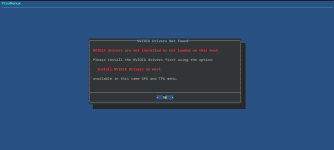
hey thanks for this script, it seems rlly helpful. but it unfortunatly didnt work for me. when i try to add the GPU to the LXC it gives me this:

1781981951726.png

and when igo to install the drivers on host through the option on the menu, it acts like it's done, but this error reappears anyway
 
I recommend against such scripts that do everything (and even more unrelated stuff) in the background. You just create a black box you can't troubleshoot.
I also can't help properly if your environment changes while I give support. Try this
Bash:
rm -f /etc/modprobe.d/blacklist.conf /etc/modprobe.d/vfio.conf
update-initramfs -ukall
Reboot, then share the output of the first two commands from #4 again.
 
Last edited: