

Proxmox boots into busybox, unable to import rpool

Boerny41

Member
Aug 19, 2022
23
4
8
I've got a mirrored rpool on SATA SSDs using systemd. I messed around with /etc/kernel/cmdline trying to get amd_pstate to work, and iirc I commented out the first line trying to use the second one. Not sure if that messed it up, if I made a typo, or something unrelated just happened, but my system only boots into busybox now.

I've tried:
Code:
zpool import -N rpool
exit
and
Code:
pool import -N rpool
mkdir -p ROOT/pve-1
mount -o zfsutil -t zfs rpool/ROOT/pve-1 ROOT/pve-1
exit
and slightly different variations with different mountpoints.

up until the exit command, everything works. However, when typing "exit" Proxmox automatically executes a command that starts with "/user/sbin/zpool import -c /etf/zsf/zpool.cache -N"
and in my case, it tries to import a pool literally named "The pool can be imported using...". It's somehow really messed up (please see the screenshot)

I'm not sure how to go on from here. I'd like to avoid a clean install if there is any way around it.
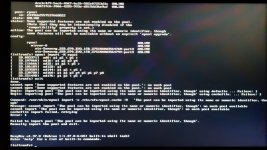
 

Attachments

  • 20260313_185102.jpg
    20260313_185102.jpg
    1.3 MB · Views: 11
Hi Boerny41,

Would it be an option to netboot.xyz or a USB stick to boot a live distro and write a new GRUB? Take care of course to include ZFS if it does not come with the booted distro.
 
Hi, sure, I can flash a stick and live boot into some distro. I'm not using grub anymore but systemd. Can you tell me exactly what to do or what I should search for?
Or do I "just" need to boot into the live distro, mount the ZFS and change the /etc/kernel/cmdline back to what it was? On the screenshot it says something about a corrupted or missing ZFS cache.

However right now it's getting pretty late for me, I'll be back tomorrow.
 
That's weird, for me it is sharp and easily readable. Guess I'll write it down, or at least the important parts... Or wait, before that, let me try Imgur:
https://imgur.com/a/qiA9J9V

I extracted the text with GPT, there might be some spelling errors, but overall it is correct.
Up until the exit command everything works fine, no errors. After that this happens:
Code:
(initramfs) zpool import -N rpool
28.083371] zd0: p1 p2 p3 p4
28.100669] zdl1: p1 p2 p3 p4
28.111760] zd132: p1 p2 p5
28.116669] zd16: p1 p2
28.130889] zd192: p1 p2 p5
28.139893] zd160: p1 p2 p5
28.144909] zd176: p1 p2 p3 p4 p5 p6 p7 p8
28.251498] zd176: p1 p2 p5

(initramfs) exit
done.
cannot open 'Some supported features are not enabled on the pool.': no such pool
Begin: Importing pool 'The pool can be imported using its name or numeric identifier, though' using defaults ... Failure: 1
Begin: Importing pool 'The pool can be imported using its name or numeric identifier, though' using cachefile... Failure: 1

Command: /usr/sbin/zpool import -c /etc/zfs/zpool.cache -N 'The pool can be imported using its name or numeric identifier, though'

Message: cannot import 'The pool can be imported using its name or numeric identifier, though': no such pool available
cannot import 'The pool can be imported using its name or numeric identifier, though': no such pool available
cachefile import failed, retrying
Error: 1

Failed to import pool 'The pool can be imported using its name or numeric identifier, though'.
Manually import the pool and exit.

BusyBox v1.37.0 (Debian 1:1.37.0-6+b5) built-in shell (ash)
Enter 'help' for a list of built-in commands.

Just in case you are confused, yes it indeed tries to import a pool literally named "The pool can be imported using its name...." and it does so every time.
 
Last edited:
I'd boot a live distro and see whether the pool can be brought up using regular methods, before staying stuck trying it from initramfs.

I presume you don't have an alternative (older) kernel to boot from where the boot configuration is not messed up?
 
I do have two older kernels to choose from when booting, but all of them end up like this. This problem started after I messed with /etc/kernel/cmdline (I guess I got a typo or something in it) and executed proxmox-boot-tool refresh.I have to admit that I do not fully know what that command does, but it seemed like it recreated all 3 kernels. My guess is that it wrote the broken cmdline to all kernels, and that's why all of them are broken, but I honestly don't know.
 
thinking about it, this does not really make sense, does it? As messed up cmdline would not prevent me from mounting my ZFS in busybox, correct?
 
I'll try that. Currently I'm failing to get my live boot system running. ZFS wasn't installed, but even after installing it, the commands were still unknown. Some userspace stuff or something... idk, gave up after two hours. Stupid AI suggested to use Proxmox rescue boot from a USB, so I installed that instead of Debian Live. When clicking "rescue boot," it says that it could not automatically mount rpool and closes itself...
 
You can edit the kernel args during boot: https://gist.github.com/Impact123/3dbd7e0ddaf47c5539708a9cbcaab9e3#temporary-kernel-arguments
I'm curious what they are at the moment.
Thank you! That was all I needed to do. Now I can fix my cmdline and everything is fine. I asked in two forums and read a bunch of threads from people with the same problem. Nobody mentioned this once.
Now I can go back and get amd_pstate working, that's the whole reason I was fiddling around with the cmdline.
 
Last edited:
  • Like
Reactions: Kingneutron