Low perf IO VM Windows on Micron 7400

NBTEC

Member
Jan 5, 2024
10
0
6
Hi , I have problem with IO on SSD NVME 7400 ( tested M.2 and U3 ) , i read some of threads in forum, with public ssd or "low end" , but threads with 7400 nvme seem far from my problem

On windows VM ( server / windows 10 / win11 ) different server configuration ( server motherboard with Epyc 8124P public with ryzen 5-7 and intel 10th-13th)
i 'v never hit up to 20 000 iops / 80MB/s on test with CrystalDiskMark Q32T1 4K Random.
and Q1T1 10K iops ( 30-50 MB/s)


but when i try on SSD SATA Micron 5400 i hit up than 40 000iops / 150MB/s , on read & write . ( Proxmox 6,7,8,9 tested )

the 7400 SSD are given at least for 95 000 iops for 2TO

I have tested multi host and options on virtual disk ( async/cache writing back / SSD option / IO thread enabled ) some options give +15% IO but i'm far to reach at least 30 000 iops .
also with virtio drivers 0.285 and 0.271 .
Virtuals disks are mounted with Virtio SCSI Single

Any idea for helping ?
all tested host are in ZFS Mirroring with sames SSD


Complementary :

For the server i want to "patch" , the host Proxmox v8 with ZFS Mirroring with Micron 7400 results are far away from VM and the zfs cache are set at 48GB

Code:
fio --ioengine=libaio --direct=1 --rw=randwrite --bs=4k --numjobs=1 --iodepth=32 --runtime=10 --time_based --name=rand_read --filename=/tmp/pve/fio.4k --size=1G
the results are
Q32T1 write: IOPS=72.0k, BW=281MiB/s (295MB/s)
Q1T1 = write: IOPS=62.5k, BW=244MiB/s

I tried on linux VM default install from Rocky
resuslts in Q32T1 are better than host
but results with Q1T1 are slow as Windows VM ( 10 K iops & 40-50MB/s)
 
Last edited:
How are you testing inside windows for performance, and your windows vm configuration, which cpu type is it?
I test inside with crystaldiskmark with Q32T1 & Q1T1 test 4K Random, i set CPU type x86-64-v2-AES , i tried on the proxmox , and other for test , with type ; host, x86-64v2 /v3/v4 , the best results seems to be witch x86-64-v2-AES and after host
all settigns CPU are in default and NUMA disabled

in this information VM OS are WinServer 2019 ( but results with W11 are similare , sometime W10 are better )

Code:
agent: 1
bios: ovmf
boot: order=scsi0;ide2;net0;ide0
cores: 12
cpu: x86-64-v2-AES
efidisk0: local-zfs:vm-102-disk-2,efitype=4m,pre-enrolled-keys=1,size=1M
ide0: local:iso/virtio-win-0.1.285.iso,media=cdrom,size=771138K
ide2: none,media=cdrom
machine: pc-q35-9.2+pve1
memory: 65536
name: X
net0: virtio=X
numa: 0
onboot: 1
ostype: win10
scsi0: local-zfs:vm-102-disk-0,cache=writeback,discard=on,iothread=1,size=400G,ssd=1
scsihw: virtio-scsi-single
smbios1:
sockets: 1
tpmstate0: local-zfs:vm-102-disk-1,size=4M,version=v2.0
unused0: local-zfs:vm-102-disk-3
 
Last edited:
Running VMs and benchmarks on local-zfs is usually not a good idea.

Your performance issue is most likely not the Micron 7400 but the fact that you are running your Windows VM on local-zfs, which is usually the Proxmox OS mirror (rpool). ZFS uses synchronous writes by default, and without a dedicated SLOG device this introduces high latency, especially for Windows workloads. Either move the VM to a separate ZFS pool with a proper SLOG, switch the dataset to sync=disabled for testing, or place the VM on local-lvm instead. The NVMe itself is not slow — the storage layout is the real bottleneck here.
 
Running VMs and benchmarks on local-zfs is usually not a good idea.

Your performance issue is most likely not the Micron 7400 but the fact that you are running your Windows VM on local-zfs, which is usually the Proxmox OS mirror (rpool). ZFS uses synchronous writes by default, and without a dedicated SLOG device this introduces high latency, especially for Windows workloads. Either move the VM to a separate ZFS pool with a proper SLOG, switch the dataset to sync=disabled for testing, or place the VM on local-lvm instead. The NVMe itself is not slow — the storage layout is the real bottleneck here.
Thanks for reply , but i m not comfortable with what you say ( how works / doing it ) i wil try to find guide. But if i make another zfs mirror that not the OS system, can that solve my problem ?

I tested on old server with ryzen 7 and SSD SATA 5400Micron, and tests reach limits of SSD Specs in VM Windows ( Local-zfs ) , sync or not
 
Yes - creating a separate ZFS mirror just for your VMs will very likely solve your problem. local-zfs is usually the Proxmox OS pool, often small and shared with the system workload, which can reduce performance for Windows VMs. A dedicated NVMe mirror for your VMs keeps the OS separate and avoids this contention, so you should see much better and more consistent I/O. Your old SATA test isn’t a fair comparison because the storage layout and load were completely different from your current setup.

For PVE itself a ZFS mirror of 2 smaller SSDs is usually enough.
 
  • Like
Reactions: leesteken
[..]Your old SATA test isn’t a fair comparison because the storage layout and load were completely different from your current setup.

For PVE itself a ZFS mirror of 2 smaller SSDs is usually enough.
proxmox are also installed on SSD SATA , and VM storage are in local-zfs
 
VM storage are in local-zfs
local-zfs is the same ZFS pool as where your Proxmox is installed. Putting the VMs in a separate ZFS pool can help with IOPS and latency. Some years ago, even putting them in a separate pool on the same (consumer) drives helped.
EDIT: Unless you created a separate storage (on a separate ZFS pool) that you gave the same name as the default ZFS pool where the installer puts Proxmox.
 
Last edited:
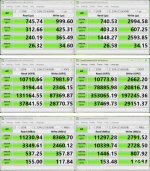
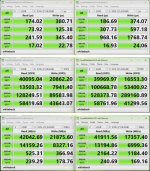
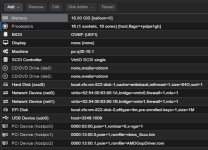
Results from installing PVE 9.15 with ZFS on a single Kioxia CD6-R 960GB (used as U.2) without any configuration, then installing guests.

•Guest Windows 11
Writeback not configured
CPU uses host
virtio 0.1.285

*Writeback uses host memory, but configuring it would likely make it even faster. (This assumes the host has sufficient free memory.)

*Of course, such speeds won't be achievable on older CPUs. (Computers affected by Meltdown/Spectre are out of the question.)

CPU : AMD Ryzen 7 8700G
MEM : G.Skill F5-5200J4040A48GX2-FX5
MB : ASRock B850M-X WiFi R2.0
U.2 : KCD6XLUL960G

edit : Added virtual machine configuration, disk, and writeback results
 

Attachments

  • 画像.jpeg
    画像.jpeg
    219.3 KB · Views: 12
  • 画像.jpeg
    画像.jpeg
    228.5 KB · Views: 10
  • IMG_0852.jpeg
    IMG_0852.jpeg
    70.1 KB · Views: 10
  • IMG_0853.jpeg
    IMG_0853.jpeg
    43.4 KB · Views: 10
Last edited:
Results from installing PVE 9.14 with ZFS on a single Kioxia CD6-R 960GB (used as U.2) without any configuration, then installing guests.

•Guest Windows 11
Writeback not configured
CPU uses host
virtio 0.1.285

*Writeback uses host memory, but configuring it would likely make it even faster.

*Of course, such speeds won't be achievable on older CPUs. (Computers affected by Meltdown/Spectre are out of the question.)

CPU : AMD Ryzen 7 8700G
MEM : G.Skill F5-5200J4040A48GX2-FX5
MB : ASRock B850M-X WiFi R2.0
don't tested with 8th gen Ryzen , but 3th,5th even 7th and in this thread the Epyc 8124P, never get close of your stats ( or stats of my ssd ), but i never tested in single ZFS
in Q1T1 in memory i'v the same result with Epyc and an Ryzen 7 2700X
 
Last edited:
local-zfs is the same ZFS pool as where your Proxmox is installed. Putting the VMs in a separate ZFS pool can help with IOPS and latency. Some years ago, even putting them in a separate pool on the same (consumer) drives helped.
EDIT: Unless you created a separate storage (on a separate ZFS pool) that you gave the same name as the default ZFS pool where the installer puts Proxmox.
no , it's basic installation , proxmox iso , zfs mirror on 2 7400
 
Until recently, I was using the 7700 and got the same results.

Since the 7700 yields the same results as the 8700G, there should be no difference with Zen 4...

The remaining differences are:
・ZFS mirror (The SAS system used on another computer is in a mirror configuration and is not slow.)
・PVE version
・Is the disk simply slow?

*I added the WB results and VM details to the above
post.
 
Last edited:
I don't understand why my cheap system and your Epyc 8124P system produce opposite results...
 

Even if it existed, I don't think the speed would change, but please try it.

balloning

Disabling the Balloon driver is common practice in Windows, so this is what I do.

https://pve.proxmox.com/wiki/Performance_Tweaks

Do not use the Virtio Balloon Driver​

The Balloon driver has been a source of performance problems on Windows, you should avoid it. (see http://forum.proxmox.com/threads/20...s-No-Hyper-Threading-Fixed-vs-Variable-Memory for the discussion thread)
 
Last edited:
Even if it existed, I don't think the speed would change, but please try it.


Disabling the Balloon driver is common practice in Windows, so this is what I do.

https://pve.proxmox.com/wiki/Performance_Tweaks

Do not use the Virtio Balloon Driver​

The Balloon driver has been a source of performance problems on Windows, you should avoid it. (see http://forum.proxmox.com/threads/20...s-No-Hyper-Threading-Fixed-vs-Variable-Memory for the discussion thread)
i disable i will see if that help for "experience user" for the TSE
 
ZFS is great for Hard Drives, but on Really fast Storage it simply doesn't scale.
(i have here multiple Servers with 8x CD8P-R or 8x 7450/7500 in Raid-10)

Option 1 -> Im using for that reason mdadm+LVM/LVM-Thin (With DRBD if i need Cluster-Sync) -> If i need max Performance.
Option 2 -> Or BTRFS
Option 3 -> ZFS with some tunings

1 is really Fast, >60% of Raw Performance almost.
2 is OK, similar features to ZFS, >20% of Raw Performance.
3 is very Comfortable, ZFS is generally amazing but it gives only <10% of Raw Performance

On all Servers the Same, i have Intel/Zen4/Zen5 Servers etc... (Xeon Gold/Genoa/Turin etc)
On home Servers (5800x/9955hx etc) the sweet spot is BTRFS i think, no memory for ARC + Faster and you usually dont need Replication etc...

On the Servers i usually use Option 1 + ZFS, Option 1 for Databases especially, since its at least 10x faster on Database Workloads.
ZFS for all VMs where Storage Speed doesnt matter as much, but reliability matters most.

Cheers
 
Last edited: