I tested several ways to import a Windows Server 2019 VM from ESXi (version 7), here are the configs I was able to test:
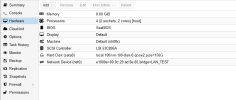
- processor: host / Disk : prepared for VirtIO / BIOS : SeaBIOS (my machine has no UEFI on Vmware )/ Machine : by default(i440fx) / SCSI controller : VirtIO = innacessible_boot_device
- processor: x86-64-v2-AES / Disk : prepared for VirtIO / BIOS : SeaBIOS / Machine : by default(i440fx) / SCSI controller : VirtIO = innacessible_boot_device
- processor : host / Disk : prepared for VirtIO / BIOS : SeaBIOS / Machine : by default(i440fx) / SCSI controller : LSI 53C895A = innacessible_boot_device
I've tested many other configurations, but I won't list them all again, as it would take too long. all these configurations lead to the same problem: innacessible_boot_device
I've also tried importing by deleting VMware tools on the machine before importing, it didn't change anything.
I tried importing from the command line by importing the .vmdk file and converting the .vmdk file to .qcow2.
However, I do have one rather interesting lead.
When I detach the disk from my windows server 2019 VM that won't boot, and attach it to a running Windows, this Windows can read the disk and its contents without any problem.
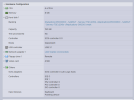
This could confirm that there are no problems with the disks, but that they are indeed a blocking parameter when the server starts up. Could this be due to a VMware setting that needs to be modified in the BIOS?
If you need more information, don't hesitate
- processor: host / Disk : prepared for VirtIO / BIOS : SeaBIOS (my machine has no UEFI on Vmware )/ Machine : by default(i440fx) / SCSI controller : VirtIO = innacessible_boot_device
- processor: x86-64-v2-AES / Disk : prepared for VirtIO / BIOS : SeaBIOS / Machine : by default(i440fx) / SCSI controller : VirtIO = innacessible_boot_device
- processor : host / Disk : prepared for VirtIO / BIOS : SeaBIOS / Machine : by default(i440fx) / SCSI controller : LSI 53C895A = innacessible_boot_device
I've tested many other configurations, but I won't list them all again, as it would take too long. all these configurations lead to the same problem: innacessible_boot_device
I've also tried importing by deleting VMware tools on the machine before importing, it didn't change anything.
I tried importing from the command line by importing the .vmdk file and converting the .vmdk file to .qcow2.
However, I do have one rather interesting lead.
When I detach the disk from my windows server 2019 VM that won't boot, and attach it to a running Windows, this Windows can read the disk and its contents without any problem.
This could confirm that there are no problems with the disks, but that they are indeed a blocking parameter when the server starts up. Could this be due to a VMware setting that needs to be modified in the BIOS?
If you need more information, don't hesitate