

migration 4.1 qcow2 to 4.2
- Thread starter drobicek
- Start date
You are using an out of date browser. It may not display this or other websites correctly.
You should upgrade or use an alternative browser.
You should upgrade or use an alternative browser.

hi can not be transferred qcow2 to new 4.2.
old HDD is qcow2 file with 4.1,and new SSD is 4.2,but I do not know where to put the file qcow2,because in put standart directory /vz does not work.
please help me
thank you
/vz is not the default Proxmox VE path, it is alwas /var/lib/vz
but you can create a symlink to point /vz to /var/lib/vz
(/vz was use as default path on some other openvz platforms)
yes I know, I thought /var/lib/vz.
but it does not work to me......
help me please
please tell in detail what is not working and what you try to do.
where? I'm just REMOVE
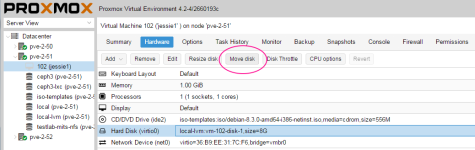
Go go the hardware tab of your VM, then click on the hard disk and you see the "move disk" button.
in new 4.2 not MOVE DISK, only remove, templates, upload from my old qcow/iso file,but this image load to LVM,but i have load LVM-THIN,because LVM small space,but LVM-THIN big space.
sorry for my English
I attached a screenshot, showing the move disk button. So if you got the qcow2 disk in a VM, you can move it to another storage.
Looks I do not get the point. You can also use scp to copy files from one server to another (CLI).
Why can´t you run a backup?
