Latest activity
-
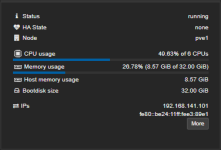
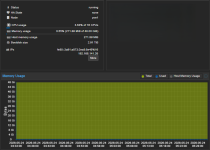
Uuzumo replied to the thread [SOLVED] The RAM capacity is not displayed correctly in the VM's web UI.You're right; enabling `balloon` did fix the display issue. Thank you. Even if someone were to explain it to me, I don’t think I could fully understand why `balloon` displays correctly when `hugepages: 1024` is not set—even if `balloon` is...
-
 ManDal replied to the thread BackupPilot - Desktop Backup Client für Proxmox Backup Server.Die Beta 5 von BackupPilot ist ab sofort verfügbar und bringt weitere Verbesserungen, Anpassungen und Korrekturen mit sich. Ein besonderer Fokus lag diesmal auf der korrekten Flatpak-Generierung als Vorbereitung für eine spätere Veröffentlichung...
 -
Uuzumo posted the thread [SOLVED] The RAM capacity is not displayed correctly in the VM's web UI in Proxmox VE: Installation and configuration.I had the opportunity to test with hugepages: 1024 enabled, and I noticed that the RAM capacity displayed in the VM's web UI summary didn't match the actual capacity. Has this always been the case? proxmox-ve: 9.2.0 (running kernel: 7.0.2-6-pve)...
-
-
Ttidal5 replied to the thread PVE 9.2 RAM Ballooning Not Working Right.Thank you for the advice, I am new to PVE and this is my first deployment at home. It is much appreciated. I will look into the discard feature and also the Resource Mappings. I think I've ran into an issue where the PCIe GPU changes identifiers...
-
Ttidal5 replied to the thread PVE 9.2 RAM Ballooning Not Working Right.
-
-
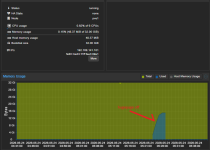
Ttidal5 replied to the thread PVE 9.2 RAM Ballooning Not Working Right.Ah, thank you for pointing that out. I will turn it off and set fixed allotment. P.S. It seems like after 40 minutes uptime, time VM is now receiving the full 20GB (19GB) of RAM allocated to it. Which is strange. Thanks for the help!
-
Ttidal5 replied to the thread PVE 9.2 RAM Ballooning Not Working Right.
-
-
Jjrl_1644 reacted to whatishappening's post in the thread [SOLVED] Can't enable secure boot on windows VM, option greyed out with
 Like.
OK the solution is way easier than I thought. Just power down, delete EFI disk, recreate it with pre-enrolled keys checked, then boot the VM. Finally found this in the manual under "10.2.11. BIOS and UEF" section.
Like.
OK the solution is way easier than I thought. Just power down, delete EFI disk, recreate it with pre-enrolled keys checked, then boot the VM. Finally found this in the manual under "10.2.11. BIOS and UEF" section. -
FFuriousRage replied to the thread [SOLVED] /var/ read-only.Did: smartctl -t short /dev/sda smartctl -t long /dev/sda smartctl -t conveyance /dev/sda smartctl -t select,123+345 /dev/sda smartctl -H /dev/sda === START OF READ SMART DATA SECTION === SMART overall-health self-assessment test result...
-
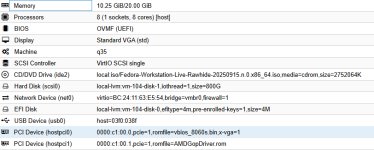
Ttidal5 posted the thread PVE 9.2 RAM Ballooning Not Working Right in Proxmox VE: Installation and configuration.I updated to 9.2 and now one of my VMs is only getting allocated the minimum RAM set in the balloon configuration (started at 3gb then moved the min to 10gb). I have 64GB of system memory to be allocated and I have the following setup: - LXC...
-
Vvirtualizerforlife posted the thread [BUG] TOTP window freezes sometimes when attempting to login and unable to click anything in Proxmox VE: Installation and configuration.Hi, I found possible bug that I would like to report here. Summary: When connecting to the local (hosted in the home network) instance of proxmox and entering login credentials everything is fine until this point. But when the login window is...
-
MMarkku reacted to berathram's post in the thread Upgrade incomplete with package conflicts with Like.
Oh my god, of course! These modernized debian list files got me confused... After adding the proper deb sources everything went well. You have my thanks!
-
 Oh my god, of course! These modernized debian list files got me confused... After adding the proper deb sources everything went well. You have my thanks!
 -
Please try a different SATA cable, different port (or if possible a port on a different SATA controller)? Looks like something goes wrong between the CPU and the drive (storage medium) but maybe it's not the drive itself. EDIT: This is not...
-
UdoB replied to the thread [SOLVED] /var/ read-only.This is usually a hardware defect. Try another disk, after first checking all cabling and connectors - as already recommended by @leesteken. I would run an extensive self-test; search for "smartctl selftest" for this. If your are brave and...
-
Bberathram replied to the thread Upgrade incomplete with package conflicts.Oh my god, of course! These modernized debian list files got me confused... After adding the proper deb sources everything went well. You have my thanks!
-
Cccolotti replied to the thread Acme Technitium Plugin Errors.I actually don’t recall. I stopped trying to use it since mine wasn’t externally exposed and it has to be for it to work with ACME per the bugzilla conversation. I think I was just using the IP address for technitium and an API key I created...
-
Vvirtualizerforlife reacted to Impact's post in the thread [SOLVED] Unable to connect to internet when creating LXC without unprivileged container option with Like.
Please use code blocks to preserve formatting and don't censor so much and needlessly. Using local for virtual disks is a bad idea too (IMHO). Try to start the CT like this to get more information lxc-start -n 101 -F -l DEBUG Also try to enable...
-
Vvirtualizerforlife reacted to jklocker's post in the thread [SOLVED] Unable to connect to internet when creating LXC without unprivileged container option with Like.
Hi, Networking shouldn't be affected by switching between privileged and unprivileged containers - both should work the same way for basic internet access, so I'd guess something else is going on here. Could you post pct config <vmid> for both...
-
Vvirtualizerforlife reacted to Impact's post in the thread [SOLVED] Unable to connect to internet when creating LXC without unprivileged container option with Like.
I list my reasons in the linked article. Can you try with the 26.04 template? That worked for me. It's in the Options tab.