PVE 9.2 RAM Ballooning Not Working Right

tidal5

New Member
Apr 5, 2026
5
1
3
I updated to 9.2 and now one of my VMs is only getting allocated the minimum RAM set in the balloon configuration (started at 3gb then moved the min to 10gb).

I have 64GB of system memory to be allocated and I have the following setup:

- LXC with .5GB Debian
- VM with 10GB Ubuntu
- VM with 8GB Ubuntu
- VM with 20GB (problematic one) Fedora

Agent is installed on all VMs.

For whatever reason, the host will never allocate beyond the minimum set for the last VM.

My current configuration should not trigger the 80% ballooning memory cutoff as mentioned in other threads here and the manual.

Any ideas what might be causing this? Is this a known issue with 9.2? I was on 9.1 prior and this setup worked fine with no other changes.

Thank you for your help!
 
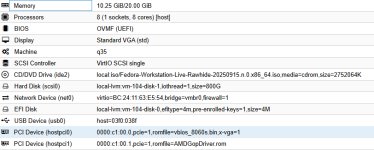
Can you share the node's Summary and the VM's Hardware tab?
Inside the VM you can check watch -n1 free -h and in another pane/session try stress-ng --avoid-oom --vm 1 --vm-bytes 16G to cause some memory pressure. In my experience the max memory is slowly given over time when "needed".
 
Last edited:
Ah, thank you for pointing that out. I will turn it off and set fixed allotment.

P.S. It seems like after 40 minutes uptime, time VM is now receiving the full 20GB (19GB) of RAM allocated to it. Which is strange.

Thanks for the help!
 
  • Like
Reactions: Impact
P.S. It seems like after 40 minutes uptime, time VM is now receiving the full 20GB (19GB) of RAM allocated to it. Which is strange.
That is indeed strange as all VM memory needs to be pinned into actual host RAM due to PCI(e) passthrough and possible device initiated DMA. Maybe you are not counting filesystem cache and it fills only after 40 minutes?

Proxmox (via the ballooning device and driver) will show what the Linux inside the VM shows as used (without cache/buffers). Enable the 'Host Memory Usage'-slider to see that it is always a little over 20GiB. Or use the info balloon command in the VM Monitor tab to see that Linux inside the VM has access (but might not yet use) all of the memory. free -h will also show that Linxu sees all of the memory (under total, but it's less because Linux reserves some memory for the kernel).
 
That is indeed strange as all VM memory needs to be pinned into actual host RAM due to PCI(e) passthrough and possible device initiated DMA. Maybe you are not counting filesystem cache and it fills only after 40 minutes?

Proxmox (via the ballooning device and driver) will show what the Linux inside the VM shows as used (without cache/buffers). Enable the 'Host Memory Usage'-slider to see that it is always a little over 20GiB. Or use the info balloon command in the VM Monitor tab to see that Linux inside the VM has access (but might not yet use) all of the memory. free -h will also show that Linxu sees all of the memory (under total, but it's less because Linux reserves some memory for the kernel).
1779566663128.png
1779566694419.png
 
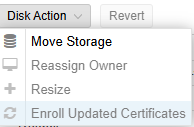
Somewhat unrelated but I noticed that your rather large virtual disk doesn't have discard enabled and hence has no proper thin provisioning support. I'd also recommend using Resource Mappings for these PCI(e) devices to avoid potential issues in the future. If you use Secure Boot (pre-entolled-keys) you might also want to update the certificates
View attachment 97885
Thank you for the advice, I am new to PVE and this is my first deployment at home. It is much appreciated. I will look into the discard feature and also the Resource Mappings. I think I've ran into an issue where the PCIe GPU changes identifiers and I have to change the ID in the Hardware tab of the VM for it to work again... Maybe that will fix this?
 
The motherboard BIOS/UEFI determine the PCI IDs, which typically change when you add/remove/enable/disable (onboard) PCI(e) devices. There isn't much Proxmox or Linux in general can do.