Wireguard VPN Issue

shyju

Renowned Member
Jul 30, 2015
7
2
68
Hi,

I'm trying to install Wireguard VPN in PVE server. The server software version is 7.1-7. The issue is wiregaurd is trying to remove the proxmox-ve. What is the best way to install Wireguard inside a PVE server.

Bash:
root@pvesrv1:~# apt install wireguard
Reading package lists... Done
Building dependency tree... Done
Reading state information... Done
The following additional packages will be installed:
  firmware-linux-free linux-image-5.10.0-11-rt-amd64 linux-image-rt-amd64 wireguard-tools
Suggested packages:
  linux-doc-5.10 debian-kernel-handbook openresolv | resolvconf
The following packages will be REMOVED:
  proxmox-ve pve-firmware pve-kernel-5.13
The following NEW packages will be installed:
  firmware-linux-free linux-image-5.10.0-11-rt-amd64 linux-image-rt-amd64 wireguard wireguard-tools
0 upgraded, 5 newly installed, 3 to remove and 29 not upgraded.
Need to get 0 B/54.2 MB of archives.
 
Last edited:
you don't want 'wireguard', but 'wireguard-tools' which is just the userspace part. the kernel module already comes with the PVE kernel packages..
 
could you also post 'pveversion -v'? IIRC if you update to the most recent PVE 7.x packages installing 'wireguard' should also work..
 
Thanks fabian for the support.

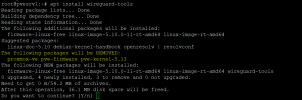
I have tried installing wireguard-tools using command "apt install wireguard-tools" but still shows the same issue.

Current version is pve-manager/7.1-7/df5740ad (running kernel: 5.13.19-2-pve)

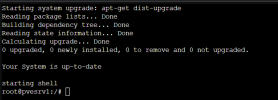
Please find below the commands & results.

1645529674288.png


wg-pve-issue.png


1645529906891.png
 
do you maybe not have any PVE repositories configured? could you post the full output of 'apt update'?
 
Please find below the output of 'apt update'

Code:
root@pvesrv1:~# apt update
Hit:1 http://security.debian.org bullseye-security InRelease
Hit:2 http://ftp.debian.org/debian bullseye InRelease
Get:3 http://ftp.debian.org/debian bullseye-updates InRelease [39.4 kB]
Err:4 https://enterprise.proxmox.com/debian/pve bullseye InRelease
  401  Unauthorized [IP: 212.224.123.70 443]
Reading package lists... Done
E: Failed to fetch https://enterprise.proxmox.com/debian/pve/dists/bullseye/InRelease  401  Unauthorized [IP: 212.224.123.70 443]
E: The repository 'https://enterprise.proxmox.com/debian/pve bullseye InRelease' is not signed.
N: Updating from such a repository can't be done securely, and is therefore disabled by default.
N: See apt-secure(8) manpage for repository creation and user configuration details.
root@pvesrv1:~#
 
Thank you fabian. Fixed the repos and did a upgrade then installed wireguard-tools and added the configuration. Everything working fine now.
:)
 
  • Like
Reactions: fabian and tom